IA & Agentes
Copilot Cowork - tarefas por evento - o agente que fica de olho no Teams e no Outlook
Copilot Cowork - event-driven tasks - the agent watching your Teams and Outlook
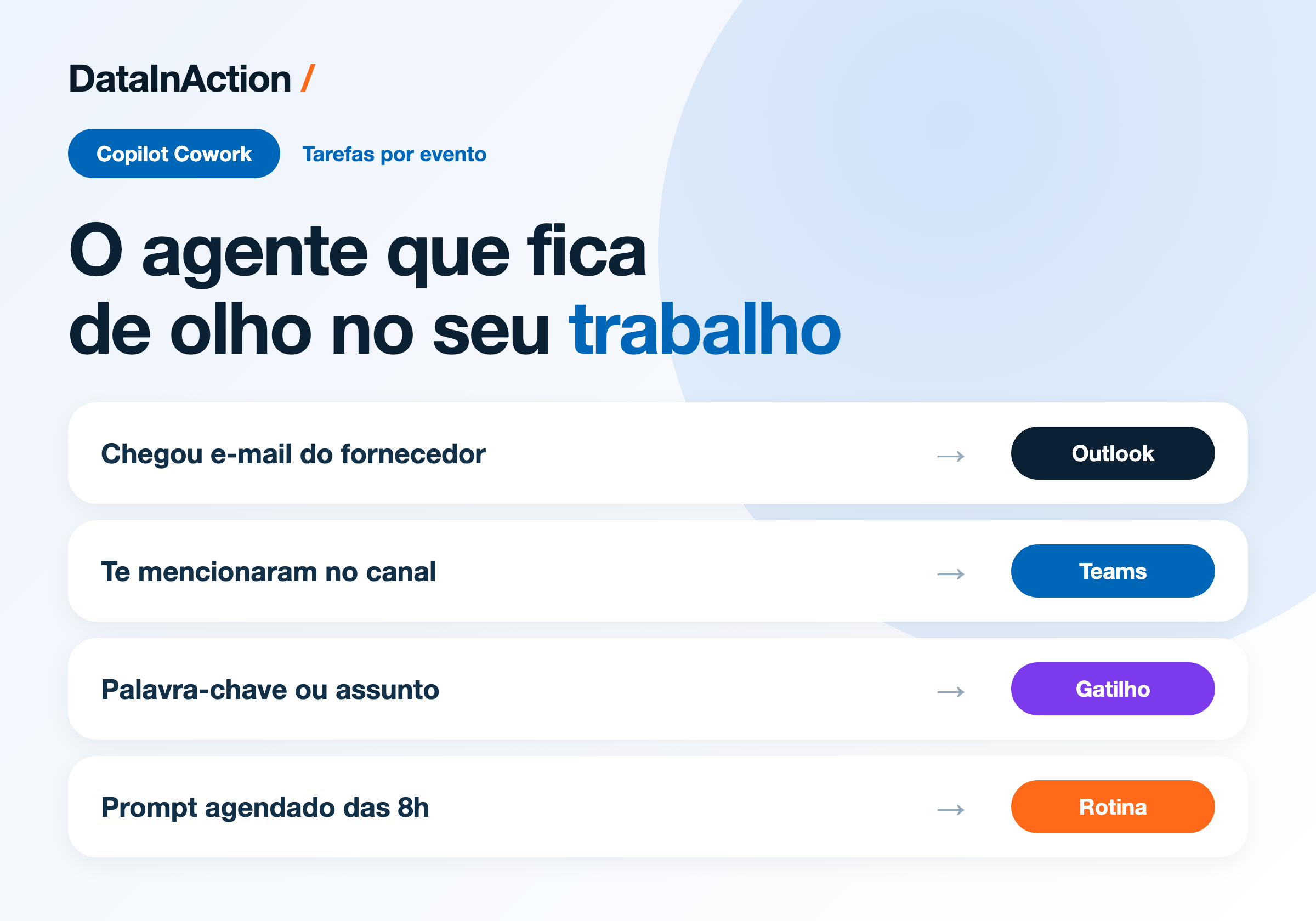
Fala dataholics, semana passada eu fiquei só no Copilot Studio e hoje vou pro lado do Microsoft 365, porque o Copilot Cowork ganhou uma capacidade que muda bastante o jogo: tarefa disparada por evento. Ele fica observando o seu Teams e o seu Outlook e age quando algo acontece, sem você pedir na hora.
O que veremos nesse post:
O que o Cowork faz de fato
Tarefa agendada e tarefa por evento
Skills e o controle que sobra pra você
Cowork ou agente do Copilot Studio
O Cowork executa, não sugere
A diferença do Cowork pro Copilot de chat é que você descreve a tarefa e ele vai lá e faz. Manda e-mail pelo Outlook, agenda reunião e organiza a agenda, cria Word, Excel, PowerPoint e PDF do zero, posta em canal e chat do Teams, procura informação na empresa inteira, navega e organiza arquivo no OneDrive e no SharePoint, faz deep research juntando várias fontes num relatório e ainda monta briefing diário.
E ele mostra cada passo na sessão enquanto trabalha, então dá pra acompanhar, interromper no meio pra dar mais contexto, pausar e retomar. Antes de qualquer ação sensível, tipo enviar o e-mail ou postar no Teams, ele para e pede seu aval, com indicador de risco nas ações de médio e alto impacto e o botão nomeado com o que vai acontecer (Send, Post). Se você cansar de aprovar a mesma coisa, tem a opção de dispensar a confirmação pra ações parecidas dali pra frente.
A versão pra conta corporativa e de escola está GA. A de conta pessoal está em preview.
Agendada e por evento
São duas formas de automação e elas resolvem coisas diferentes:
Prompt agendado - roda no horário que você definiu, então a tarefa recorrente acontece sozinha. Tipo o briefing das 8h.
Tarefa por evento - roda quando alguma coisa acontece, e é aí que fica interessante.
Os gatilhos que dá pra usar hoje são remetente, @mention, palavra-chave ou assunto, e nome de evento. Eles valem em chat e canal do Teams, e-mail do Outlook e reunião. Na prática você monta coisas como "quando chegar e-mail do fornecedor X com a palavra fatura, extrai os dados e joga na planilha" ou "quando eu for mencionado num canal com a palavra incidente, monta um resumo do que foi dito e me manda".
Eu montei um pra testar, com gatilho de menção em canal, e a sensação é diferente de agente de chat mesmo. Não tem ninguém abrindo janela e digitando, a coisa simplesmente acontece e aparece o resultado. Ainda estou de olho pra ver com que frequência ele dispara em situação que eu não queria, porque palavra-chave é um filtro meio grosseiro e "fatura" aparece em muito e-mail que não é o que você quer.
Skills e plugins
O Cowork trabalha carregando skills conforme precisa, e o painel lateral vai mostrando quais estão ativas durante a sessão. Já vêm de fábrica Word, Excel, PowerPoint, PDF, Email, Scheduling, Calendar Management, Meetings, Daily Briefing, Enterprise Search, Communications, Deep Research e Adaptive Cards.
Dá pra criar as suas também, até 50 skills customizadas, e ele descobre sozinho as suas skills no começo de cada sessão. Se o nome soa familiar é porque é o mesmo conceito que apareceu no Copilot Studio, que eu abri no post sobre Skills. Além disso ele aceita plugin da loja do Microsoft 365, e o administrador pode distribuir plugin pra empresa toda.
Cowork ou agente do Copilot Studio?
Essa é a pergunta que eu mais recebo desde que o Cowork ficou GA, e a régua que eu uso é a seguinte.
Cowork é o seu assistente pessoal de execução. Ele trabalha com as suas permissões, no seu e-mail, na sua agenda, nos seus arquivos, e pede sua aprovação. Quando a tarefa é individual e o gatilho é a sua rotina, é Cowork.
Agente do Copilot Studio é solução de área ou de empresa. Você desenha, governa, publica em canal, define knowledge e tool, controla por ambiente e DLP, e outras pessoas consomem aquilo. Quando o processo é do time, precisa de auditoria e roda sem uma pessoa específica atrás, é Copilot Studio.
Reginaldo, e se eu quiser os dois conversando?
Dá certo, e é um desenho comum. O agente do Copilot Studio fica sendo a peça que sabe do processo da empresa, e o Cowork chama o agente quando a sua rotina precisa daquilo, sem você ter que recriar a mesma regra dos dois lados.
DETALHE IMPORTANTE: o Cowork exige licença de usuário do Microsoft 365 Copilot, mas o consumo é cobrado à parte em Copilot Credits. Ele vem desligado por padrão e é o administrador que libera e define política de gasto, com o dashboard de custo no admin center do Microsoft 365. Ou seja, a mesma conversa de crédito que eu levantei no post de Copilot Credits vale aqui também.
RESUMO
Cowork executa a tarefa e pede aprovação antes das ações sensíveis.
Automação em duas formas: prompt agendado e tarefa por evento.
Gatilhos por remetente, @mention, palavra-chave, assunto e nome de evento, no Teams e no Outlook.
Skills nativas mais até 50 customizadas, e plugins da loja do Microsoft 365.
Cowork para rotina individual, Copilot Studio para processo de time com governança.
Licença de Microsoft 365 Copilot mais Copilot Credits, desligado por padrão.
Comenta aí que gatilho você montaria primeiro, eu quero coletar ideia boa antes de subir os meus pra valer.
Referências:
Fique bem e até a próxima.
#copilotcowork #microsoft365copilot #copilotstudio #microsoft #ia #agentes #datainaction
Hey dataholics, last week I stayed inside Copilot Studio and today I'm moving over to the Microsoft 365 side, because Copilot Cowork picked up a capability that changes the game quite a bit: tasks triggered by events. It watches your Teams and your Outlook and acts when something happens, without you asking in the moment.
What we'll see in this post:
What Cowork actually does
Scheduled tasks and event-driven tasks
Skills and the control you keep
Cowork or a Copilot Studio agent
Cowork executes, it doesn't suggest
The difference between Cowork and chat Copilot is that you describe the task and it goes and does it. It sends email through Outlook, schedules meetings and organizes your calendar, creates Word, Excel, PowerPoint and PDF from scratch, posts in Teams channels and chats, searches for information across the whole company, browses and organizes files in OneDrive and SharePoint, does deep research pulling several sources into a report and even puts together a daily briefing.
And it shows every step in the session while it works, so you can follow along, interrupt it midway to add context, pause and resume. Before any sensitive action, like sending that email or posting in Teams, it stops and asks for your go-ahead, with a risk indicator on medium and high impact actions and the button named after what will happen (Send, Post). If you get tired of approving the same thing, there's an option to skip confirmation for similar actions from then on.
The version for work and school accounts is GA. The personal account one is in preview.
Scheduled and event-driven
There are two flavors of automation and they solve different things:
Scheduled prompt - runs at the time you set, so the recurring task happens on its own. Like the 8am briefing.
Event-driven task - runs when something happens, and that's where it gets interesting.
The triggers available today are sender, @mention, keyword or topic, and event name. They work across Teams chats and channels, Outlook email and meetings. In practice you build things like "when an email from supplier X arrives with the word invoice, extract the data and drop it into the spreadsheet" or "when I get mentioned in a channel with the word incident, summarize what was said and send it to me".
I set one up to test, triggered by a channel mention, and the feeling really is different from a chat agent. Nobody is opening a window and typing, the thing just happens and the result shows up. I'm still watching how often it fires in situations I didn't want, because a keyword is a fairly blunt filter and "invoice" shows up in a lot of email that isn't what you're after.
Skills and plugins
Cowork works by loading skills as it needs them, and the side panel shows which ones are active during the session. It ships with Word, Excel, PowerPoint, PDF, Email, Scheduling, Calendar Management, Meetings, Daily Briefing, Enterprise Search, Communications, Deep Research and Adaptive Cards.
You can create your own too, up to 50 custom skills, and it discovers your skills automatically at the start of each session. If the name sounds familiar it's because it's the same concept that showed up in Copilot Studio, which I covered in the post about Skills. On top of that it accepts plugins from the Microsoft 365 store, and the administrator can push plugins to the whole company.
Cowork or a Copilot Studio agent?
That's the question I get the most since Cowork went GA, and here's the rule of thumb I use.
Cowork is your personal execution assistant. It works with your own permissions, in your email, your calendar, your files, and it asks for your approval. When the task is individual and the trigger is your own routine, it's Cowork.
A Copilot Studio agent is a department or company solution. You design it, govern it, publish it to a channel, define knowledge and tools, control it by environment and DLP, and other people consume it. When the process belongs to the team, needs auditing and runs without one specific person behind it, it's Copilot Studio.
Reginaldo, what if I want the two talking to each other?
That works, and it's a common design. The Copilot Studio agent becomes the piece that knows the company process, and Cowork calls that agent when your routine needs it, without you having to rebuild the same rule on both sides.
IMPORTANT: Cowork requires a Microsoft 365 Copilot user license, but consumption is billed separately in Copilot Credits. It comes turned off by default and it's the administrator who enables it and sets spending policy, with the cost dashboard in the Microsoft 365 admin center. So the same credit conversation I raised in the Copilot Credits post applies here too.
RECAP
Cowork carries out the task and asks for approval before sensitive actions.
Automation comes in two flavors: scheduled prompts and event-driven tasks.
Triggers by sender, @mention, keyword, topic and event name, across Teams and Outlook.
Built-in skills plus up to 50 custom ones, and plugins from the Microsoft 365 store.
Cowork for individual routine, Copilot Studio for team processes with governance.
Microsoft 365 Copilot license plus Copilot Credits, off by default.
Comment below which trigger you'd build first, I want to collect good ideas before I put mine live for real.
References:
Take care and see you next time.
#copilotcowork #microsoft365copilot #copilotstudio #microsoft #ai #agents #datainaction
Gostou? Tem mais no YouTube e no LinkedIn.
Enjoyed it? There's more on YouTube and LinkedIn.
Continue lendo Keep reading
![GitHub Copilot a fundo [5] - AI Credits: o Copilot virou usage-based](/images/ghcopilot-aicredits-capa.png)
GitHub Copilot a fundo [5] - AI Credits: o Copilot virou usage-based
Ler → Read →![GitHub Copilot a fundo [4] - Copilot CLI: o agente que mora no seu terminal](/images/ghcopilot-cli-capa.png)
GitHub Copilot a fundo [4] - Copilot CLI: o agente que mora no seu terminal
Ler → Read →![GitHub Copilot a fundo [3] - MCP: ferramentas para o agente sem perder a governança](/images/ghcopilot-mcp-capa.png)