IA & Agentes
Copilot Studio - Base de Conhecimento [1] - O que é o Knowledge e todas as fontes possíveis
Copilot Studio - Knowledge base [1] - What Knowledge is and every possible source
![Copilot Studio - Base de Conhecimento [1] - O que é o Knowledge e todas as fontes possíveis](/images/copilot-knowledge-1-capa.png)
Fala dataholics, bora de mais conteúdo técnico! Hoje eu abro uma nova série dentro do Copilot Studio do zero: vamos destrinchar bloco por bloco do agente. E o primeiro que escolhi é o mais importante de todos na prática, o Knowledge (a base de conhecimento).
Lá na parte 2 a gente viu que um agente é feito de 6 blocos. Agora vou pegar cada um e aprofundar. Nessa semana o assunto é knowledge, e nesse post de abertura o objetivo é entender o que é o Knowledge e conhecer TODAS as possibilidades de fonte que o Copilot Studio te dá. Conceito e panorama primeiro, prática de cada fonte nos próximos posts.
O que veremos nesse post:
O que é o bloco Knowledge (e por que ele é RAG)
A tela "Add knowledge": upload, Featured e Advanced
O catálogo completo de fontes, agrupado
Os limites que ninguém te conta antes
O que vem pela frente na série
O que é o bloco Knowledge
O Knowledge são as fontes que o agente usa pra responder com base nos SEUS dados, e não no conhecimento genérico do modelo. É o famoso grounding, a base do RAG (Retrieval Augmented Generation).
Sem knowledge, o agente responde com o que o modelo aprendeu no treino (genérico, e às vezes ele inventa). Com knowledge, antes de responder ele busca o trecho certo na fonte e o modelo escreve em cima daquele conteúdo, ainda por cima citando a origem. Menos alucinação, mais confiança. É esse bloco que decide se o seu agente vai ser um chatzinho genérico ou um agente que realmente conhece a sua empresa.
E a melhor parte: no Copilot Studio isso é RAG gerenciado. Só que aqui vale abrir um parêntese, porque muita gente associa RAG a "banco vetorial" e no Copilot Studio você não monta nenhum.
RAG é Retrieval Augmented Generation, e é um padrão, não uma tecnologia específica. São duas etapas: Retrieval (buscar o trecho relevante numa fonte) e Augmented Generation (injetar esse trecho no prompt pra o modelo responder em cima dele). O que confunde é o "retrieval": ele PODE ser busca vetorial com embeddings, mas não precisa ser. Pode ser busca por palavra-chave, busca semântica, ou até uma consulta no próprio banco.
E é isso que rola no Copilot Studio, o retrieval muda conforme a fonte:
Arquivos que você sobe: viram índice vetorial gerenciado dentro do Dataverse (aqui sim tem embeddings).
SharePoint: usa o índice do Microsoft Search (GraphSearch), não um vetor seu.
Dataverse, Azure SQL e afins: consultam a própria fonte pra trazer o dado.
Ou seja: é RAG em todos os casos (busca + geração com grounding), só que a Microsoft abstrai o "como". Você ganha o RAG sem subir um banco vetorial na mão (e, se quiser o seu próprio índice, o Azure AI Search também está lá na lista).
A tela "Add knowledge"
Quando você clica em adicionar knowledge, cai nessa tela. No topo tem o Upload file: você arrasta um arquivo do computador, ou sincroniza do OneDrive e do SharePoint. Logo abaixo, os conectores ficam divididos em duas abas: Featured (as fontes em destaque) e Advanced (as mais avançadas).
Essa é a aba Featured:
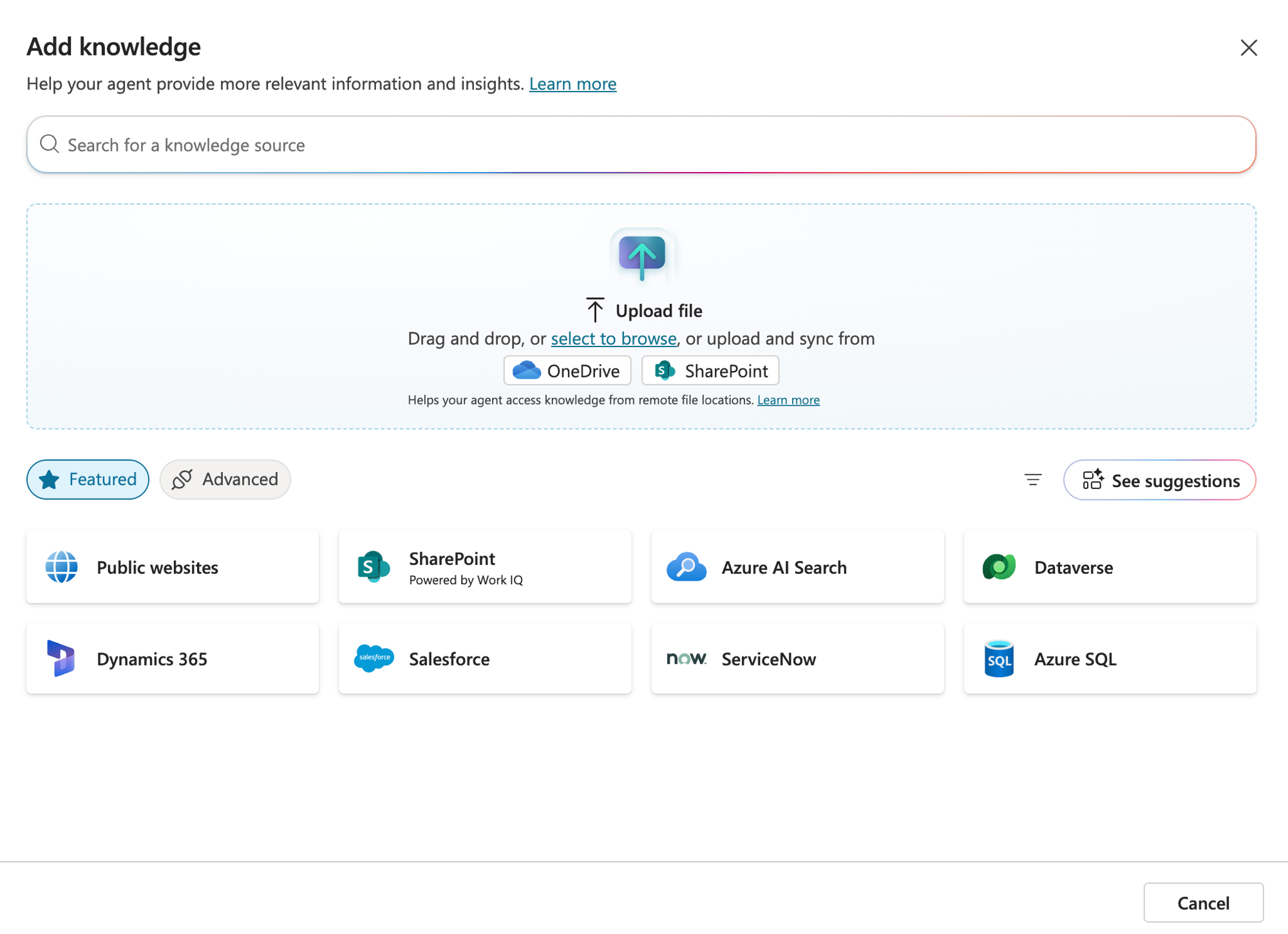
Aqui moram as fontes mais usadas no mundo Microsoft e alguns SaaS populares: Public websites, SharePoint (repare no "Powered by Work IQ"), Azure AI Search, Dataverse, Dynamics 365, Salesforce, ServiceNow e Azure SQL.
E essa é a aba Advanced:
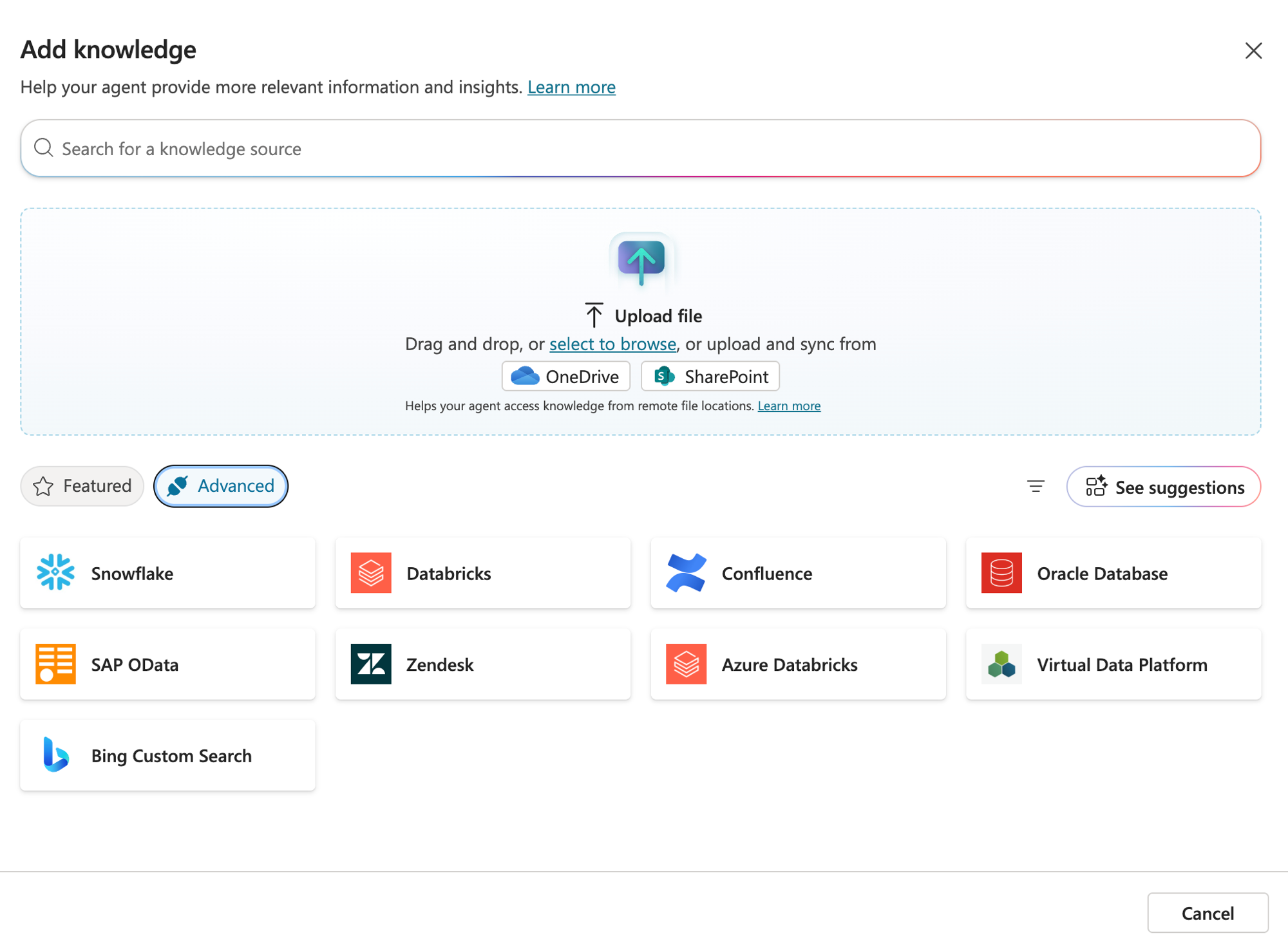
Aqui é onde o pessoal de dados sorri: Snowflake, Databricks, Confluence, Oracle Database, SAP OData, Zendesk, Azure Databricks, Virtual Data Platform e Bing Custom Search. Ou seja, dá pra plugar o seu Lakehouse ou o seu data warehouse direto como fonte de conhecimento do agente.
O catálogo, agrupado pra fazer sentido
São muitas opções, então eu gosto de pensar em 5 grupos:
Arquivos: upload direto, OneDrive ou SharePoint (PDF, Word, PowerPoint, etc.).
Microsoft: SharePoint, Dataverse, Dynamics 365, Azure SQL e Azure AI Search.
Web: Public websites e Bing Custom Search.
Apps de negócio: Salesforce, ServiceNow, Zendesk e Confluence.
Dados e Analytics: Databricks, Azure Databricks, Snowflake, Oracle e SAP OData.
Reparou que tem coisa não estruturada (documento, site) e estruturada (tabela, banco)? Guarda isso, porque cada tipo tem um comportamento diferente e é o que vou detalhar nos próximos posts.
Reginaldo, com tanta fonte assim, qual eu escolho?
Boa pergunta. A regra é simples: use a fonte onde o dado JÁ vive, e não jogue tudo dentro do agente de uma vez. Documento da empresa costuma estar no SharePoint, dado de cliente no Salesforce ou Dynamics, número de negócio no Databricks ou no Azure SQL. Comece pela fonte que responde a maioria das perguntas dos seus usuários.
Os limites (e por que dependem da orquestração)
Aqui tem uma pegadinha que confunde bastante gente: os limites de knowledge dependem do modo de orquestração do agente, generative (o moderno, que é o padrão) ou classic.
Na orquestração generative os limites são folgados: até 25 URLs de SharePoint, 25 sites públicos, e Dataverse e conectores praticamente ilimitados. O detalhe é que, quando você passa de 25 fontes diferentes, um GPT interno entra pra filtrar quais fontes buscar em cada pergunta (os arquivos que você sobe não contam nesse limite de 25).
Já na orquestração classic o aperto é bem maior: 4 URLs de SharePoint, 4 sites, 2 fontes Dataverse (até 15 tabelas cada), e por aí vai.
A real: em vez de decorar tabela de limite, conecte só as fontes que respondem as perguntas dos seus usuários. Menos fonte boa ganha de muita fonte bagunçada, e você foge dos limites naturalmente.
O que vem pela frente
Esse foi o panorama. Nos próximos posts da série a gente desce pra prática, pegando as fontes mais interessantes uma por uma:
SharePoint, a fonte mais usada no dia a dia (e por que ela usa o índice do Work IQ).
Internet, com sites públicos e Bing Custom Search.
Databricks, plugando o Lakehouse direto no agente.
Azure SQL, trazendo dado estruturado como fonte.
RESUMO
Knowledge dá grounding ao agente: é RAG gerenciado sobre os SEUS dados, com citação da fonte.
A tela "Add knowledge" tem Upload file (device, OneDrive, SharePoint) e duas abas: Featured e Advanced.
O catálogo vai de arquivo e site público a Databricks, Snowflake, Salesforce, Azure SQL e mais.
Regra de ouro: conecte a fonte onde o dado JÁ vive.
Limites dependem da orquestração: generative é folgado (25 sites, 25 URLs SharePoint, Dataverse ilimitado; acima de 25 fontes um GPT filtra); classic é restrito (4 SharePoint, 4 sites, 2 Dataverse).
Fica ligado que nessa semana sai um post por dia, aprofundando cada fonte.
Referências:
https://learn.microsoft.com/en-us/microsoft-copilot-studio/knowledge-copilot-studio
https://learn.microsoft.com/en-us/microsoft-copilot-studio/knowledge-add-unstructured-data
Fique bem e até a próxima.
#copilotstudio #microsoft #ia #agentes #rag #datainaction
Hey dataholics! Let's dive into more technical content. Today I'm kicking off a new series inside Copilot Studio from scratch: we're going to break down the agent block by block. And the first one I picked is the most important in practice, Knowledge (the knowledge base).
Back in part 2 we saw that an agent is made of 6 blocks. Now I'll take each one and go deep. This week the topic is knowledge, and in this opening post the goal is to understand what Knowledge is and get to know ALL the source possibilities Copilot Studio gives you. Concept and overview first, hands-on with each source in the next posts.
What we'll cover in this post:
What the Knowledge block is (and why it's RAG)
The "Add knowledge" screen: upload, Featured and Advanced
The full source catalog, grouped
The limits nobody tells you about upfront
What's coming next in the series
What the Knowledge block is
Knowledge is the set of sources the agent uses to answer based on YOUR data, not on the model's generic knowledge. It's the well-known grounding, the foundation of RAG (Retrieval Augmented Generation).
Without knowledge, the agent answers with whatever the model learned during training (generic, and sometimes it just makes things up). With knowledge, before answering it fetches the right passage from the source and the model writes on top of that content, citing the origin. Less hallucination, more trust. This is the block that decides whether your agent will be a generic little chat or an agent that actually knows your company.
And the best part: in Copilot Studio this is managed RAG. But here's a side note worth making, because a lot of people associate RAG with "vector database" and in Copilot Studio you don't set one up.
RAG stands for Retrieval Augmented Generation, and it's a pattern, not a specific technology. It's two steps: Retrieval (fetch the relevant passage from a source) and Augmented Generation (inject that passage into the prompt so the model answers on top of it). What trips people up is the "retrieval": it CAN be vector search with embeddings, but it doesn't have to be. It can be keyword search, semantic search, or even a query against the source itself.
And that's exactly what happens in Copilot Studio, the retrieval changes depending on the source:
Files you upload: become a managed vector index inside Dataverse (here you do get embeddings).
SharePoint: uses the Microsoft Search index (GraphSearch), not a vector of yours.
Dataverse, Azure SQL and the like: query the source itself to bring back the data.
In other words: it's RAG in every case (retrieval + generation with grounding), Microsoft just abstracts the "how". You get RAG without standing up a vector database by hand (and if you want your own index, Azure AI Search is right there on the list too).
The "Add knowledge" screen
When you click to add knowledge, you land on this screen. At the top there's Upload file: you drag a file from your computer, or sync from OneDrive and SharePoint. Right below, the connectors are split into two tabs: Featured (the highlighted sources) and Advanced (the more advanced ones).
This is the Featured tab:
This is home to the most-used sources in the Microsoft world plus a few popular SaaS: Public websites, SharePoint (notice the "Powered by Work IQ"), Azure AI Search, Dataverse, Dynamics 365, Salesforce, ServiceNow and Azure SQL.
And this is the Advanced tab:
This is where the data folks smile: Snowflake, Databricks, Confluence, Oracle Database, SAP OData, Zendesk, Azure Databricks, Virtual Data Platform and Bing Custom Search. In short, you can plug your Lakehouse or your data warehouse straight in as a knowledge source for the agent.
The catalog, grouped to make sense
There are a lot of options, so I like to think in 5 groups:
Files: direct upload, OneDrive or SharePoint (PDF, Word, PowerPoint, etc.).
Microsoft: SharePoint, Dataverse, Dynamics 365, Azure SQL and Azure AI Search.
Web: Public websites and Bing Custom Search.
Business apps: Salesforce, ServiceNow, Zendesk and Confluence.
Data and Analytics: Databricks, Azure Databricks, Snowflake, Oracle and SAP OData.
Notice there's unstructured stuff (a document, a website) and structured stuff (a table, a database)? Keep that in mind, because each type behaves differently and that's what I'll detail in the next posts.
Reginaldo, with this many sources, which one do I pick?
Good question. The rule is simple: use the source where the data ALREADY lives, and don't dump everything into the agent at once. Company documents usually sit in SharePoint, customer data in Salesforce or Dynamics, business numbers in Databricks or Azure SQL. Start with the source that answers most of your users' questions.
The limits (and why they depend on orchestration)
Here's a catch that confuses a lot of people: the knowledge limits depend on the agent's orchestration mode, generative (the modern one, which is the default) or classic.
With generative orchestration the limits are generous: up to 25 SharePoint URLs, 25 public websites, and Dataverse and connectors practically unlimited. The catch is that once you go past 25 different sources, an internal GPT steps in to filter which sources are worth searching for each question (the files you upload don't count toward that 25).
With classic orchestration the squeeze is much tighter: 4 SharePoint URLs, 4 websites, 2 Dataverse sources (up to 15 tables each), and so on.
The bottom line: instead of memorizing a limits table, connect only the sources that answer your users' questions. A few good sources beat a pile of messy ones, and you naturally stay away from the limits.
What's coming next
That was the overview. In the next posts of the series we go hands-on, taking the most interesting sources one by one:
SharePoint, the most-used source day to day (and why it uses the Work IQ index).
Internet, with public websites and Bing Custom Search.
Databricks, plugging the Lakehouse straight into the agent.
Azure SQL, bringing structured data in as a source.
SUMMARY
Knowledge grounds the agent: it's managed RAG over YOUR data, with source citation.
The "Add knowledge" screen has Upload file (device, OneDrive, SharePoint) and two tabs: Featured and Advanced.
The catalog goes from a file and a public website all the way to Databricks, Snowflake, Salesforce, Azure SQL and more.
Rule of thumb: connect the source where the data ALREADY lives.
Limits depend on orchestration: generative is generous (25 websites, 25 SharePoint URLs, Dataverse unlimited; past 25 sources a GPT filters); classic is restrictive (4 SharePoint, 4 websites, 2 Dataverse).
Stay tuned, this week there's a new post every day, going deeper into each source.
References:
https://learn.microsoft.com/en-us/microsoft-copilot-studio/knowledge-copilot-studio
https://learn.microsoft.com/en-us/microsoft-copilot-studio/knowledge-add-unstructured-data
Stay well and see you next time.
#copilotstudio #microsoft #ia #agentes #rag #datainaction
Gostou? Tem mais no YouTube e no LinkedIn.
Enjoyed it? There's more on YouTube and LinkedIn.
Continue lendo Keep reading
![GitHub Copilot a fundo [5] - AI Credits: o Copilot virou usage-based](/images/ghcopilot-aicredits-capa.png)
GitHub Copilot a fundo [5] - AI Credits: o Copilot virou usage-based
Ler → Read →![GitHub Copilot a fundo [4] - Copilot CLI: o agente que mora no seu terminal](/images/ghcopilot-cli-capa.png)
GitHub Copilot a fundo [4] - Copilot CLI: o agente que mora no seu terminal
Ler → Read →![GitHub Copilot a fundo [3] - MCP: ferramentas para o agente sem perder a governança](/images/ghcopilot-mcp-capa.png)