IA & Agentes
Copilot Studio - Novidades [1] - A nova experiência de agente e o novo runtime de orquestração
Copilot Studio - What's New [1] - The new agent experience and the new orchestration runtime
![Copilot Studio - Novidades [1] - A nova experiência de agente e o novo runtime de orquestração](/images/copilot-novidades-1-capa.png)
Fala dataholics, acabei de fechar a série do ecossistema de Copilots e a Microsoft resolveu mexer justamente na tela onde a gente passou os últimos meses. Copilot Studio agora tem uma nova experiência de agente, com outro runtime de orquestração por trás, e a mudança vai bem além do layout. Abro uma série de 5 posts só de novidade pra colocar todo mundo em dia.
O que veremos nesse post:
O que é a nova experiência e como você entra nela
As duas telas lado a lado, clássica e nova
O que a nova faz melhor e o que a clássica ainda faz sozinha
A pegadinha da migração
O que mudou de verdade
Na experiência clássica, que é a que eu usei em toda a série, você constrói o agente em volta de Topics, nós, condições e branching, e escolhe se a orquestração é clássica ou generativa. Na nova, você descreve o agente em linguagem natural e o sistema gera a configuração por baixo, sem topic nenhum no meio do caminho. Não existe mais o botão de escolher a orquestração porque todos os agentes da nova experiência rodam no enhanced orchestration runtime, que é o motor novo, com raciocínio mais profundo e resposta melhor principalmente quando o dado está no Microsoft 365.
Pra entrar é simples, o banner aparece na home da experiência clássica e você clica em Try it now. Depois dá pra ir e voltar quando quiser pelo toggle New experience.

Como saber em qual das duas você está
Esse é o truque mais rápido: olha o menu. Se o lado esquerdo mostra Topics, Knowledge, Actions e Settings como itens separados, você está na clássica.
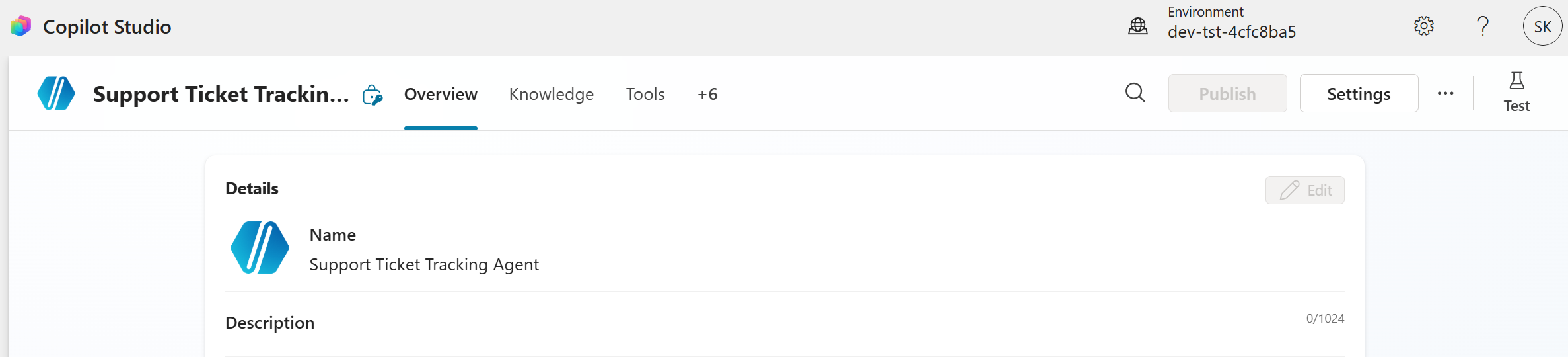
Se o topo do agente mostra as abas Build, Preview, Evaluate e Monitor, você está na nova. E é nessa tela que aparece o que interessa: um painel único com Model, Microsoft IQ, Skills, Tools, Knowledge, Connected agents e Memory, tudo no mesmo lugar em vez de espalhado em quatro menus.
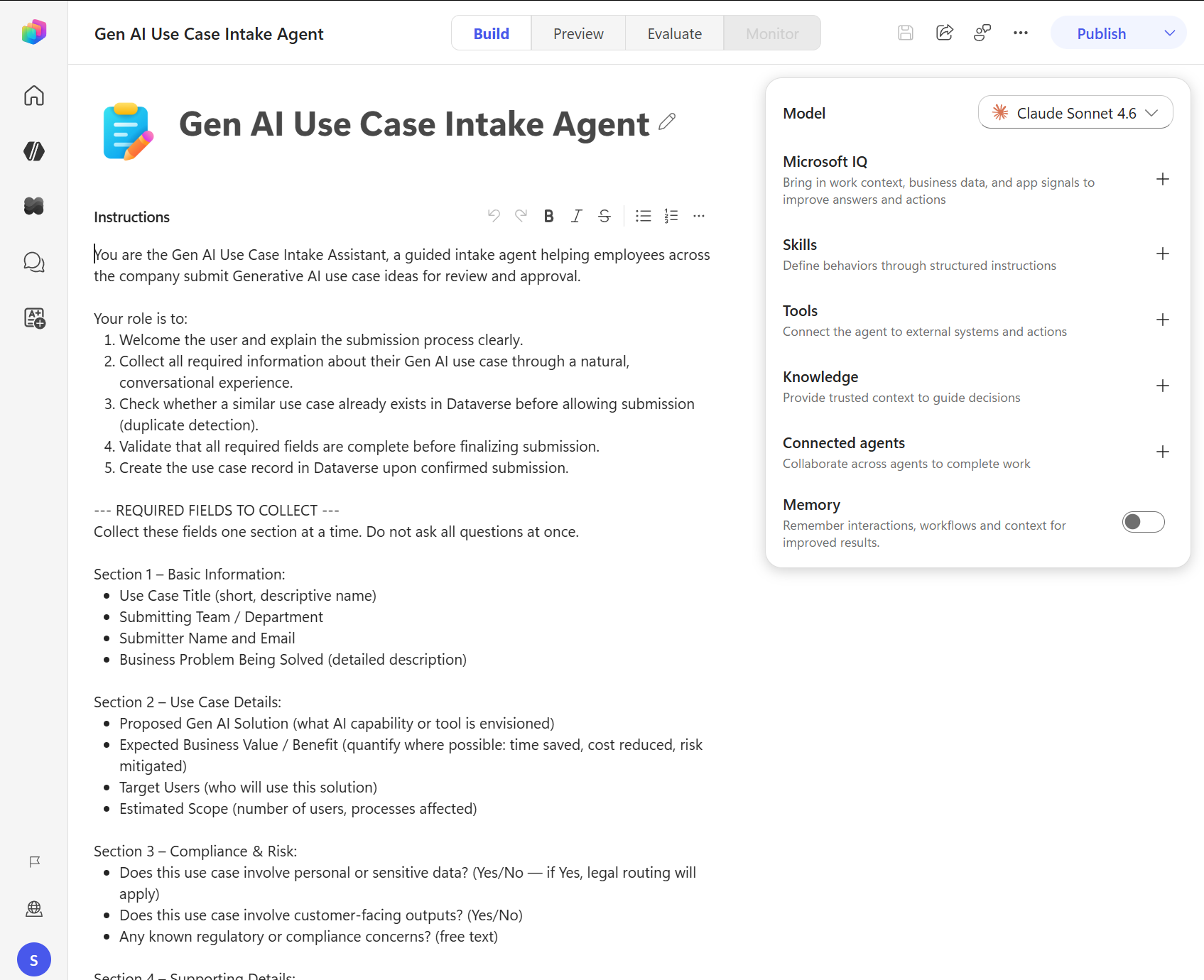
Repara nesse print que três coisas dali são novas e vão ser os próximos posts da série: Microsoft IQ, Skills e Memory. O Evaluate e o Monitor também subiram de status, viraram aba fixa do agente e agora você tropeça neles enquanto constrói, sem precisar lembrar de abrir um lugar separado. Quem acompanhou os posts de Evaluation sabe que eu já defendia avaliar antes de publicar, então ter isso na cara do maker é ótimo.
O que a clássica ainda faz e a nova não
Aqui é onde eu peço calma antes de sair recriando agente. A documentação é honesta e lista o que fica pra trás:
Conversa determinística com Topics: se você precisa de controle passo a passo, com condição e branching explícito, a clássica ainda é a única que entrega isso. Na nova quem decide o caminho é a instrução mais o raciocínio do modelo.
Orquestração configurável: na nova não tem escolha, é o runtime novo pra todo mundo.
Conjunto de features maduro: a clássica tem mais coisa configurável, e a Microsoft mesmo escreve que algumas capacidades ainda não chegaram na nova.
DETALHE IMPORTANTE: não existe caminho de migração. Agente criado na nova não vai pra clássica e agente da clássica não vai pra nova, porque a arquitetura e o runtime são diferentes. Você escolhe a experiência no momento em que cria o agente e fica com ela.
Reginaldo, então quer dizer que meus agentes em produção viram lixo?
Não. A clássica continua totalmente suportada e os agentes que você já tem seguem funcionando do mesmo jeito. O que muda é a sua decisão pro próximo agente que você criar.
Minha leitura, sem marketing
Um detalhe que passa batido: a nova experiência está como production-ready preview, que é um nome esquisito e no fim das contas quer dizer preview com bênção pra produção, ainda sujeito aos termos suplementares. Eu tenho um pé atrás em colocar processo crítico em cima disso agora, principalmente sem caminho de volta pra clássica.
Onde eu iria de cabeça: agente novo de perguntas e respostas em cima de dado do Microsoft 365, que é justamente onde o runtime novo diz entregar mais qualidade. Onde eu ficaria na clássica: fluxo de atendimento com script, coleta de campo obrigatório e regra de compliance, ou seja tudo que precisa acontecer na ordem certa sempre. E se o seu caso é o segundo, sem pressa, a clássica não vai desaparecer amanhã.
RESUMO
Clássica - Topics, canvas com nós, orquestração escolhível, mais features maduras.
Nova - linguagem natural, abas Build/Preview/Evaluate/Monitor, runtime único de orquestração, Skills, Memory e Microsoft IQ.
Entra pelo Try it now na home e volta pelo toggle quando quiser.
Sem migração nos dois sentidos, a escolha é na criação do agente.
Recomendação: comece pela nova em agente novo focado em dado do M365, mantenha na clássica o que precisa de fluxo determinístico.
Nos próximos 4 posts eu abro cada peça nova dessa tela, começando pelas Skills. Se você chegou aqui sem ter visto a série anterior, vale começar pelo post de anatomia do agente, porque muito do que está aqui é evolução daquilo.
Referências:
Agents overview (new experience)
Classic vs. new agent experience
Prints desse post: documentação oficial da Microsoft.
Fique bem e até a próxima.
#copilotstudio #microsoft #ia #agentes #datainaction
Hey dataholics, I just wrapped up the Copilot ecosystem series and Microsoft decided to change exactly the screen where we spent the last few months. Copilot Studio now has a new agent experience, with a different orchestration runtime behind it, and the change goes well beyond the layout. I'm opening a 5 post series about what's new to get everyone up to date.
What we'll see in this post:
What the new experience is and how you get into it
The two screens side by side, classic and new
What the new one does better and what the classic still does alone
The migration catch
What actually changed
In the classic experience, the one I used throughout the whole series, you build the agent around Topics, nodes, conditions and branching, and you pick whether orchestration is classic or generative. In the new one you describe the agent in natural language and the system generates the configuration underneath, with no topics in the middle of the road. The button to pick orchestration is gone because every agent in the new experience runs on the enhanced orchestration runtime, which is the new engine, with deeper reasoning and better answers especially when the data lives in Microsoft 365.
Getting in is simple, the banner shows up on the classic home page and you click Try it now. After that you can go back and forth whenever you want using the New experience toggle.
How to tell which one you're in
This is the quickest trick: look at the menu. If the left side shows Topics, Knowledge, Actions and Settings as separate items, you're in the classic one.
If the top of the agent shows the Build, Preview, Evaluate and Monitor tabs, you're in the new one. And this is the screen where the interesting part shows up: a single panel with Model, Microsoft IQ, Skills, Tools, Knowledge, Connected agents and Memory, all in the same place instead of spread across four menus.
Notice in this screenshot that three things there are new and will be the next posts in the series: Microsoft IQ, Skills and Memory. Evaluate and Monitor got promoted too, they became fixed tabs on the agent and now you bump into them while building, with no separate place to remember to open. Anyone who followed the Evaluation posts knows I already argued for evaluating before publishing, so having that right in the maker's face is great.
What the classic still does and the new one doesn't
Here is where I ask you to slow down before recreating agents. The documentation is honest and lists what gets left behind:
Deterministic conversation with Topics: if you need step by step control, with explicit conditions and branching, the classic one is still the only one that delivers that. In the new one the path is decided by the instructions plus the model's reasoning.
Configurable orchestration: in the new one there's no choice, it's the new runtime for everybody.
Mature feature set: the classic one has more configurable stuff, and Microsoft itself writes that some capabilities haven't landed in the new one yet.
IMPORTANT: there's no migration path. An agent created in the new experience won't move to the classic one and an agent from the classic won't move to the new one, because the architecture and the runtime are different. You choose the experience at the moment you create the agent and you stick with it.
Reginaldo, so does that mean my agents in production become garbage?
No. The classic experience stays fully supported and the agents you already have keep working the same way. What changes is your decision for the next agent you create.
My read, no marketing
One detail that slips by: the new experience sits as a production-ready preview, which is a weird name and in the end means a preview with a blessing for production, still subject to the supplemental terms. I'm a bit cautious about putting a critical process on top of that right now, especially with no way back to the classic experience.
Where I'd go without thinking twice: a brand new question and answer agent on top of Microsoft 365 data, which is exactly where the new runtime claims to deliver more quality. Where I'd stay on classic: a support flow with a script, mandatory field collection and compliance rules, meaning everything that has to happen in the right order every time. And if your case is the second one, no rush, the classic experience isn't disappearing tomorrow.
RECAP
Classic - Topics, node canvas, selectable orchestration, more mature features.
New - natural language, Build/Preview/Evaluate/Monitor tabs, single orchestration runtime, Skills, Memory and Microsoft IQ.
You get in through Try it now on the home page and go back with the toggle whenever you want.
No migration either way, the choice happens when you create the agent.
Recommendation: start with the new one for a new agent focused on M365 data, keep on classic whatever needs a deterministic flow.
In the next 4 posts I'll open each new piece of that screen, starting with Skills. If you got here without reading the previous series, it's worth starting with the agent anatomy post, because a lot of what's here builds on that.
References:
Agents overview (new experience)
Classic vs. new agent experience
Screenshots in this post: official Microsoft documentation.
Take care and see you next time.
#copilotstudio #microsoft #ai #agents #datainaction
Gostou? Tem mais no YouTube e no LinkedIn.
Enjoyed it? There's more on YouTube and LinkedIn.
Continue lendo Keep reading
![GitHub Copilot a fundo [5] - AI Credits: o Copilot virou usage-based](/images/ghcopilot-aicredits-capa.png)
GitHub Copilot a fundo [5] - AI Credits: o Copilot virou usage-based
Ler → Read →![GitHub Copilot a fundo [4] - Copilot CLI: o agente que mora no seu terminal](/images/ghcopilot-cli-capa.png)
GitHub Copilot a fundo [4] - Copilot CLI: o agente que mora no seu terminal
Ler → Read →![GitHub Copilot a fundo [3] - MCP: ferramentas para o agente sem perder a governança](/images/ghcopilot-mcp-capa.png)