IA & Agentes
Copilot Studio - Novidades [2] - Skills: instruções modulares que você escreve uma vez e reusa
Copilot Studio - What's New [2] - Skills: modular instructions you write once and reuse
![Copilot Studio - Novidades [2] - Skills: instruções modulares que você escreve uma vez e reusa](/images/copilot-novidades-2-capa.png)
Fala dataholics, hoje o assunto são as Skills da nova experiência do Copilot Studio, que resolvem uma chatice bem conhecida de quem cria agente. Se você já se pegou copiando o mesmo bloco gigante de instrução de um agente pro outro, com o famoso "cola aqui e ajusta o nome da empresa", esse post é pra você.
O que é uma Skill
Uma Skill é uma capacidade que você define com três coisas: um nome, uma descrição e um bloco de instruções em Markdown. Ela vive dentro do agente como um componente separado, então o runtime de orquestração ativa a skill quando o pedido do usuário casa com a descrição dela. Pensa numa skill como um modo que o agente liga quando precisa, tipo "agora eu estou no papel de quem trata escalação de suporte" e aí ele segue aquele roteiro.
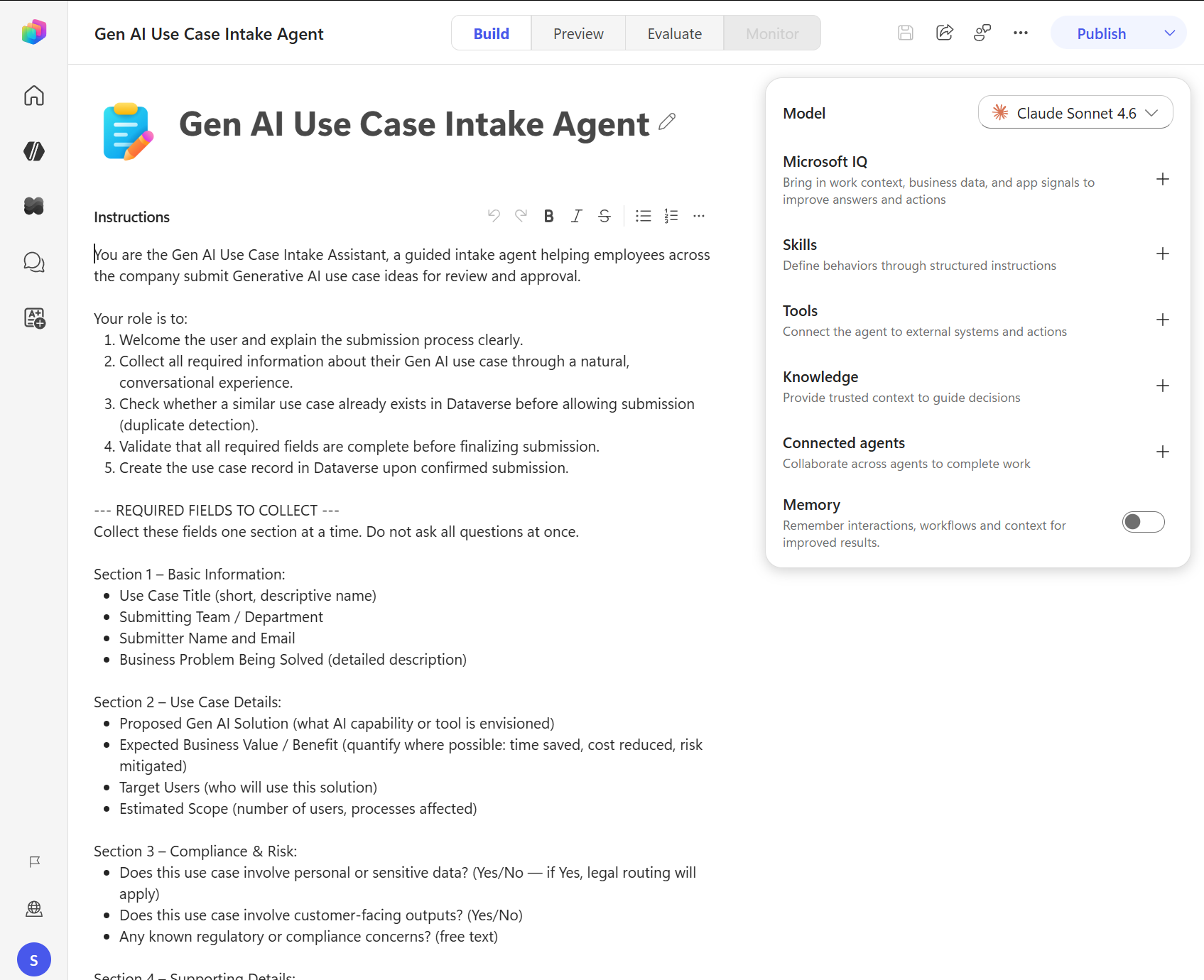
No print da nova tela Build ela fica ali no painel, entre Microsoft IQ e Tools.
Como cada peça tem função parecida na conversa, vale a comparação rápida pra não confundir:
Instructions - quem o agente é, tom, escopo e comportamento geral.
Knowledge - o dado que ele consulta pra responder.
Tools - o que ele executa fora dele, chamando conector, API ou servidor MCP.
Skills - como ele conduz uma tarefa específica, e isso é só instrução, sem serviço externo envolvido.
Criando uma na prática
O caminho é curto: abre o agente, vai na aba Build, no painel de componentes clica em Skills e escolhe Create from blank. Aí você preenche:
Name - só letra minúscula, número e hífen, e não pode começar nem terminar com hífen. Ex.: escalacao-suporte-n2.
Description - o que a skill faz e quando ela deve ser ativada. É essa frase que o orquestrador lê pra decidir, então ela é a parte mais importante do formulário.
Instructions - o roteiro em Markdown, com passo a passo, formato de resposta e o que fazer em caso de exceção.
O detalhe legal é que a skill tem um formato padrão de arquivo, um SKILL.md com front matter YAML no topo e o Markdown embaixo. Ou seja você pode escrever no seu editor favorito e subir pronto, sem digitar no navegador:
---
name: escalacao-suporte-n2
description: Use quando o usuario relatar um incidente que o N1 nao resolveu,
  pedir prioridade alta ou mencionar SLA estourado. Nao use para duvida simples de produto.
---

# Escalacao para o N2

## Passos
1. Confirme o numero do ticket. Se o usuario nao tiver, pergunte antes de seguir.
2. Colete: sistema afetado, horario de inicio, impacto (quantos usuarios) e se ja existe workaround.
3. Classifique a severidade usando a regra: S1 = servico parado, S2 = degradado, S3 = pontual.
4. Use a tool criar-incidente-n2 com os campos coletados.
5. Responda ao usuario com o numero do incidente e o prazo do SLA da severidade.

## Formato da resposta
Sempre em topicos, com o numero do incidente em negrito na primeira linha.

## Excecoes
- Se a severidade for S1, avise que o acionamento e imediato e nao pergunte mais nada.
- Se o usuario nao souber o impacto, assuma S3 e registre isso na descricao.
E se você quiser levar material de apoio junto, existe o skill package, que é um ZIP com o SKILL.md mais arquivos opcionais tipo script, template e documento de referência. Sobe o ZIP no agente e a skill entra completa.
Por que isso resolve o reuso de verdade
Antes, comportamento reaproveitável no Copilot Studio significava duas saídas ruins: ou você inflava o campo de Instructions do agente até ele ficar num texto que ninguém mais consegue revisar, ou você recortava aquilo em Topics e perdia a flexibilidade. Com skill você quebra o comportamento em pedaços pequenos, cada um com propósito claro, cria uma vez e adiciona nos agentes que precisarem. Como o formato é Markdown, cai muito bem em repositório git, review de PR e padronização entre times.
Se você trabalha em consultoria ou num time de plataforma, o valor aqui é direto: dá pra montar uma biblioteca de skills da casa, tipo "tom de voz oficial", "como citar fonte", "como escalar", e distribuir isso por arquivo em vez de por print no Teams.
DETALHE IMPORTANTE: a descrição é o gatilho. Se você escrever algo vago tipo "ajuda o usuário com suporte", a skill vai ativar na hora errada ou não ativar nunca, exatamente o mesmo problema de descrição ruim em tool que eu comentei na série de Tools. Escreva quando usar e também quando não usar, como no exemplo acima.
RESUMO
Skill = nome + descrição + instruções Markdown, empacotada como SKILL.md ou ZIP.
O orquestrador ativa pela descrição, então invista nela.
Skill não chama serviço externo, isso continua sendo trabalho de Tool. Ela pode instruir o agente a usar uma tool de um jeito específico.
Cria uma vez, usa em vários agentes, versiona em git.
Disponível só na nova experiência, que eu abri no post [1], e ainda em preview.
Comenta aí se você já montaria uma biblioteca de skills pra sua empresa, eu já estou rascunhando a minha. No próximo post é a vez do Memory, o agente que lembra de você entre conversas.
Referências:
Print desse post: documentação oficial da Microsoft.
Espero que tenha gostado.
#copilotstudio #skills #microsoft #ia #agentes #datainaction
Hey dataholics, today the subject is Skills in the new Copilot Studio experience, which fix a well known annoyance for anyone who builds agents. If you have ever caught yourself copying the same giant instruction block from one agent to another, with the classic "paste it here and fix the company name", this post is for you.
What a Skill is
A Skill is a capability you define with three things: a name, a description and a block of instructions in Markdown. It lives inside the agent as a separate component, so the orchestration runtime activates the skill when the user's request matches its description. Think of a skill as a mode the agent turns on when it needs to, something like "right now I'm playing the role of whoever handles support escalation" and then it follows that script.
In the screenshot of the new Build screen it sits right there in the panel, between Microsoft IQ and Tools.
Since each piece has a similar looking role in the conversation, a quick comparison helps you not mix them up:
Instructions - who the agent is, tone, scope and general behavior.
Knowledge - the data it looks at to answer.
Tools - what it runs outside itself, calling a connector, an API or an MCP server.
Skills - how it handles a specific task, and that's instruction only, no external service involved.
Creating one in practice
The path is short: open the agent, go to the Build tab, in the components panel click Skills and pick Create from blank. Then you fill in:
Name - lowercase letters, numbers and hyphens only, and it can't start or end with a hyphen. Example: support-escalation-l2.
Description - what the skill does and when it should be activated. This is the sentence the orchestrator reads to decide, so it's the most important part of the form.
Instructions - the script in Markdown, with step by step guidance, response format and what to do on an exception.
The nice detail is that a skill has a standard file format, a SKILL.md with YAML front matter on top and Markdown below. Which means you can write it in your favorite editor and upload it ready to go, without typing in the browser:
---
name: support-escalation-l2
description: Use when the user reports an incident L1 could not solve,
  asks for high priority or mentions a breached SLA. Do not use for simple product questions.
---

# Escalation to L2

## Steps
1. Confirm the ticket number. If the user does not have it, ask before moving on.
2. Collect: affected system, start time, impact (how many users) and whether a workaround exists.
3. Classify severity using the rule: S1 = service down, S2 = degraded, S3 = isolated.
4. Use the create-incident-l2 tool with the collected fields.
5. Reply to the user with the incident number and the SLA deadline for that severity.

## Response format
Always in bullets, with the incident number in bold on the first line.

## Exceptions
- If severity is S1, say the escalation is immediate and do not ask anything else.
- If the user does not know the impact, assume S3 and record that in the description.
And if you want to carry supporting material along, there's the skill package, a ZIP with the SKILL.md plus optional files like scripts, templates and reference documents. Upload the ZIP to the agent and the skill lands complete.
Why this actually solves reuse
Before this, reusable behavior in Copilot Studio meant two bad options: either you inflated the agent's Instructions field until it became a wall of text nobody can review anymore, or you carved it into Topics and lost the flexibility. With skills you break the behavior into small pieces, each one with a clear purpose, create it once and add it to whichever agents need it. Since the format is Markdown, it fits really well in a git repo, PR review and standardization across teams.
If you work in consulting or on a platform team, the value here is direct: you can build a house library of skills, something like "official tone of voice", "how to cite a source", "how to escalate", and distribute that as files instead of as screenshots in Teams.
IMPORTANT: the description is the trigger. If you write something vague like "helps the user with support", the skill will fire at the wrong time or never fire at all, which is exactly the bad tool description problem I talked about in the Tools series. Write when to use it and also when not to, like in the example above.
RECAP
Skill = name + description + Markdown instructions, packaged as SKILL.md or a ZIP.
The orchestrator activates it from the description, so invest in that.
A skill doesn't call an external service, that's still Tool work. It can instruct the agent to use a tool in a specific way.
Create once, use across several agents, version it in git.
Available only in the new experience, which I covered in post [1], and still in preview.
Tell me in the comments if you'd already build a skill library for your company, I'm drafting mine. Next post it's Memory's turn, the agent that remembers you between conversations.
References:
Screenshot in this post: official Microsoft documentation.
Hope you liked it.
#copilotstudio #skills #microsoft #ai #agents #datainaction
Gostou? Tem mais no YouTube e no LinkedIn.
Enjoyed it? There's more on YouTube and LinkedIn.
Continue lendo Keep reading
![GitHub Copilot a fundo [5] - AI Credits: o Copilot virou usage-based](/images/ghcopilot-aicredits-capa.png)
GitHub Copilot a fundo [5] - AI Credits: o Copilot virou usage-based
Ler → Read →![GitHub Copilot a fundo [4] - Copilot CLI: o agente que mora no seu terminal](/images/ghcopilot-cli-capa.png)
GitHub Copilot a fundo [4] - Copilot CLI: o agente que mora no seu terminal
Ler → Read →![GitHub Copilot a fundo [3] - MCP: ferramentas para o agente sem perder a governança](/images/ghcopilot-mcp-capa.png)