IA & Agentes
Copilot Studio - Novidades [3] - Memory: o agente que lembra de você entre conversas
Copilot Studio - What's New [3] - Memory: the agent that remembers you between conversations
![Copilot Studio - Novidades [3] - Memory: o agente que lembra de você entre conversas](/images/copilot-novidades-3-capa.png)
Fala pessoal, sextou e o assunto de hoje é a coisa que mais irrita quem usa agente no dia a dia: o agente que esquece tudo. Você explica na segunda-feira que prefere resposta curta, em tópicos, sem enrolação, e na terça ele volta escrevendo três parágrafos de introdução. A nova experiência trouxe o Memory pra resolver isso.
Como funciona o ciclo
Com o Memory ligado o agente mantém um store de memória por usuário, então cada pessoa que fala com aquele agente tem a própria pasta e ninguém vê a memória do outro. O ciclo tem três passos e é bem simples de entender:
Capture - o agente registra sinais como preferência do usuário, padrão que ele observou e nota sobre o próprio trabalho.
Store - isso vira arquivo na pasta daquele usuário pra aquele agente, num store dentro do tenant.
Apply - na próxima interação ele lê de lá antes de responder ou decidir.
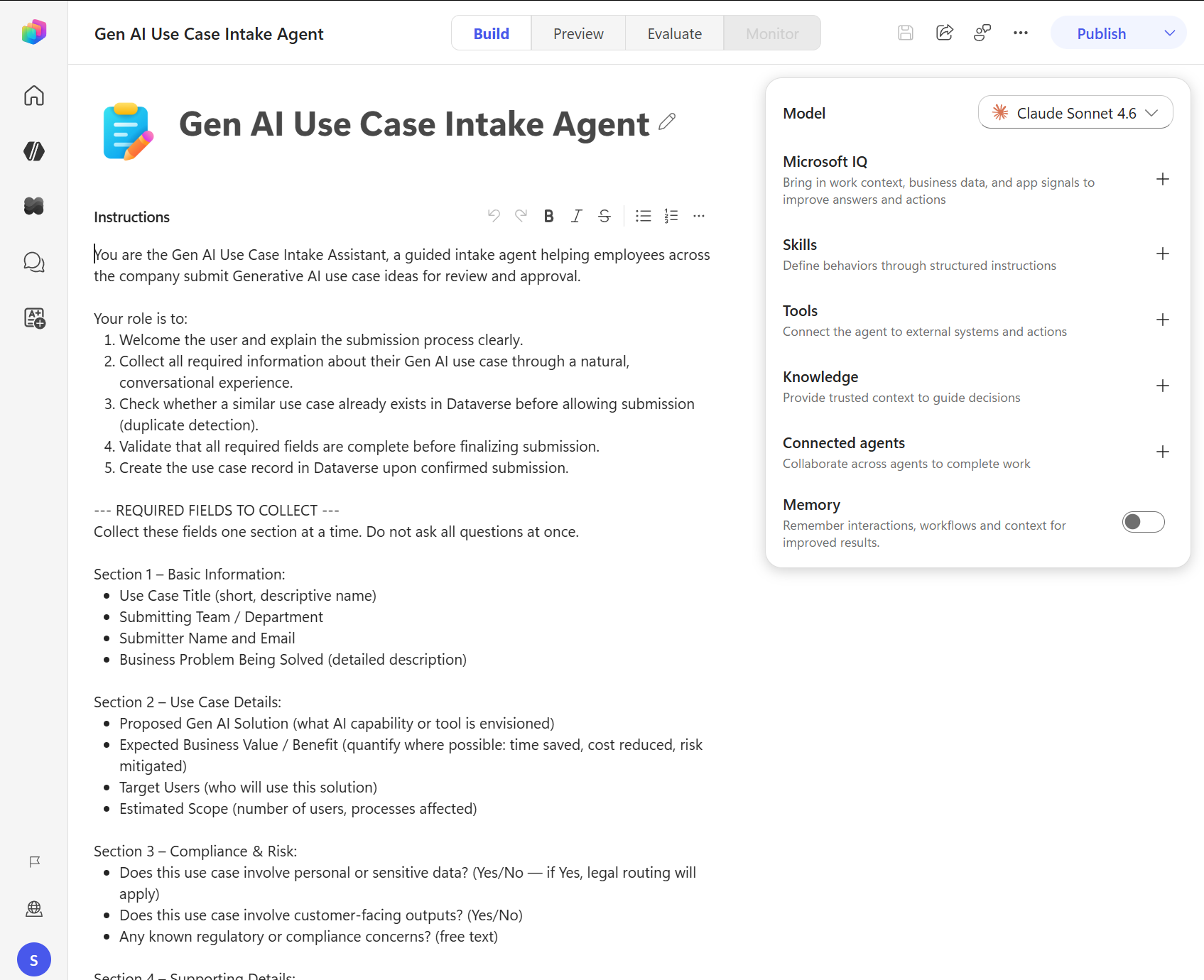
Ligar é um toggle só, você abre o agente na aba Build e o Memory está lá embaixo no painel de componentes, aparecendo desligado no print da documentação.
Quem já brincou de agente com LangGraph vai reconhecer o problema que isso resolve. Lá o MemorySaver padrão vive em processo, aí você reinicia o container e a memória vai embora junto, e se você tem duas réplicas cada uma lembra de uma coisa diferente. Aqui a Microsoft resolveu isso do lado dela, com store no tenant e escopo por usuário, e você não escreve uma linha de código pra ter isso.
A regra dos 28 dias
DETALHE IMPORTANTE: se um usuário passa 28 dias sem nenhuma atividade com o agente, as memórias dele naquele agente são apagadas. Não é o agente inteiro que perde memória, é o usuário inativo. Faz sentido do ponto de vista de privacidade e de custo de armazenamento, mas fica de olho se o seu caso é um agente sazonal, tipo aquele que só é usado no fechamento trimestral, porque nesse cenário a memória nunca vai amadurecer.
Outro ponto importante: desligar o toggle não apaga a memória que já existe, só impede o agente de usar. Então se você desligou por engano e religou, o histórico volta a valer.
Onde o usuário administra a própria memória
Tem um portal de memória que abre em aba nova e mostra o que está guardado por agente, onde dá pra ver tudo e apagar tudo pelos três pontinhos com um Delete all memories. Você chega nele pelo componente Memory na aba Build, e num agente conversacional a primeira resposta do agente com memória ligada já vem com o link do portal.
E olha que prático: em agente conversacional o usuário administra por conversa mesmo, em linguagem natural. Dá pra pedir "me diz o que você lembra de mim", "atualiza que eu troquei de time" ou "esquece o que eu falei sobre relatório". Pra apagar ou ajustar uma memória específica, pede no chat, e pra limpar tudo de uma vez usa o portal.
Em agente autônomo, que não tem chat pra você pedir nada, o portal é o único caminho e a documentação fala isso na cara, ele é o acesso principal nesse cenário.
Aí sobra trabalho de governança pra quem administra o ambiente, porque agente autônomo escreve memória sem ninguém olhando.
Minha ressalva
Memória é ótima pra experiência e é exatamente onde dado pessoal entra sem você pedir. O agente vai anotar preferência, jeito de trabalhar, às vezes contexto de projeto e nome de gente. Antes de ligar isso num agente que atende cliente final, passa pelo time de privacidade e decide o que você quer que ele memorize, principalmente com a discussão de LGPD em cima. Ainda está em preview, então trate como feature que vai mudar, e leia junto o material de governança que eu escrevi na série de publicação.
Eu ainda não rodei isso por semanas seguidas pra ver como a memória envelhece, se ela acumula lixo ou se o agente aprende a filtrar. Quando tiver esse teste na mão eu volto e conto.
Referências:
Memory (preview) - Copilot Studio
Print desse post: documentação oficial da Microsoft.
No próximo post é o Microsoft IQ, que é o agente pegando e-mail, calendário, Teams e arquivo como contexto. Fiquem bem e até a próxima.
#copilotstudio #memory #microsoft #ia #agentes #datainaction
Hey folks, it's Friday here and today's subject is the thing that annoys agent users the most in daily life: the agent that forgets everything. You explain on Monday that you prefer short answers, in bullets, no fluff, and on Tuesday it comes back writing three paragraphs of introduction. The new experience brought Memory to fix that.
How the cycle works
With Memory turned on the agent keeps a memory store per user, so each person who talks to that agent has their own folder and nobody sees anyone else's memory. The cycle has three steps and it's easy to follow:
Capture - the agent records signals like user preferences, patterns it observed and notes about its own work.
Store - that becomes files in that user's folder for that agent, in a store inside the tenant.
Apply - on the next interaction it reads from there before answering or deciding.
Turning it on is a single toggle, you open the agent on the Build tab and Memory sits at the bottom of the components panel, showing up switched off in the documentation screenshot.
Anyone who has played with LangGraph agents will recognize the problem this solves. Over there the default MemorySaver lives in process, so you restart the container and the memory goes with it, and if you have two replicas each one remembers something different. Here Microsoft solved that on their side, with a store in the tenant and per user scope, and you write zero lines of code for it.
The 28 day rule
IMPORTANT: if a user goes 28 days with no activity on the agent, their memories for that agent are deleted. It's not the whole agent losing memory, it's the inactive user. It makes sense from a privacy and storage cost angle, but keep an eye out if your case is a seasonal agent, the kind that only gets used during quarterly close, because in that scenario the memory will never mature.
Another important point: turning the toggle off does not delete the memory that already exists, it only stops the agent from using it. So if you turned it off by mistake and turned it back on, the history counts again.
Where the user manages their own memory
There's a memory portal that opens in a new tab and shows what is stored per agent, where you can see everything and delete everything through the three dots with a Delete all memories. You reach it from the Memory component on the Build tab, and in a conversational agent the first response from a memory enabled agent already includes the portal link.
And here's the practical bit: in a conversational agent the user manages it right in the conversation, in natural language. You can ask "tell me what you remember about me", "update that I changed teams" or "forget what I said about the report". To delete or adjust a specific memory, ask in chat, and to wipe everything at once use the portal.
On an autonomous agent, which has no chat for you to ask anything, the portal is the only way in and the documentation says so plainly, it's the primary path in that scenario.
So governance work lands on whoever administers the environment, because an autonomous agent writes memory with nobody watching.
My caveat
Memory is great for experience and it's exactly where personal data walks in without you asking. The agent will note preferences, ways of working, sometimes project context and people's names. Before turning this on in an agent that serves end customers, run it by your privacy team and decide what you want it to memorize, especially with the LGPD discussion on top. It's still in preview, so treat it as a feature that will change, and read it together with the governance material I wrote in the publishing series.
I still haven't run this for weeks in a row to see how the memory ages, whether it piles up junk or the agent learns to filter. When I have that test in hand I'll come back and tell you.
References:
Memory (preview) - Copilot Studio
Screenshot in this post: official Microsoft documentation.
Next post is Microsoft IQ, which is the agent picking up email, calendar, Teams and files as context. Take care and see you next time.
#copilotstudio #memory #microsoft #ai #agents #datainaction
Gostou? Tem mais no YouTube e no LinkedIn.
Enjoyed it? There's more on YouTube and LinkedIn.
Continue lendo Keep reading
![GitHub Copilot a fundo [5] - AI Credits: o Copilot virou usage-based](/images/ghcopilot-aicredits-capa.png)
GitHub Copilot a fundo [5] - AI Credits: o Copilot virou usage-based
Ler → Read →![GitHub Copilot a fundo [4] - Copilot CLI: o agente que mora no seu terminal](/images/ghcopilot-cli-capa.png)
GitHub Copilot a fundo [4] - Copilot CLI: o agente que mora no seu terminal
Ler → Read →![GitHub Copilot a fundo [3] - MCP: ferramentas para o agente sem perder a governança](/images/ghcopilot-mcp-capa.png)