IA & Agentes
Copilot Studio - Novidades [4] - Microsoft IQ: e-mail, calendário, Teams e arquivos como contexto
Copilot Studio - What's New [4] - Microsoft IQ: email, calendar, Teams and files as context
![Copilot Studio - Novidades [4] - Microsoft IQ: e-mail, calendário, Teams e arquivos como contexto](/images/copilot-novidades-4-capa.png)
Fala pessoal, ótima semana a todos. Hoje a gente chega na mudança mais forte da nova experiência do Copilot Studio. Na série de Base de Conhecimento eu passei cinco posts mostrando como apontar o agente pra documento, site e índice. O Microsoft IQ inverte essa lógica: em vez de você apontar arquivo por arquivo, você liga uma chave e o agente passa a ter acesso dinâmico ao contexto da empresa.
O que veremos nesse post:
O que é o Microsoft IQ e as três famílias dele
Todas as fontes do Work IQ, uma por uma
A diferença entre isso e Knowledge normal
O que a doc promete e o que ela entrega hoje
Uma camada de contexto, três famílias
Microsoft IQ é uma camada de contexto que conecta o agente a dado organizacional através de fontes especializadas, e ela se divide em três:
Work IQ - e-mail, chat, arquivo e atividade do Microsoft 365. É a família com mais fontes e a que muda o dia a dia de agente interno.
Fabric IQ - dado de negócio e analytics no Microsoft Fabric, pra insight e decisão em cima de número.
Foundry IQ (preview) - knowledge base indexada no Azure AI Search, que é exatamente o caminho que eu já tinha aberto no post de Foundry IQ com Databricks. Agora ele entra direto no painel do agente, junto com as outras fontes.
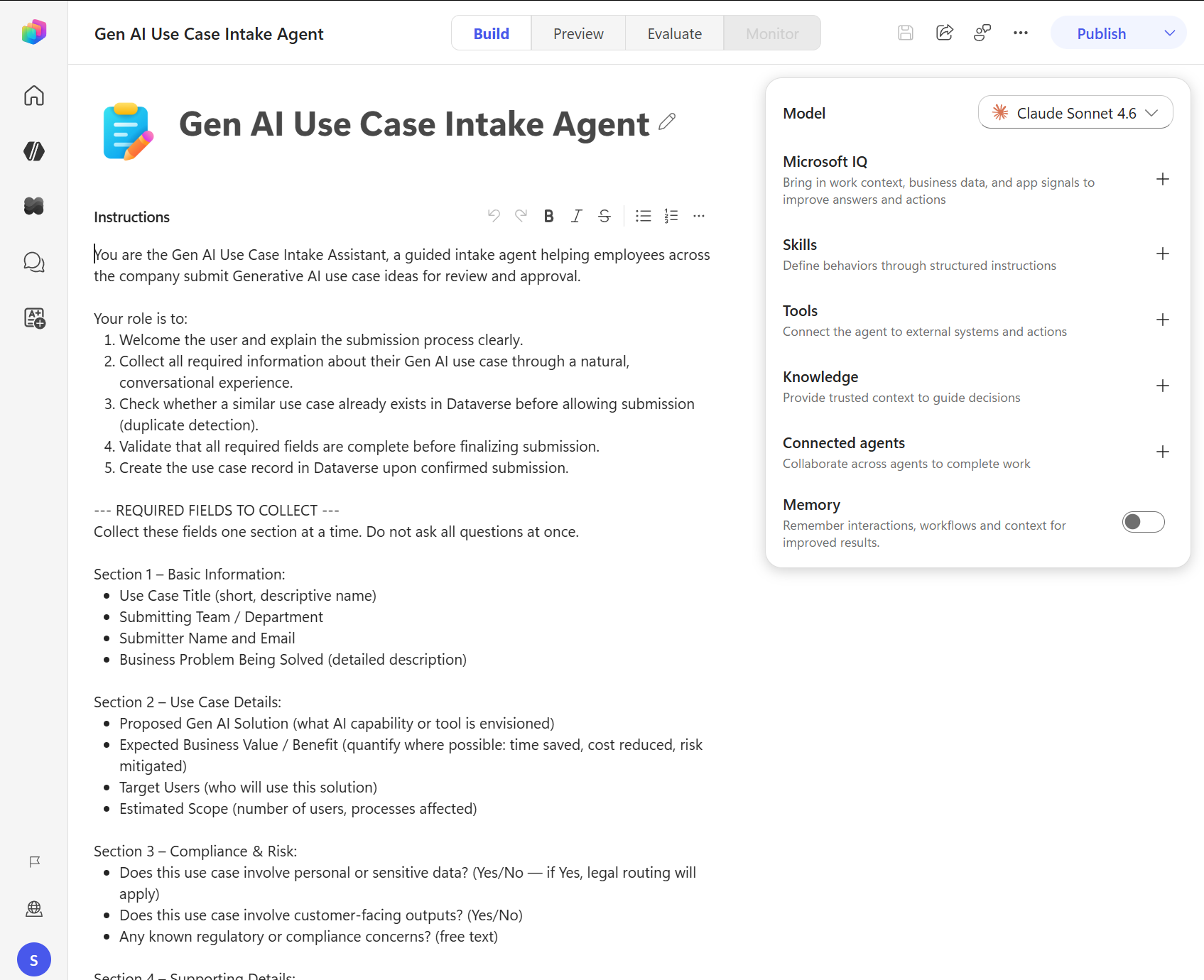
No painel da aba Build o Microsoft IQ é o primeiro item embaixo do Model, com aquela descrição de trazer contexto de trabalho e sinal de aplicação pra melhorar resposta e ação.
Por dentro do Work IQ
Aqui tem um detalhe de arquitetura que vale saber, porque muda como você pensa em governança. Todo o acesso a dado do Microsoft 365 no Work IQ passa por um gateway único, o Agent 365 MCP gateway, que fica no servidor M365Copilot em agent365.svc.cloud.microsoft, e nenhuma fonte tem servidor MCP próprio. Uma porta só pra tudo, o que simplifica auditoria e conversa direto com o Agent 365 que eu comentei no post de governança.
As fontes disponíveis hoje:
Mail - caixa de entrada, itens enviados e pastas. Busca e-mail, lê conteúdo e rascunha resposta.
Calendar - eventos e agenda, próxima reunião e disponibilidade.
Teams - mensagem, canal e conversa, com busca no histórico de chat.
OneDrive e SharePoint - arquivo das bibliotecas, busca e leitura de conteúdo.
User profile e people - diretório da organização, perfil de pessoa, estrutura de reporte e contato.
Microsoft 365 Copilot Search - busca ampla e unificada atravessando vários serviços do M365.
SharePoint Lists - dado estruturado de lista, consultando item.
Quando você liga o Microsoft IQ, duas fontes já vêm ativas por padrão: User Profile e Microsoft 365 Copilot Search. As outras você habilita uma a uma conforme o agente precisar, e isso é bom, porque ninguém quer um agente de RH lendo a caixa de entrada inteira sem necessidade.
E a parte que todo mundo pergunta primeiro: tudo respeita a permissão que o usuário já tem. O agente só alcança o que aquela pessoa alcançaria. É o mesmo princípio que eu expliquei na parte 2 da série de Knowledge, quando falei do SharePoint usando o índice nativo com trimming de permissão.
Microsoft IQ ou Knowledge? As duas coisas
A diferença fica clara quando você compara:
Knowledge - conteúdo estático ou semi-estático, você aponta pra documento, site ou biblioteca específica, e é somente leitura.
Microsoft IQ - dado organizacional dinâmico, você liga e desliga fonte, sem apontar arquivo, o escopo é o que o usuário alcança, e a fonte pode servir como knowledge (ler) e como tool (agir).
Na prática você vai usar os dois. Manual de produto e política interna continuam bem em Knowledge, com controle de qual biblioteca entra. Contexto vivo do trabalho, tipo "qual foi a última conversa que eu tive com o cliente X e o que ficou combinado", só existe via Microsoft IQ.
O que eu olhei com desconfiança
A página geral do Microsoft IQ diz que o agente pode tomar ação, citando rascunhar e-mail e criar documento. Só que a tabela de capacidade por fonte, na página das fontes do Work IQ, hoje lista Knowledge (leitura) em todas as sete e deixa a coluna de Tools (ações) vazia em todas. Provavelmente é doc correndo atrás do produto, coisa normal em preview, mas se o seu caso de uso depende de o agente escrever e não só ler, vale testar no seu tenant antes de prometer isso pra área de negócio.
O outro ponto é o de sempre em preview: a Microsoft avisa que nome e parâmetro de tool MCP podem mudar, então não crie dependência dura em cima disso agora.
RESUMO
Microsoft IQ = camada de contexto com Work IQ, Fabric IQ e Foundry IQ.
Work IQ passa por um gateway MCP único do Agent 365, sem servidor dedicado por fonte.
Sete fontes hoje, com User Profile e M365 Copilot Search ligadas por padrão.
Permissão do usuário manda, o agente não vê mais que ele.
Knowledge continua valendo pro conteúdo curado, o IQ entra pro contexto vivo.
Referências:
Microsoft IQ overview for agents (preview)
Microsoft IQ sources for agents (preview)
Print desse post: documentação oficial da Microsoft.
Fecho a série no próximo post falando de modelo, que agora tem Claude Sonnet 5 e GPT-5.5 na lista e umas tags que mudam bastante o custo do seu agente. Espero que ajude.
#copilotstudio #microsoftiq #workiq #microsoft #ia #agentes #datainaction
Hey folks, have a great week. Today we get to the strongest change in the new Copilot Studio experience. In the Knowledge Base series I spent five posts showing how to point the agent at documents, sites and indexes. Microsoft IQ flips that logic: instead of pointing at file after file, you flip a switch and the agent gets dynamic access to the company's context.
What we'll see in this post:
What Microsoft IQ is and its three families
Every Work IQ source, one by one
The difference between this and regular Knowledge
What the docs promise and what they deliver today
One context layer, three families
Microsoft IQ is a context layer that connects the agent to organizational data through specialized sources, and it splits into three:
Work IQ - email, chat, files and activity from Microsoft 365. It's the family with the most sources and the one that changes daily life for internal agents.
Fabric IQ - business data and analytics in Microsoft Fabric, for insights and decisions on top of numbers.
Foundry IQ (preview) - knowledge bases indexed in Azure AI Search, which is exactly the path I had already opened in the Foundry IQ with Databricks post. Now it lands right in the agent's panel, next to the other sources.
In the Build tab panel Microsoft IQ is the first item under Model, with that description about bringing in work context and app signals to improve answers and actions.
Inside Work IQ
There's an architecture detail here worth knowing, because it changes how you think about governance. All Microsoft 365 data access in Work IQ goes through a single gateway, the Agent 365 MCP gateway, which lives on the M365Copilot server at agent365.svc.cloud.microsoft, and no source gets its own MCP server. One door for everything, which simplifies auditing and talks straight to the Agent 365 I covered in the governance post.
The sources available today:
Mail - inbox, sent items and folders. Searches email, reads content and drafts responses.
Calendar - events and scheduling, next meeting and availability.
Teams - messages, channels and conversations, with search over chat history.
OneDrive and SharePoint - files in the libraries, search and content reading.
User profile and people - the organization directory, people profiles, reporting structure and contact details.
Microsoft 365 Copilot Search - broad unified search spanning multiple M365 services.
SharePoint Lists - structured list data, querying items.
When you turn Microsoft IQ on, two sources come active by default: User Profile and Microsoft 365 Copilot Search. You enable the others one by one as the agent needs them, and that's good, because nobody wants an HR agent reading the entire inbox for no reason.
And the part everyone asks first: everything respects the permissions the user already has. The agent only reaches what that person would reach. It's the same principle I explained in part 2 of the Knowledge series, when I talked about SharePoint using the native index with permission trimming.
Microsoft IQ or Knowledge? Both
The difference gets clear when you compare:
Knowledge - static or semi-static content, you point at a specific document, site or library, and it's read only.
Microsoft IQ - dynamic organizational data, you turn sources on and off, with no file to point at, the scope is whatever the user can reach, and a source can serve as knowledge (read) and as a tool (act).
In practice you'll use both. Product manuals and internal policies still fit well in Knowledge, with control over which library goes in. Live work context, like "what was the last conversation I had with client X and what did we agree on", only exists through Microsoft IQ.
What I looked at with suspicion
The Microsoft IQ overview page says the agent can take actions, citing drafting emails and creating documents. Except the capability table per source, on the Work IQ sources page, today lists Knowledge (read) on all seven and leaves the Tools (actions) column empty on all of them. It's probably docs catching up with the product, normal in preview, but if your use case depends on the agent writing and not just reading, test it in your tenant before promising that to the business.
The other point is the usual one in preview: Microsoft warns that MCP tool names and parameters may change, so don't build a hard dependency on top of that right now.
RECAP
Microsoft IQ = context layer with Work IQ, Fabric IQ and Foundry IQ.
Work IQ goes through a single Agent 365 MCP gateway, with no dedicated server per source.
Seven sources today, with User Profile and M365 Copilot Search on by default.
The user's permissions rule, the agent doesn't see more than they do.
Knowledge still holds for curated content, IQ steps in for live context.
References:
Microsoft IQ overview for agents (preview)
Microsoft IQ sources for agents (preview)
Screenshot in this post: official Microsoft documentation.
I close the series in the next post talking about models, which now include Claude Sonnet 5 and GPT-5.5 in the list plus some tags that change your agent's cost quite a bit. Hope it helps.
#copilotstudio #microsoftiq #workiq #microsoft #ai #agents #datainaction
Gostou? Tem mais no YouTube e no LinkedIn.
Enjoyed it? There's more on YouTube and LinkedIn.
Continue lendo Keep reading
![GitHub Copilot a fundo [5] - AI Credits: o Copilot virou usage-based](/images/ghcopilot-aicredits-capa.png)
GitHub Copilot a fundo [5] - AI Credits: o Copilot virou usage-based
Ler → Read →![GitHub Copilot a fundo [4] - Copilot CLI: o agente que mora no seu terminal](/images/ghcopilot-cli-capa.png)
GitHub Copilot a fundo [4] - Copilot CLI: o agente que mora no seu terminal
Ler → Read →![GitHub Copilot a fundo [3] - MCP: ferramentas para o agente sem perder a governança](/images/ghcopilot-mcp-capa.png)