IA & Agentes
Microsoft Foundry - Skills - instrução versionada que até o Claude Code consegue ler
Microsoft Foundry - Skills - versioned instructions even Claude Code can read
Fala dataholics, fui mexer na área de Tools do portal do Microsoft Foundry e apareceu uma aba nova ali do lado de Toolboxes, chamada Skills, ainda com o selo de Preview. Quem acompanhou a série de novidades do Copilot Studio já viu skill por lá, só que a implementação do Foundry é bem diferente e merece um post só dela.
A skill saiu de dentro do agente
No Copilot Studio a skill vive dentro do agente, como um componente do painel Build, e eu falei disso no post [2] da série de novidades. No Foundry o desenho é outro, porque a skill é um recurso do projeto: ela existe sozinha, tem ciclo de vida próprio e o agente só aponta pra ela.
Parece detalhe de arquitetura mas muda a operação inteira. Aquela política de escalação que dez agentes seguem passa a morar num lugar só, e quando a política muda você sobe uma versão nova, testa e promove, sem abrir agente por agente pra editar system prompt e redeployar todos. Se você trabalha em time de plataforma ou consultoria já sabe exatamente a dor que eu tô descrevendo.
Criando uma skill pelo portal
O caminho é curto, vai em Tools e abre a aba Skills. Com o projeto vazio ele te oferece o botão Add skill com duas opções, Create skill pra escrever ali na hora e Upload skill pra subir arquivo pronto.
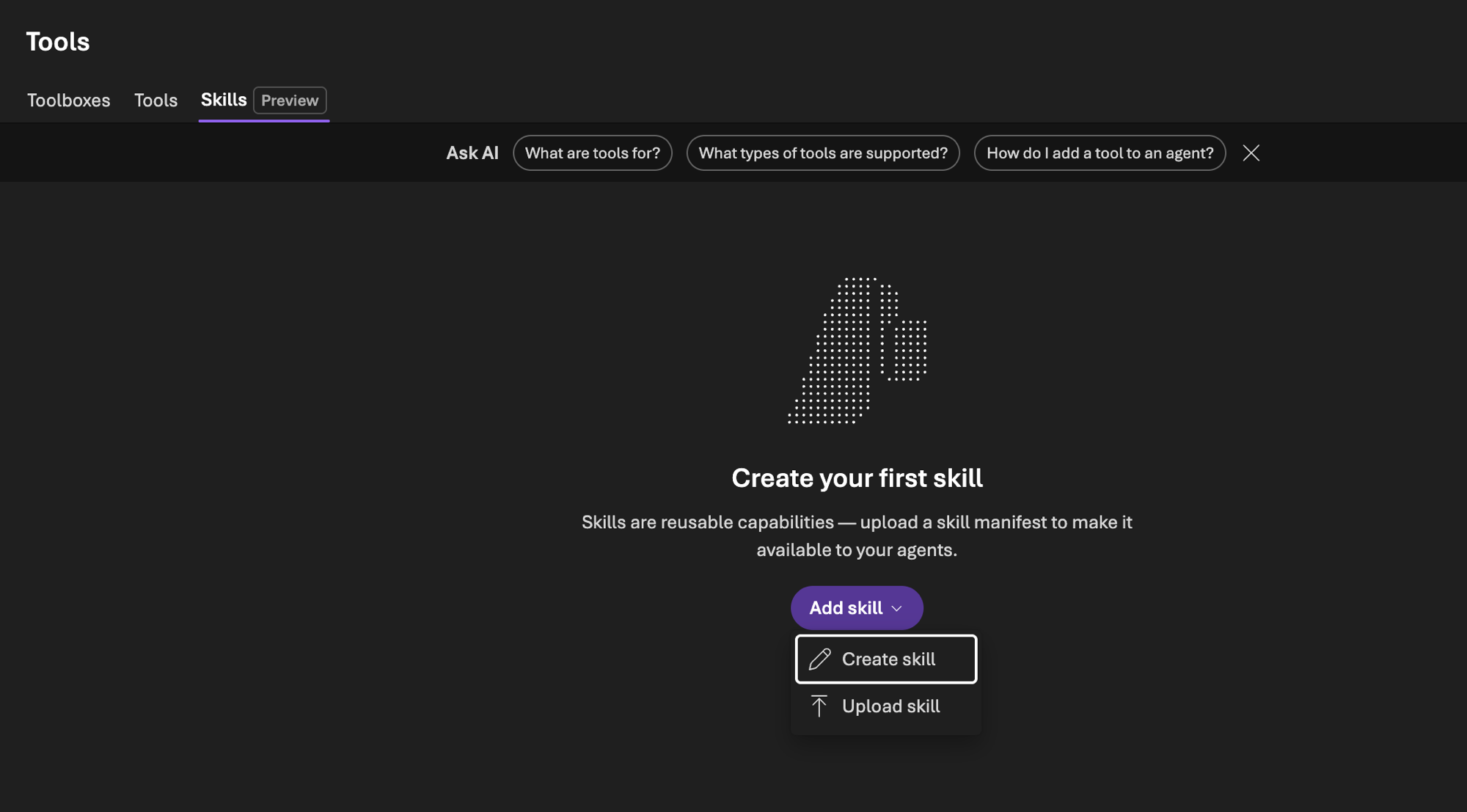
Clicando em Create skill abre o modal Write skill com três campos e nada mais:
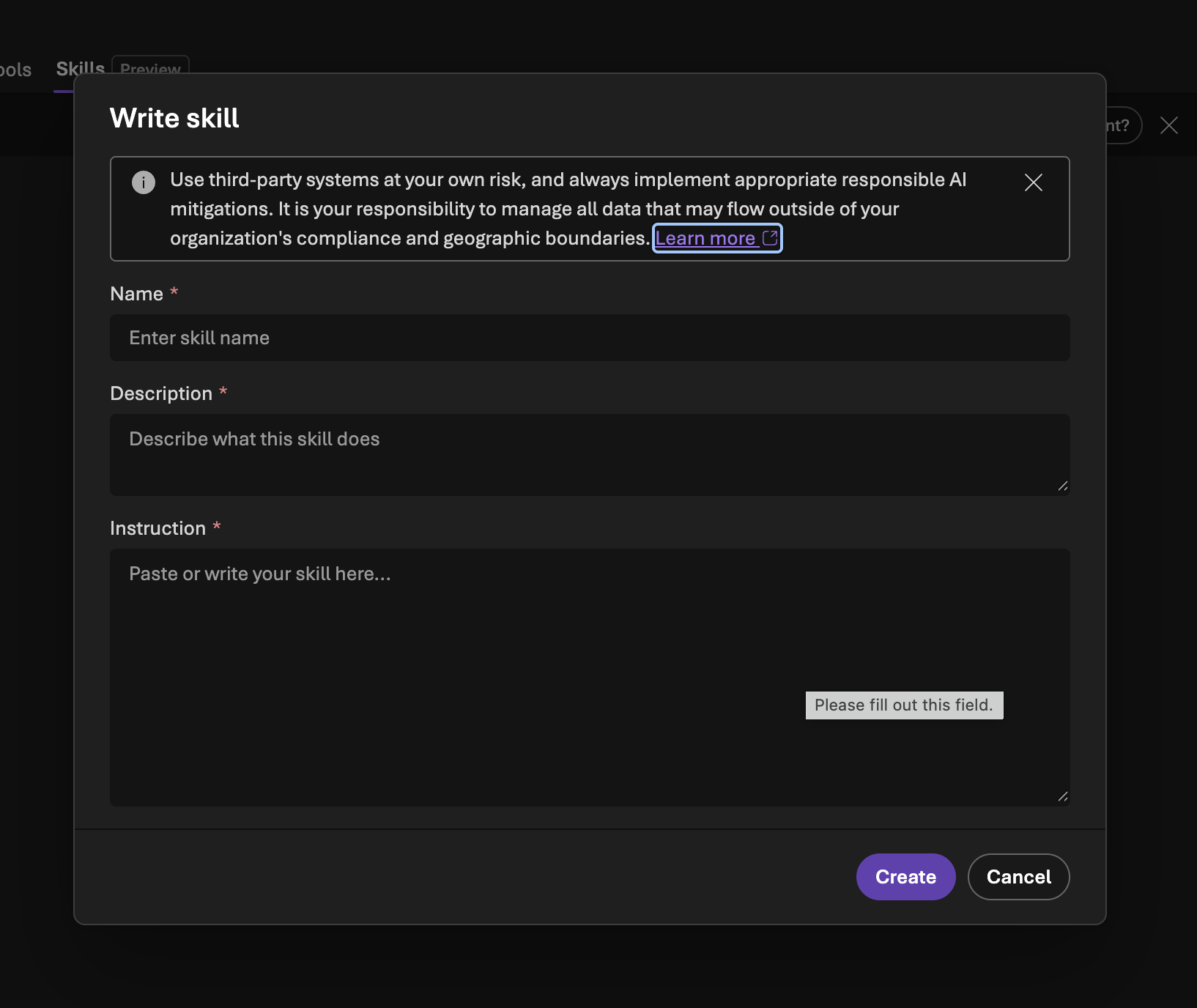
Name - só letra minúscula, número e hífen, não pode começar nem terminar com hífen, não aceita hífen duplicado e vai até 64 caracteres. Nome fora do padrão devolve invalid_payload na hora de criar a versão.
Description - uma linha, até 1024 caracteres. Não é enfeite de listagem: é ela que o agente lê pra decidir se aquela skill é relevante pro pedido, então escreva quando usar e também quando não usar.
Instruction - o Markdown de verdade, com o passo a passo, o formato de resposta e o que fazer nas exceções.
Aquele banner cinza no topo do modal não é enfeite também. A Microsoft avisa que se você usar Skills com servidor, agente, código ou modelo de terceiro o risco é seu, e que garantir que o dado não vaze da fronteira de compliance e da fronteira geográfica da sua organização é responsabilidade sua. Faz todo sentido, porque skill no fim é texto livre que vira instrução de sessão do agente.
O SKILL.md por trás do formulário
Esses três campos são a cara amigável de um arquivo. O Foundry segue a especificação aberta Agent Skills, a mesma que o Copilot Studio adotou, então a skill é um SKILL.md com front matter YAML no topo e o Markdown embaixo:
---
name: escalacao-suporte-n2
description: Use quando o usuario relatar um incidente que o N1 nao resolveu, pedir prioridade alta ou mencionar SLA estourado. Nao use para duvida simples de produto.
---

# Escalacao para o N2

## Passos
1. Confirme o numero do ticket. Se o usuario nao tiver, pergunte antes de seguir.
2. Colete sistema afetado, horario de inicio, impacto e se ja existe workaround.
3. Classifique a severidade: S1 = servico parado, S2 = degradado, S3 = pontual.
4. Responda com o numero do incidente e o prazo de SLA daquela severidade.

## Excecoes
- Se for S1, avise que o acionamento e imediato e nao pergunte mais nada.
- Se o usuario nao souber o impacto, assuma S3 e registre isso na descricao.
Pegadinha do YAML: o name e o description precisam ficar sem aspas no front matter. E cada skill mora no próprio subdiretório, tipo escalacao-suporte-n2/SKILL.md, não um SKILL.md solto na raiz do projeto. Se você quiser levar material de apoio junto, empacota o SKILL.md mais os arquivos num ZIP e sobe o pacote.
As duas formas de entregar a skill pro agente
Depois que a skill existe no projeto você escolhe como ela chega no agente, e tem um ponto aqui que eu curti bastante.
1. Anexando num toolbox. Você cria uma versão do toolbox referenciando a skill e ela passa a aparecer como MCP Resource no mesmo endpoint das tools. Aí qualquer cliente MCP chama resources/list no startup pra descobrir o que tem e resources/read pra baixar o conteúdo, sem precisar de SDK do Foundry. A doc é explícita nisso: GitHub Copilot, Claude Code ou o seu próprio harness consomem do mesmo jeito. Ou seja a mesma skill que padroniza o agente de produção padroniza o seu VS Code, e isso é bem legal.
O carregamento segue o padrão de progressive disclosure do Agent Skills, em três tempos: primeiro só o nome e a descrição das skills entram no system prompt, aí o agente decide que uma é relevante e busca o corpo inteiro, e se a skill tiver anexo ele lê sob demanda. Na prática isso quer dizer que dá pra manter uma biblioteca grande sem queimar contexto, porque o corpo só desce quando alguém vai usar.
2. Baixando direto no hosted agent. É o modo direct injection, onde você baixa a skill da API pro diretório do projeto do agente e ele lê os SKILL.md no startup, injetando o conteúdo como instrução extra de cada sessão. Não precisa de toolbox e serve bem quando você quer travar uma versão específica junto do código.
Reginaldo, e se eu não quiser ser surpreendido por uma versão nova no meio do sprint?
Na referência da skill dentro do toolbox você passa o version e trava num snapshot imutável. Omitindo o campo, ela segue o default_version, que é o comportamento padrão.
Versão, promoção e rollback
A API de Skills nasceu versionada e é isso que faz a feature ficar de pé em ambiente sério. Cada update cria uma SkillVersion nova e imutável, e o objeto pai guarda o default_version, que é a versão ativa, mais o latest_version. O fluxo fica bem parecido com deploy de aplicação: cria a versão, testa, promove. Deu problema, repoint pra anterior.
# cria a skill a partir do arquivo
azd ai skill create escalacao-suporte-n2 --file ./SKILL.md --no-prompt

# sobe uma versao nova (entra como default automaticamente)
azd ai skill update escalacao-suporte-n2 --file ./SKILL.md --no-prompt

# rollback: repoint de metadata, sem upload nenhum
azd ai skill update escalacao-suporte-n2 --set-default-version v1 --no-prompt
Esse último comando não sobe conteúdo, é só metadata, então o rollback é imediato e nenhum toolbox ou agente que referencia a skill sem pinar versão precisa ser tocado. Pra quem já apagou um fim de semana revertendo prompt na mão, esse detalhe vale o post inteiro.
DETALHE IMPORTANTE: Skills não suportam private networking. A API não responde por private endpoint, então se o seu recurso do Foundry está com acesso público desabilitado você simplesmente não cria, não gerencia e não baixa skill. Pra quem atende cliente regulado isso já é motivo pra deixar a feature no banco de reservas até virar GA, e é bom colocar na conta antes de desenhar arquitetura em cima disso.
Outros três cuidados que eu anotei lendo a doc:
Toda chamada da API de Skills exige o header Foundry-Features: Skills=V1Preview. Esqueceu o header, não funciona.
No azd o update recusa .zip. Pra trocar um pacote inteiro você usa create --force, e esse force apaga a skill e todas as versões dela antes de subir a v1 nova. Cuidado com o dedo nesse comando.
Skill anexada num toolbox tem que estar no mesmo projeto do Foundry, não existe referência cruzada entre projetos.
Sobre permissão, você precisa da role Foundry User no projeto. Esse é o nome novo do antigo Azure AI User, e como o rename das roles ainda está rolando, pode ser que você encontre o nome velho em alguns lugares do portal.
RESUMO
Skill no Foundry é recurso do projeto e o agente só referencia, diferente do Copilot Studio onde ela mora dentro do agente.
Formato SKILL.md no padrão aberto Agent Skills, front matter sem aspas, nome minúsculo com hífen e até 64 caracteres.
Duas entregas: anexa num toolbox e vira MCP Resource pra qualquer cliente, ou baixa direto no hosted agent como instrução de sessão.
Progressive disclosure economiza contexto, porque só nome e descrição vão pro system prompt.
Versão imutável com default_version pra promover e fazer rollback sem deploy de agente.
Ainda em preview e sem private networking, então avalie bem antes de levar pra produção regulada.
Comparando as duas casas, a leitura que eu faço é que o Foundry entregou a versão de engenharia da mesma ideia, com API versionada, promoção de versão e interoperabilidade MCP, enquanto o Copilot Studio entregou a versão de maker. Se quiser ver essa diferença de filosofia com mais calma, eu comparei as duas plataformas nesse post do ecossistema.
Comenta aí se você já mantém uma biblioteca de instruções padronizada no seu time, porque com skill versionada isso finalmente vira artefato de esteira em vez de print no Teams.
Referências:
Use skills with Microsoft Foundry agents (preview)
github.com/microsoft/skills, skills prontas pra Foundry e Azure
Prints desse post: portal do Microsoft Foundry, aba Tools e Skills.
Espero que tenha gostado.
#foundry #skills #mcp #microsoft #ia #agentes #datainaction
Hey dataholics, I went to poke around the Tools area in the Microsoft Foundry portal and a new tab showed up right next to Toolboxes, called Skills, still carrying the Preview badge. Anyone following the Copilot Studio what's new series has seen skills over there already, but the Foundry implementation is quite different and deserves a post of its own.
The skill moved out of the agent
In Copilot Studio the skill lives inside the agent, as a component of the Build panel, and I covered that in post [2] of the what's new series. In Foundry the design is different, because the skill is a project resource: it exists on its own, has its own lifecycle and the agent just points at it.
It sounds like an architecture detail but it changes the whole operation. That escalation policy ten agents follow now lives in a single place, and when the policy changes you push a new version, test it and promote it, without opening agent by agent to edit the system prompt and redeploy everything. If you work on a platform team or in consulting you know exactly the pain I'm describing.
Creating a skill from the portal
The path is short, go to Tools and open the Skills tab. With an empty project it offers you the Add skill button with two options, Create skill to write it right there and Upload skill to push a file you already have.
Clicking Create skill opens the Write skill modal with three fields and nothing else:
Name - lowercase letters, numbers and hyphens only, it can't start or end with a hyphen, it doesn't accept a double hyphen and it goes up to 64 characters. A name outside that pattern returns invalid_payload when you create the version.
Description - one line, up to 1024 characters. It's not just listing decoration: this is what the agent reads to decide whether that skill is relevant to the request, so write when to use it and also when not to.
Instruction - the actual Markdown, with the step by step guidance, the response format and what to do on exceptions.
That gray banner at the top of the modal isn't decoration either. Microsoft warns that if you use Skills with a third party server, agent, code or model the risk is yours, and that making sure your data doesn't leave your organization's compliance and geographic boundaries is your responsibility. Makes complete sense, because a skill in the end is free text that becomes session instructions for the agent.
The SKILL.md behind the form
Those three fields are the friendly face of a file. Foundry follows the open Agent Skills specification, the same one Copilot Studio adopted, so a skill is a SKILL.md with YAML front matter on top and the Markdown below:
---
name: support-escalation-l2
description: Use when the user reports an incident L1 could not solve, asks for high priority or mentions a breached SLA. Do not use for a simple product question.
---

# Escalation to L2

## Steps
1. Confirm the ticket number. If the user doesn't have it, ask before moving on.
2. Collect the affected system, start time, impact and whether a workaround exists.
3. Classify severity: S1 = service down, S2 = degraded, S3 = isolated.
4. Reply with the incident number and the SLA target for that severity.

## Exceptions
- If it's S1, say the escalation is immediate and don't ask anything else.
- If the user doesn't know the impact, assume S3 and record that in the description.
YAML gotcha: name and description have to stay unquoted in the front matter. And each skill lives in its own subdirectory, something like support-escalation-l2/SKILL.md, not a loose SKILL.md at the project root. If you want to carry supporting material along, package the SKILL.md plus the files into a ZIP and upload the bundle.
The two ways to deliver a skill to the agent
Once the skill exists in the project you choose how it reaches the agent, and there's one point here I liked a lot.
1. Attaching it to a toolbox. You create a toolbox version referencing the skill and it starts showing up as an MCP Resource on the same endpoint as the tools. Then any MCP client calls resources/list at startup to discover what's there and resources/read to download the content, with no Foundry SDK required. The docs are explicit about it: GitHub Copilot, Claude Code or your own harness consume it the same way. Which means the same skill that standardizes your production agent standardizes your VS Code too, and that's pretty cool.
Loading follows the Agent Skills progressive disclosure pattern, in three beats: first only the skill names and descriptions go into the system prompt, then the agent decides one is relevant and fetches the full body, and if the skill has attachments it reads them on demand. In practice that means you can keep a big library without burning context, because the body only comes down when someone is going to use it.
2. Downloading it straight into the hosted agent. This is direct injection mode, where you download the skill from the API into the agent project directory and it reads the SKILL.md files at startup, injecting the content as extra instructions for each session. No toolbox needed, and it works well when you want to lock a specific version alongside the code.
Reginaldo, what if I don't want to be surprised by a new version in the middle of the sprint?
In the skill reference inside the toolbox you pass the version and lock it to an immutable snapshot. Leaving the field out, it follows the default_version, which is the standard behavior.
Version, promotion and rollback
The Skills API was born versioned and that's what makes the feature hold up in a serious environment. Every update creates a new immutable SkillVersion, and the parent object keeps the default_version, which is the active one, plus the latest_version. The flow ends up looking a lot like an application deploy: create the version, test it, promote it. Something broke, repoint to the previous one.
# create the skill from the file
azd ai skill create support-escalation-l2 --file ./SKILL.md --no-prompt

# push a new version (it becomes the default automatically)
azd ai skill update support-escalation-l2 --file ./SKILL.md --no-prompt

# rollback: metadata repoint, no upload at all
azd ai skill update support-escalation-l2 --set-default-version v1 --no-prompt
That last command doesn't upload content, it's metadata only, so the rollback is immediate and no toolbox or agent that references the skill without pinning a version needs to be touched. For anyone who has burned a weekend reverting prompts by hand, that detail alone is worth the whole post.
IMPORTANT: Skills don't support private networking. The API doesn't answer over a private endpoint, so if your Foundry resource has public access disabled you simply can't create, manage or download a skill. For anyone serving regulated customers that's already reason enough to keep the feature on the bench until it reaches GA, and it's worth factoring in before you design an architecture on top of it.
Three other things I noted while reading the docs:
Every Skills API call requires the Foundry-Features: Skills=V1Preview header. Forget the header and it doesn't work.
In azd, update rejects .zip. To swap a whole package you use create --force, and that force deletes the skill and all of its versions before uploading the new v1. Careful with your finger on that command.
A skill attached to a toolbox has to be in the same Foundry project, there's no cross project reference.
On permissions, you need the Foundry User role on the project. That's the new name for the old Azure AI User, and since the role rename is still rolling out, you might still find the old name in some spots of the portal.
RECAP
A skill in Foundry is a project resource and the agent just references it, unlike Copilot Studio where it lives inside the agent.
SKILL.md format following the open Agent Skills standard, unquoted front matter, lowercase name with hyphens and up to 64 characters.
Two deliveries: attach it to a toolbox and it becomes an MCP Resource for any client, or download it straight into the hosted agent as session instructions.
Progressive disclosure saves context, because only names and descriptions go into the system prompt.
Immutable versions with default_version to promote and roll back without deploying an agent.
Still in preview and without private networking, so weigh it carefully before taking it to regulated production.
Comparing the two houses, my read is that Foundry shipped the engineering version of the same idea, with a versioned API, version promotion and MCP interoperability, while Copilot Studio shipped the maker version. If you want to see that difference in philosophy more slowly, I compared both platforms in this ecosystem post.
Tell me in the comments if you already keep a standardized instruction library in your team, because with versioned skills that finally becomes a pipeline artifact instead of a screenshot in Teams.
References:
Use skills with Microsoft Foundry agents (preview)
github.com/microsoft/skills, ready made skills for Foundry and Azure
Screenshots in this post: Microsoft Foundry portal, Tools and Skills tab.
Hope you enjoyed it.
#foundry #skills #mcp #microsoft #ai #agents #datainaction
Gostou? Tem mais no YouTube e no LinkedIn.
Enjoyed it? There's more on YouTube and LinkedIn.
Continue lendo Keep reading
![GitHub Copilot a fundo [5] - AI Credits: o Copilot virou usage-based](/images/ghcopilot-aicredits-capa.png)
GitHub Copilot a fundo [5] - AI Credits: o Copilot virou usage-based
Ler → Read →![GitHub Copilot a fundo [4] - Copilot CLI: o agente que mora no seu terminal](/images/ghcopilot-cli-capa.png)
GitHub Copilot a fundo [4] - Copilot CLI: o agente que mora no seu terminal
Ler → Read →![GitHub Copilot a fundo [3] - MCP: ferramentas para o agente sem perder a governança](/images/ghcopilot-mcp-capa.png)