IA & Agentes
Copilot Studio - Base de Conhecimento [3] - Semantic index por dentro e o Foundry IQ
Copilot Studio - Knowledge base [3] - The semantic index from the inside and Foundry IQ
![Copilot Studio - Base de Conhecimento [3] - Semantic index por dentro e o Foundry IQ](/images/copilot-knowledge-3-capa.png)
Fala dataholics! Chegamos na parte 3 da série Base de Conhecimento e é a que amarra o SharePoint de vez. No post 2 a gente viu que o SharePoint reaproveita o semantic index do tenant e hoje eu abro esse índice por dentro pra você entender como ele funciona de verdade, se tem custo, onde ele te limita e como tudo isso conversa com o novo Foundry IQ que a Microsoft mostrou no Ignite 2025.
O que veremos nesse post:
O semantic index por dentro (como funciona)
Tem custo?
Limitações que você precisa conhecer
Foundry IQ: RAG customizado no Azure AI Search
As duas SharePoints do Foundry IQ
Fechando o loop: Azure AI Search como Knowledge do agente
Resumo
O semantic index por dentro
O semantic index é uma representação por significado do conteúdo do seu Microsoft 365 e não é força de expressão dizer isso porque a própria doc da Microsoft afirma que ele funciona criando índices vetorizados ("creating vectorized indices") capazes de buscar entre bilhões de vetores. Cada pedaço do conteúdo vira um vetor que representa aquele significado e os vetores parecidos ficam próximos no espaço, e é por isso que a busca entende "último evento antes de tal data" mesmo quando o documento não tem essas palavras escritas do mesmo jeito.
E quando esse embedding acontece? Deixa eu te dar um exemplo bem concreto. Você sobe um Word numa biblioteca do SharePoint e o arquivo cru continua lá no site do jeitinho que você subiu, o original nunca sai do lugar. O que roda por trás dos panos é o Microsoft Graph pegando o texto desse arquivo e gerando a versão vetorizada que vai pro índice, e o momento em que isso acontece depende de onde o conteúdo está:
Documento que você cria ou edita no seu contexto (mailbox) é indexado quase em tempo real.
Documento novo num site do SharePoint acessível por dois ou mais usuários entra no índice diariamente.
Documento que já estava indexado e sofre alteração tem as mudanças reindexadas na hora.
O que vai pro índice então é só a representação vetorial e ela mora num container isolado do seu tenant enquanto o arquivo original segue exatamente onde estava, o que quer dizer que isso nem toca na sua cota de storage.
Mais duas coisas que valem gravar sobre ele:
São dois níveis de índice e um fica no nível do tenant (o conteúdo do SharePoint da organização) enquanto o outro é por usuário (seus e-mails, arquivos compartilhados com você, coisas onde te marcaram), então cada pessoa tem a sua fatia.
Ele respeita a permissão (ACL) porque o índice guarda o controle de acesso do conteúdo original e por isso a busca só te devolve aquilo que você já teria direito de ver. É o security trimming que vimos no post 2 e agora você entende de onde ele vem, está embutido no próprio índice.
E o ponto mais importante do modelo é que você não monta esse índice, ele é criado e mantido automaticamente pela Microsoft pra todo tenant em cima do que o Microsoft Search e o Microsoft Graph já indexam. Sem pipeline seu e sem banco de vetores seu, é o RAG que já vem pronto.
Tem custo?
O semantic index não tem custo à parte porque ele vem junto com a licença do Microsoft 365 Copilot e é criado automaticamente pela Microsoft sem SKU separado e sem consumir a sua cota de storage (como vimos, ele mora num container isolado do tenant). Se você já tem Copilot esse índice está pago dentro dele e nem tem botão pra ligar, dimensionar ou escolher modelo.
O custo mesmo só aparece quando você sai do gerenciado e vai montar o seu próprio índice no Azure AI Search (é pra onde a gente caminha nesse post) porque aí entra cobrança de recurso, o serviço do Azure AI Search é pago por tier, replicas e storage e o enriquecimento via skillsets tem cobrança própria. Nada disso existe no semantic index gerenciado e é justamente esse o preço da liberdade que você ganha do outro lado.
Limitações que você precisa conhecer
O modelo gerenciado é ótimo mas ele te tira o controle de algumas coisas e vale saber onde aperta:
Você não controla o chunking porque a estratégia de indexação é uma caixa fechada da Microsoft, então se o seu caso pede um chunk do seu jeito (por seção, por tamanho, com overlap específico) o semantic index não deixa você mexer.
Metadados de coluna entram só em cenário com escopo e o SharePoint usa as colunas como sinal de relevância quando você atrela uma biblioteca ou pasta específica na experiência web, não é um esquema de campos que você modela e filtra livremente como faria no Azure AI Search.
Escala das listas pesa e como vimos no post 2 dá pra conectar até 10 listas, sendo que listas com mais de 35 mil linhas começam a derrubar qualidade e latência.
Freshness não é você quem controla porque a atualização do conteúdo segue o refresh do índice do tenant.
Restricted SharePoint Search bloqueia o uso do SharePoint pra grounding se a política estiver ligada.
Repara no padrão porque quase toda limitação aqui é um "eu não controlo", e é exatamente aí que o Foundry IQ entra.
Foundry IQ: RAG customizado no Azure AI Search
O Foundry IQ foi anunciado no Ignite 2025 como a camada de conhecimento pros agentes e é construído em cima do Azure AI Search com a ideia de entregar um retrieval mais esperto que o RAG simples. Em vez de só buscar trechos parecidos ele faz query planning, quebra a pergunta em partes, refina a busca e passa tudo por um ranking semântico unificado, que é o que a Microsoft chama de agentic retrieval.
A grande diferença pro semantic index é que aqui o índice é seu e você define o chunking, o enriquecimento e os campos, o oposto da caixa fechada do M365.
No portal ele vive em Microsoft Foundry, AI Search na seção Agentic retrieval e fica dividido em Knowledge sources (as fontes) e Knowledge bases (o agrupamento que responde). Montei uma knowledge base rápida e perguntei "alguma referência sobre RAG?" só pra ver ele trabalhar:
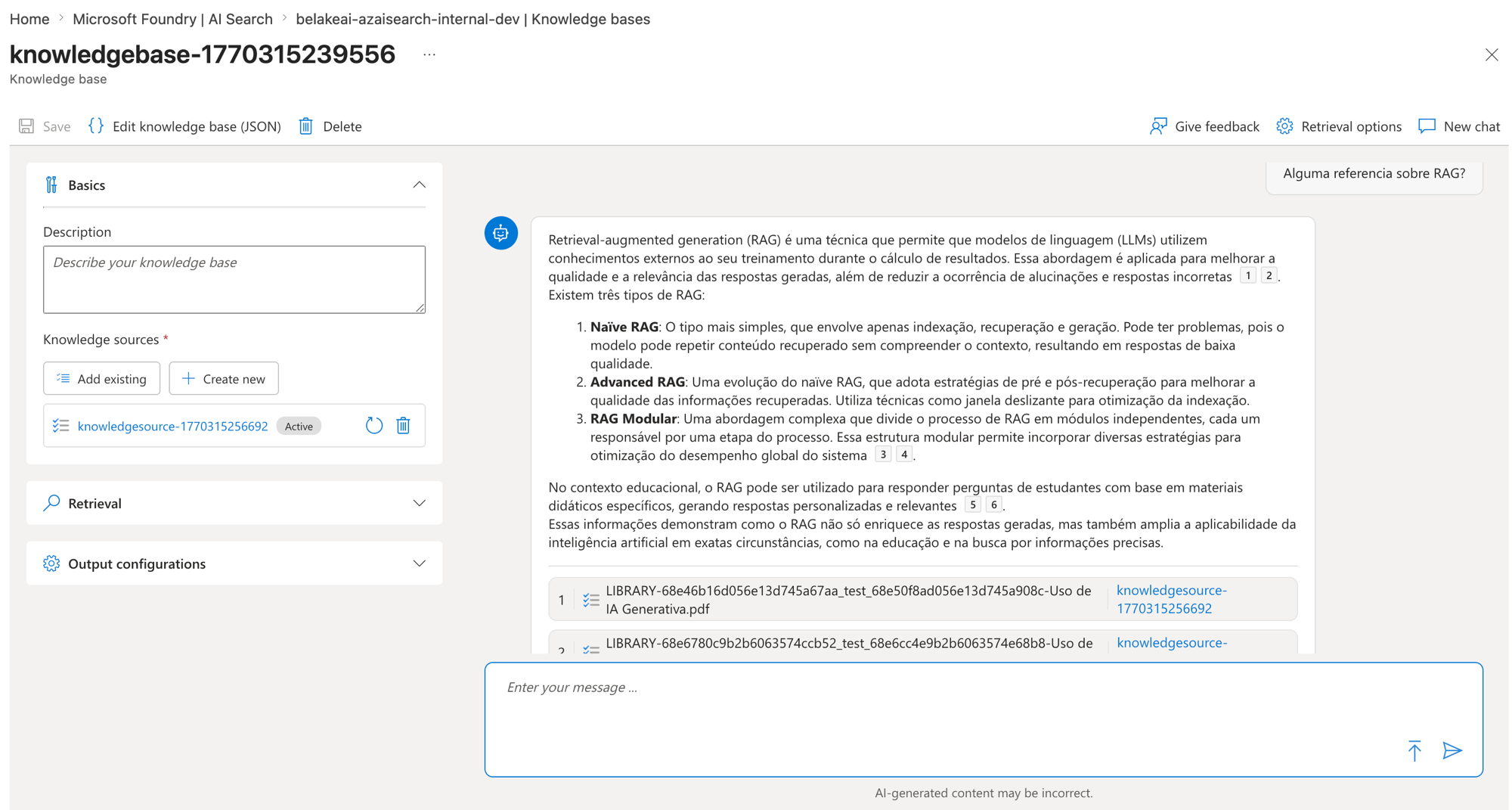
Repara no lado direito que ele respondeu explicando os tipos de RAG e ainda citou a fonte (o arquivo "Uso de IA Generativa.pdf" que estava no meu knowledge source). É o mesmo espírito do Copilot Studio com grounding e citação só que aqui o motor é o Azure AI Search e quem monta tudo é você.
As duas SharePoints do Foundry IQ
Quando você vai adicionar um Knowledge source no Foundry IQ o SharePoint aparece duas vezes na lista e a diferença entre as duas é tudo:
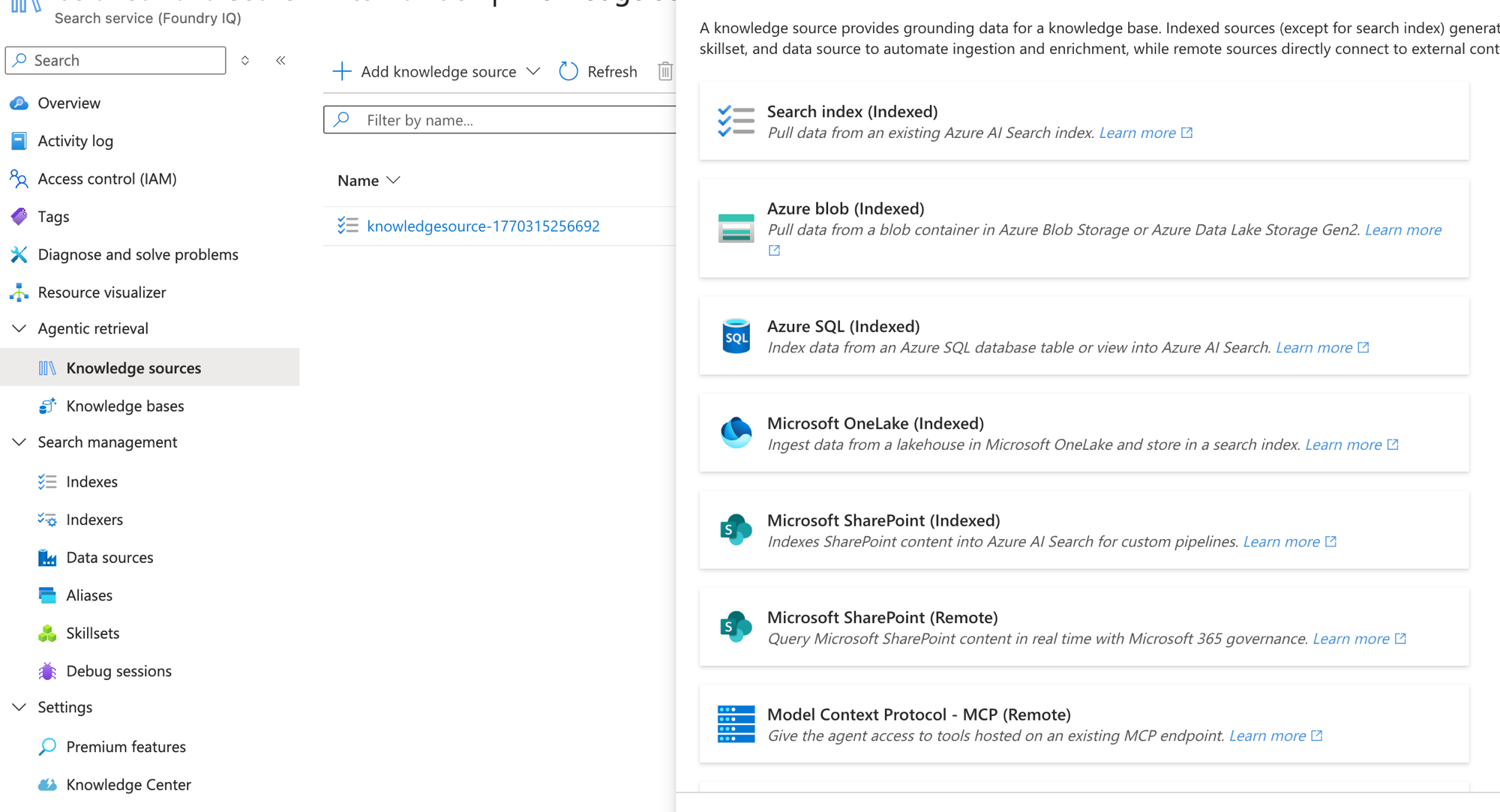
O próprio texto no topo da tela já entrega a regra geral e diz que fontes Indexed geram skillset e data source pra automatizar a ingestão e o enriquecimento enquanto fontes Remote conectam direto no conteúdo externo. Aplicando isso ao SharePoint:
Microsoft SharePoint (Indexed): "Indexes SharePoint content into Azure AI Search for custom pipelines." Ele copia o conteúdo do SharePoint pra dentro do seu Azure AI Search criando indexer, skillset e data source, e vira um índice vetorial seu com pipeline que você controla (chunking, enriquecimento, campos custom). O preço é que você duplica o dado, assume a governança e paga o Azure AI Search.
Microsoft SharePoint (Remote): "Query Microsoft SharePoint content in real time with Microsoft 365 governance." Ele não copia nada e consulta o SharePoint ao vivo herdando a governança nativa do M365, incluindo o security trimming e o semantic index do tenant que a gente abriu lá em cima. É o mundo gerenciado só que acessado pelo lado do Azure.
Reginaldo, se o Remote já herda tudo do M365 por que eu usaria o Indexed e teria todo esse trabalho?
Boa, essa é a pergunta certa. Você vai pro Indexed justamente quando bate nas limitações lá de cima e precisa de chunking do seu jeito, de campos e metadados que o semantic index não expõe ou quer misturar o SharePoint com dado que nem vive no M365 (um blob, um SQL) no mesmo índice. Fora esses casos o Remote resolve com bem menos dor de cabeça.
Fechando o loop: Azure AI Search como Knowledge do agente
Agora a parte que junta tudo e que talvez já esteja na sua cabeça: dá pra usar o Azure AI Search direto como base de conhecimento no Copilot, né?
Dá sim. Lá no post 1 a gente viu que o Azure AI Search está na lista de fontes de Knowledge do Copilot Studio (na aba Advanced) e é assim que o ciclo fecha, porque quando o gerenciado não te atende você monta o RAG do seu jeito no Foundry IQ e Azure AI Search com o seu chunking, os seus campos e o seu enriquecimento e depois conecta esse índice como Knowledge do agente no Copilot Studio.
No fim é o mesmo SharePoint aparecendo em três níveis de controle:
Copilot Studio, Knowledge (SharePoint) é o totalmente gerenciado que reusa o semantic index do tenant, o que vimos nos posts 1 e 2.
Foundry IQ, SharePoint (Remote) é o mesmo modelo gerenciado só que acessado do lado Azure herdando a governança do M365, a ponte entre os dois mundos.
Foundry IQ, SharePoint (Indexed) é quando você sai do gerenciado, monta o pipeline no Azure AI Search e pluga de volta no agente com controle total.
Na prática eu escolho assim: se o dado vive no M365 e a permissão do usuário tem que valer eu fico no gerenciado (Copilot Studio ou Remote), e se preciso de chunking customizado, enriquecimento pesado ou juntar fontes de fora aí eu vou de Foundry IQ e conecto o Azure AI Search como knowledge do agente.
RESUMO
O semantic index é o índice por significado do M365 em dois níveis (tenant e usuário) com a permissão (ACL) embutida, e ele vem pronto porque você não monta.
Custo: o índice é incluso na licença M365 Copilot sem SKU à parte, e o custo de recurso só aparece do lado do Azure AI Search.
Limitações: você não controla o chunking, metadados custom só entram com escopo, listas grandes pesam e o refresh não é você quem define.
O Foundry IQ (Ignite 2025) é a camada de agentic retrieval no Azure AI Search onde o índice é seu com chunking, campos e enriquecimento no seu controle.
No Foundry IQ o SharePoint vem em duas formas, o Indexed que copia pro seu Azure AI Search e o Remote que consulta ao vivo herdando a governança do M365.
Dá pra plugar o Azure AI Search como Knowledge do agente no Copilot Studio e é assim que você usa um RAG customizado do Foundry IQ dentro do seu Copilot.
Fechou a parte 3. A série continua saindo um por dia e no próximo eu quero colocar o SharePoint (Remote) pra rodar no Foundry IQ na prática e comparar o retrieval com o do Copilot Studio.
Referências:
https://learn.microsoft.com/en-us/microsoftsearch/semantic-index-for-copilot
https://learn.microsoft.com/en-us/azure/search/search-agentic-retrieval-concept
https://learn.microsoft.com/en-us/azure/search/search-howto-index-sharepoint-online
Fique bem e até a próxima.
#copilotstudio #sharepoint #foundryiq #ia #agentes #datainaction
Hey dataholics! We've reached part 3 of the Knowledge base series and it's the one that ties SharePoint together for good. In post 2 we saw that SharePoint reuses the tenant's semantic index and today I open that index up so you understand how it really works, whether it has a cost, where it limits you and how all of that talks to the new Foundry IQ Microsoft showed at Ignite 2025.
What we'll cover in this post:
The semantic index from the inside (how it works)
Is there a cost?
Limitations you need to know
Foundry IQ: custom RAG on Azure AI Search
The two SharePoints of Foundry IQ
Closing the loop: Azure AI Search as the agent's Knowledge
Summary
The semantic index from the inside
The semantic index is a representation by meaning of your Microsoft 365 content and that's not just a figure of speech because Microsoft's own docs say it works by creating vectorized indices that can search across billions of vectors. Each piece of content becomes a vector that represents its meaning and similar vectors sit close together in space, which is why the search understands "last event before such a date" even when the document doesn't have those exact words written.
And when does that embedding happen? Let me give you a really concrete example. You upload a Word file to a SharePoint library and the raw file stays right there in the site the way you uploaded it, the original never leaves its place. What runs behind the scenes is Microsoft Graph taking the text of that file and generating the vectorized version that goes into the index, and the moment this happens depends on where the content lives:
A document you create or edit in your own context (mailbox) is indexed in near real time.
A new document in a SharePoint site accessible by two or more users enters the index daily.
A document already indexed that gets changed has its changes reindexed immediately.
So what goes into the index is only the vector representation and it lives in an isolated container in your tenant while the original file stays exactly where it was, which means this doesn't even touch your storage quota.
Two more things worth remembering about it:
There are two index levels and one sits at the tenant level (the organization's SharePoint content) while the other is per user (your emails, files shared with you, things you were mentioned in), so each person has their own slice.
It respects permissions (ACL) because the index keeps the access control of the original content and that's why the search only returns what you'd already be allowed to see. It's the security trimming we saw in post 2 and now you understand where it comes from, it's baked into the index itself.
And the most important point of the model is that you don't build this index, it's created and maintained automatically by Microsoft for every tenant on top of what Microsoft Search and Microsoft Graph already index. No pipeline of yours and no vector store of yours, it's the RAG that comes ready.
Is there a cost?
The semantic index has no separate cost because it comes with the Microsoft 365 Copilot license and is created automatically by Microsoft with no separate SKU and without consuming your storage quota (as we saw, it lives in an isolated tenant container). If you already have Copilot this index is paid for inside it and there isn't even a button to turn it on, size it or pick a model.
The real cost only shows up when you leave the managed world and go build your own index on Azure AI Search (which is where we're heading in this post) because that's when resource billing kicks in, the Azure AI Search service is charged by tier, replicas and storage and enrichment via skillsets has its own charge. None of that exists in the managed semantic index and that's exactly the price of the freedom you get on the other side.
Limitations you need to know
The managed model is great but it takes some control away from you and it's worth knowing where it pinches:
You don't control the chunking because the indexing strategy is a closed box from Microsoft, so if your case calls for chunking your own way (by section, by size, with a specific overlap) the semantic index won't let you touch it.
Column metadata only kicks in when scoped and SharePoint uses the columns as a relevance signal when you attach a specific library or folder on the web experience, it's not a field schema you model and filter freely like you would in Azure AI Search.
List scale hurts and as we saw in post 2 you can connect up to 10 lists, with lists over 35,000 rows starting to drag down quality and latency.
Freshness isn't yours to control because content updates follow the tenant index refresh.
Restricted SharePoint Search blocks using SharePoint for grounding if the policy is on.
Notice the pattern because almost every limitation here is an "I don't control it", and that's exactly where Foundry IQ comes in.
Foundry IQ: custom RAG on Azure AI Search
Foundry IQ was announced at Ignite 2025 as the knowledge layer for agents and it's built on top of Azure AI Search with the idea of delivering a retrieval smarter than plain RAG. Instead of just fetching similar passages it does query planning, breaks the question into parts, refines the search and runs everything through a unified semantic ranking, which is what Microsoft calls agentic retrieval.
The big difference from the semantic index is that here the index is yours and you define the chunking, the enrichment and the fields, the opposite of the M365 closed box.
In the portal it lives in Microsoft Foundry, AI Search under the Agentic retrieval section and it's split into Knowledge sources (the sources) and Knowledge bases (the grouping that answers). I put together a quick knowledge base and asked "any reference about RAG?" just to watch it work:
Notice on the right side that it answered explaining the types of RAG and even cited the source (the "Uso de IA Generativa.pdf" file that was in my knowledge source). It's the same spirit as Copilot Studio with grounding and citation only here the engine is Azure AI Search and you're the one building it all.
The two SharePoints of Foundry IQ
When you go to add a Knowledge source in Foundry IQ the SharePoint shows up twice in the list and the difference between the two is everything:
The text at the top of the screen already gives the general rule and says that Indexed sources generate a skillset and data source to automate ingestion and enrichment while Remote sources connect directly to the external content. Applying that to SharePoint:
Microsoft SharePoint (Indexed): "Indexes SharePoint content into Azure AI Search for custom pipelines." It copies the SharePoint content into your Azure AI Search creating an indexer, skillset and data source, and it becomes a vector index of yours with a pipeline you control (chunking, enrichment, custom fields). The price is that you duplicate the data, take on its governance and pay for Azure AI Search.
Microsoft SharePoint (Remote): "Query Microsoft SharePoint content in real time with Microsoft 365 governance." It copies nothing and queries SharePoint live inheriting the native M365 governance, including the security trimming and the tenant's semantic index we opened up above. It's the managed world only accessed from the Azure side.
Reginaldo, if Remote already inherits everything from M365 why would I use Indexed and go through all that trouble?
Good, that's the right question. You go for Indexed exactly when you hit the limitations from above and you need chunking your own way, fields and metadata the semantic index doesn't expose or you want to mix SharePoint with data that doesn't even live in M365 (a blob, a SQL) in the same index. Outside those cases Remote gets it done with way less headache.
Closing the loop: Azure AI Search as the agent's Knowledge
Now the part that ties it all together and that might already be on your mind: you can use Azure AI Search directly as a knowledge base in Copilot, right?
You can. Back in post 1 we saw that Azure AI Search is in the Copilot Studio Knowledge source list (in the Advanced tab) and that's how the cycle closes, because when the managed one doesn't cut it you build the RAG your own way in Foundry IQ and Azure AI Search with your chunking, your fields and your enrichment and then connect that index as the agent's Knowledge in Copilot Studio.
In the end it's the same SharePoint showing up at three levels of control:
Copilot Studio, Knowledge (SharePoint) is the fully managed one that reuses the tenant's semantic index, what we saw in posts 1 and 2.
Foundry IQ, SharePoint (Remote) is the same managed model only accessed from the Azure side inheriting M365 governance, the bridge between the two worlds.
Foundry IQ, SharePoint (Indexed) is when you leave the managed world, build the pipeline in Azure AI Search and plug it back into the agent with full control.
In practice I choose like this: if the data lives in M365 and the user's permission has to hold I stay managed (Copilot Studio or Remote), and if I need custom chunking, heavy enrichment or to join outside sources then I go Foundry IQ and connect Azure AI Search as the agent's knowledge.
RECAP
The semantic index is the M365 index by meaning in two levels (tenant and user) with permissions (ACL) baked in, and it comes ready because you don't build it.
Cost: the index is included in the M365 Copilot license with no separate SKU, and resource cost only shows up on the Azure AI Search side.
Limitations: you don't control the chunking, custom metadata only kicks in when scoped, big lists hurt and the refresh isn't yours to define.
Foundry IQ (Ignite 2025) is the agentic retrieval layer on Azure AI Search where the index is yours with chunking, fields and enrichment under your control.
In Foundry IQ the SharePoint comes in two forms, the Indexed that copies into your Azure AI Search and the Remote that queries live inheriting M365 governance.
You can plug Azure AI Search as the agent's Knowledge in Copilot Studio and that's how you use a custom RAG from Foundry IQ inside your Copilot.
That wraps part 3. The series keeps going one post a day and in the next one I want to put SharePoint (Remote) to run in Foundry IQ hands-on and compare the retrieval with Copilot Studio's.
References:
https://learn.microsoft.com/en-us/microsoftsearch/semantic-index-for-copilot
https://learn.microsoft.com/en-us/azure/search/search-agentic-retrieval-concept
https://learn.microsoft.com/en-us/azure/search/search-howto-index-sharepoint-online
Stay well and see you next time.
#copilotstudio #sharepoint #foundryiq #ai #agents #datainaction
Gostou? Tem mais no YouTube e no LinkedIn.
Enjoyed it? There's more on YouTube and LinkedIn.
Continue lendo Keep reading
![GitHub Copilot a fundo [5] - AI Credits: o Copilot virou usage-based](/images/ghcopilot-aicredits-capa.png)
GitHub Copilot a fundo [5] - AI Credits: o Copilot virou usage-based
Ler → Read →![GitHub Copilot a fundo [4] - Copilot CLI: o agente que mora no seu terminal](/images/ghcopilot-cli-capa.png)
GitHub Copilot a fundo [4] - Copilot CLI: o agente que mora no seu terminal
Ler → Read →![GitHub Copilot a fundo [3] - MCP: ferramentas para o agente sem perder a governança](/images/ghcopilot-mcp-capa.png)