IA & Agentes
Copilot Studio - Base de Conhecimento [2] - SharePoint: como funciona, Work IQ e o fluxo de busca
Copilot Studio - Knowledge base [2] - SharePoint: how it works, Work IQ and the search flow
![Copilot Studio - Base de Conhecimento [2] - SharePoint: como funciona, Work IQ e o fluxo de busca](/images/copilot-knowledge-2-capa.png)
Fala dataholics, bora de mais conteúdo técnico! Essa é a parte 2 da série Base de Conhecimento no Copilot Studio. No post anterior a gente viu o catálogo inteiro de fontes. Agora vamos pegar a mais usada de todas no dia a dia: o SharePoint.
E não é só "aponta a URL e pronto". Eu quero te mostrar como a busca funciona por dentro, o que é esse tal de Work IQ, e principalmente ler junto com você o fluxo que o agente executa pra responder uma pergunta. É aí que a ficha cai.
O que veremos nesse post:
As duas formas de plugar SharePoint (e a diferença)
Conectando na prática: sites e listas
O que é o Work IQ (o "Powered by Work IQ")
O fluxo de busca do agente, caixa por caixa
Particularidades e pegadinhas
Resumo
As duas formas de plugar SharePoint
Detalhe que confunde todo mundo: na tela "Add knowledge" o SharePoint aparece em dois lugares, e não é a mesma coisa.
Na seção Upload file: serve pra pegar arquivos ou pastas específicas do SharePoint, com sincronização. Esse conteúdo é indexado e guardado (vetorizado) como no post anterior.
Na aba Featured: é o suporte completo ao SharePoint. Você conecta por URL de site ou por listas, e a busca roda em cima do índice nativo do SharePoint.
Neste post o foco é a segunda opção (a da aba Featured), que é a mais poderosa. E logo de cara ela te avisa de uma regra importante:
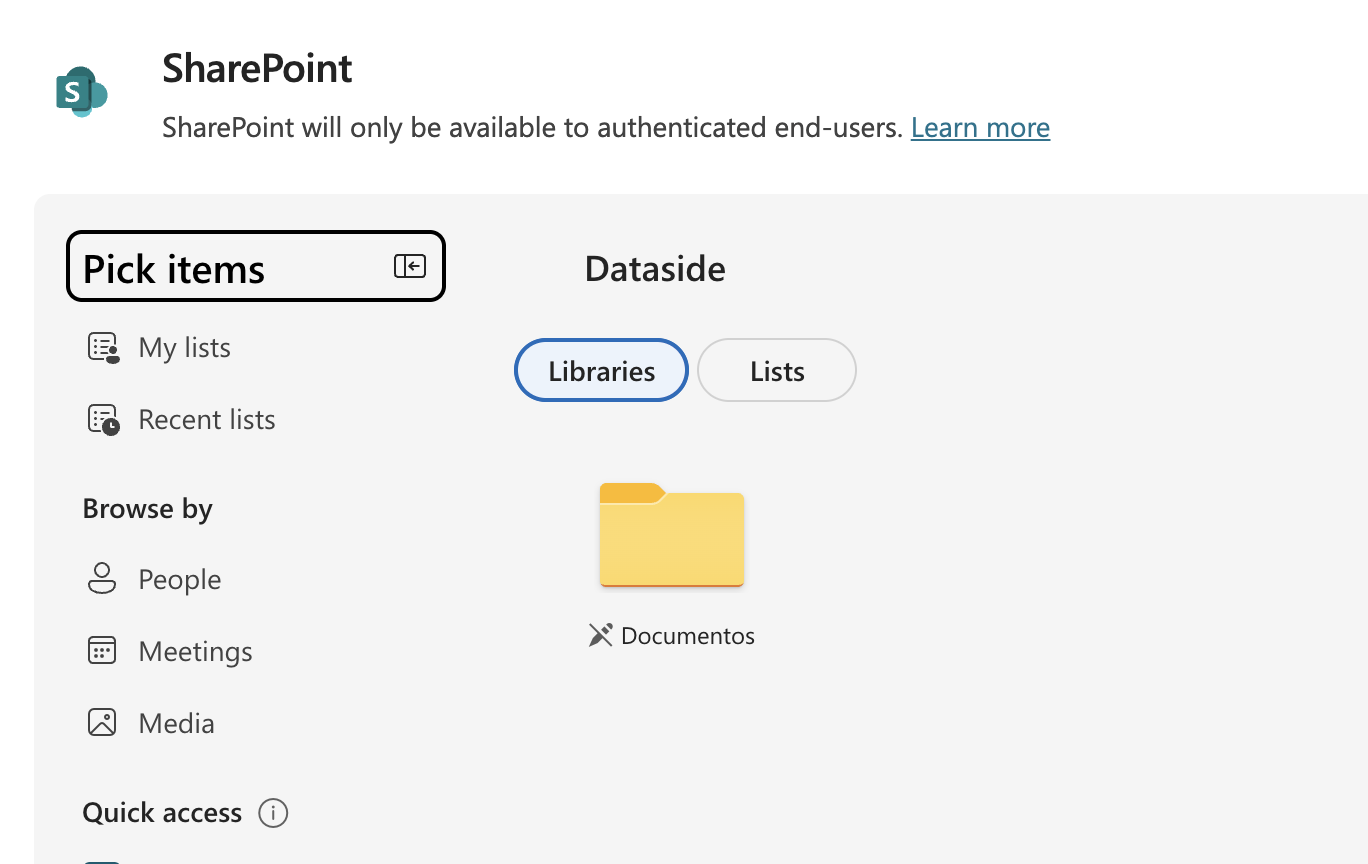
"SharePoint will only be available to authenticated end-users." Ou seja: a busca roda com a identidade do usuário que está conversando. Isso é o security trimming, o agente só devolve o que aquela pessoa já teria permissão de ver no SharePoint. Documento que você não acessa, o agente também não te mostra. Por padrão a autenticação já vem como Authenticate with Microsoft (Entra ID).
Conectando na prática: sites e listas
Você tem dois caminhos ao adicionar:
Site (URL): cola a URL do site e o agente passa a buscar naquele endereço e em todos os subcaminhos. Ex.: apontar pra /sites/Dataside cobre o que está abaixo dele.
Listas: no Pick items (o print acima) você navega entre Libraries e Lists e escolhe a biblioteca ou lista. Dá pra selecionar até 10 listas, e listas com mais de 35 mil linhas começam a pesar na qualidade e na latência.
Depois de adicionar, a fonte aparece na aba Knowledge do agente, com tipo, para quem está disponível, uso e quando foi atualizada pela última vez:
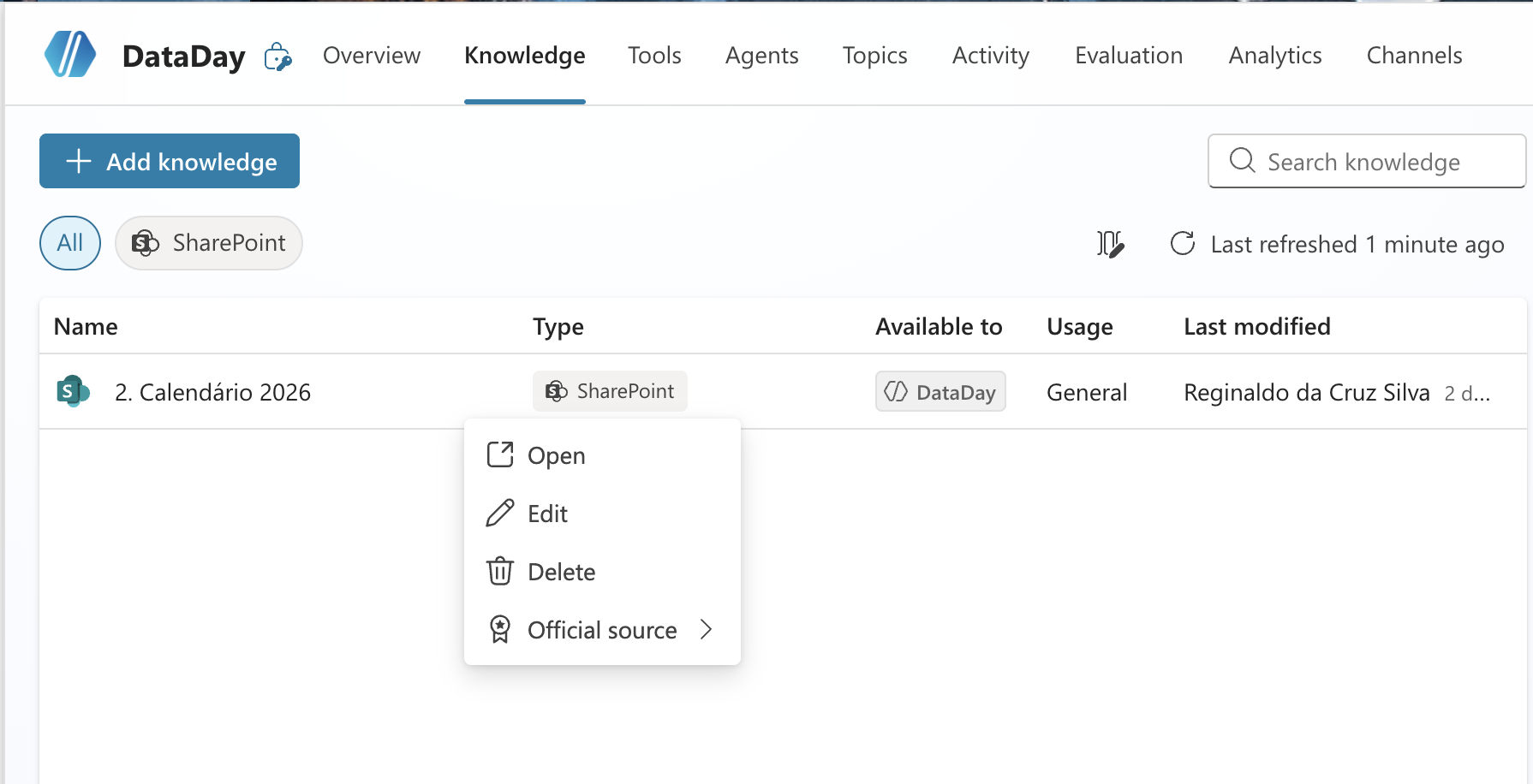
Repare no "Last refreshed 1 minute ago" e no menu Official source. Marcar uma fonte como oficial sinaliza pro agente que ela é confiável e autoritativa. Vale saber que esse comportamento de "resposta com fonte oficial" tem mais efeito na orquestração classic (na generative o mais importante é caprichar na descrição da fonte).
O que é o Work IQ
Na tela, o SharePoint vem com o selo "Powered by Work IQ". Vale entender o que é isso, porque é o coração da busca.
O Work IQ é a camada de inteligência que "conhece" o seu trabalho e alimenta tanto o Microsoft 365 Copilot quanto os seus agentes. A Microsoft descreve ele em três camadas: Data (unifica sinais de arquivos, e-mails, reuniões, chats), Memory (constrói entendimento persistente de como as pessoas e times trabalham) e Inference (modelos, skills e tools pra raciocinar e agir).
Na prática, pro nosso caso, o que importa: quando o agente busca no SharePoint, ele usa o semantic index do tenant (o mesmo índice do Microsoft Search / Copilot). A Microsoft chama isso de tenant graph grounding with semantic search (por baixo é a Microsoft Search / Microsoft Graph). Isso significa busca por significado, não só por palavra-chave batida. É por isso que o agente entende "último evento antes de tal data" mesmo sem essas palavras estarem escritas iguais no documento.
Reginaldo, então o SharePoint não gera embedding meu como os arquivos que eu subo?
Exato, e essa é a grande diferença. Arquivo que você faz upload vira índice vetorial gerenciado no Dataverse (vimos no post 1). Já o SharePoint reaproveita o índice que já existe no seu tenant, ele não cria um índice separado só pro agente. Menos duplicação, e você herda a inteligência do Microsoft Search.
O fluxo de busca, caixa por caixa
Agora a parte que eu mais gosto. No Test your agent dá pra ver o passo a passo que o agente executou. Fiz a pergunta "último evento da Dataside antes de 2 de julho de 2026" e olha o que apareceu:
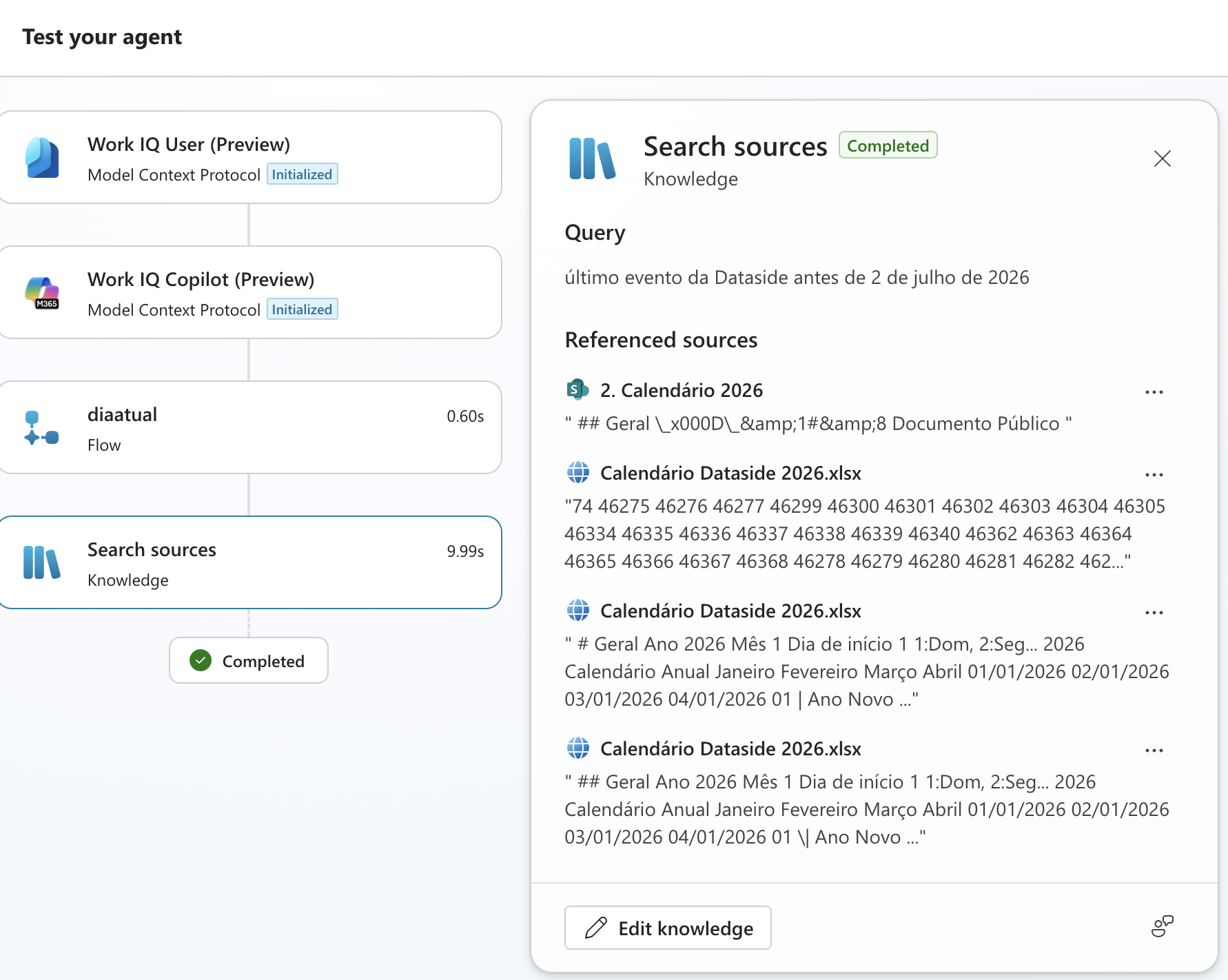
A orquestração generativa não vai direto na fonte. Ela raciocina em passos. Vamos ler cada caixa e, mais importante, o PORQUÊ de cada uma:
Work IQ User (Preview) e Work IQ Copilot (Preview), marcados como Model Context Protocol · Initialized: são os servidores MCP do Work IQ (Mail, Calendar, Teams e afins) sendo inicializados no começo do turno. Por que existem? Pra dar ao agente contexto do seu M365 e capacidade de raciocinar sobre o seu ambiente de trabalho. Cuidado pra não confundir: esses MCP são uma camada à parte (exigem licença do M365 Copilot) e NÃO são quem busca no SharePoint, quem faz o retrieval é a caixa Search sources logo abaixo. O selo "Powered by Work IQ" do SharePoint se refere ao grounding pelo semantic index do tenant, não a esses MCP. (MCP a gente aprofunda numa série própria mais pra frente.)
diaatual (Flow, 0.60s): um flow que devolve a data de hoje. Por quê? A pergunta é relativa ("antes de 2 de julho"), então antes de buscar qualquer coisa o agente precisa saber que dia é hoje. Sem isso ele não sabe o que é "antes".
Search sources (Knowledge, 9.99s): aqui sim é o retrieval. O agente faz a busca semântica no índice do SharePoint e traz os trechos mais relevantes. Repare que essa é de longe a etapa mais lenta (quase 10s).
E no painel da direita você vê o output dessa busca: a Query que o agente montou e os Referenced sources, os pedaços que ele recuperou (o item "2. Calendário 2026" do SharePoint e os chunks do arquivo "Calendário Dataside 2026.xlsx"). São esses trechos que "aumentam" o prompt pra o modelo escrever a resposta final. RAG na veia.
Sacou a diferença de ver isso? Quando o agente responde errado, você abre o Test pane e vê EXATAMENTE onde quebrou: faltou a data? A busca não trouxe o trecho certo? É assim que se depura um agente.
Particularidades e pegadinhas
Renomear quebra: se você renomeia o site ou a pasta no SharePoint, o link da fonte pode quebrar e gerar falha de permissão. Aí precisa gerar um novo link e atualizar a fonte.
Restricted SharePoint Search: se essa política estiver ligada no tenant, o uso do SharePoint fica bloqueado.
Transcripts não guardam o conteúdo: por segurança, os transcripts da conversa não incluem o conteúdo dos documentos usados na resposta (a pergunta e a resposta continuam lá).
Filtros ajudam: nas Advanced settings da fonte dá pra filtrar por Modified on, Author, Title, etc. Ex.: só buscar o que foi modificado nos últimos 6 meses. Ótimo pra cortar ruído.
RESUMO
SharePoint entra de duas formas: arquivos/pastas (Upload file, com sync) ou suporte completo por site/listas (aba Featured).
Só usuários autenticados: a busca respeita o acesso de cada pessoa (security trimming).
Work IQ é a camada de inteligência; a busca do SharePoint usa o semantic index do tenant (Microsoft Search / Microsoft Graph), por significado.
O SharePoint reaproveita o índice do tenant, não cria um vetor próprio como os arquivos que você sobe.
O Test pane mostra o fluxo: Work IQ (MCP) inicializa, um flow traz a data, e o Search sources faz o retrieval. Ler isso é como se depura o agente.
No próximo post eu desço ainda mais no SharePoint: o semantic index por dentro e como ele conversa com o Foundry IQ. Fica ligado que sai um por dia.
Referências:
https://learn.microsoft.com/en-us/microsoft-copilot-studio/knowledge-add-sharepoint
https://learn.microsoft.com/en-us/microsoft-copilot-studio/use-work-iq
https://learn.microsoft.com/en-us/microsoft-copilot-studio/knowledge-copilot-studio
Fique bem e até a próxima.
#copilotstudio #sharepoint #workiq #ia #agentes #datainaction
Hey dataholics! This is part 2 of the Knowledge base in Copilot Studio series. In the previous post we saw the whole source catalog. Now let's take the most-used one day to day: SharePoint.
And it's not just "point at a URL and done". I want to show you how the search works under the hood, what this Work IQ thing is, and above all read the flow the agent runs to answer a question together with you. That's where it clicks.
What we'll cover in this post:
The two ways to plug in SharePoint (and the difference)
Connecting in practice: sites and lists
What Work IQ is (the "Powered by Work IQ")
The agent's search flow, box by box
Particularities and gotchas
Summary
The two ways to plug in SharePoint
A detail that confuses everyone: on the "Add knowledge" screen SharePoint shows up in two places, and they're not the same thing.
In the Upload file section: it's for grabbing specific files or folders from SharePoint, with sync. That content is indexed and stored (vectorized) like in the previous post.
In the Featured tab: it's the full support for SharePoint. You connect by site URL or by lists, and the search runs on top of SharePoint's native index.
In this post the focus is the second option (the Featured tab one), which is the more powerful. And right away it warns you about an important rule:
"SharePoint will only be available to authenticated end-users." In other words: the search runs with the identity of the user who's chatting. That's security trimming, the agent only returns what that person would already be allowed to see in SharePoint. A document you can't access, the agent won't show you either. By default authentication already comes as Authenticate with Microsoft (Entra ID).
Connecting in practice: sites and lists
You have two paths when adding:
Site (URL): paste the site URL and the agent starts searching that address and all subpaths. For example, pointing at /sites/Dataside covers everything below it.
Lists: in Pick items (the print above) you navigate between Libraries and Lists and pick the library or list. You can select up to 10 lists, and lists with more than 35,000 rows start to hurt quality and latency.
After adding, the source shows up in the agent's Knowledge tab, with type, who it's available to, usage, and when it was last refreshed:
Notice the "Last refreshed 1 minute ago" and the Official source menu. Marking a source as official signals to the agent that it's trusted and authoritative. Worth noting: this "answer from an official source" behavior mostly kicks in with classic orchestration (with generative, what matters most is a solid source description).
What Work IQ is
On the screen, SharePoint comes with the "Powered by Work IQ" badge. It's worth understanding what that is, because it's the heart of the search.
Work IQ is the intelligence layer that "knows" your work and grounds both Microsoft 365 Copilot and your agents. Microsoft describes it in three layers: Data (unifies signals from files, emails, meetings, chats), Memory (builds persistent understanding of how people and teams work) and Inference (models, skills and tools to reason and act).
In practice, for our case, what matters: when the agent searches SharePoint, it uses the tenant's semantic index (the same Microsoft Search / Copilot index). Microsoft calls this tenant graph grounding with semantic search (under the hood it's Microsoft Search / Microsoft Graph). That means search by meaning, not just exact keyword. That's why the agent understands "last event before such a date" even without those exact words in the document.
Reginaldo, so SharePoint doesn't generate my embeddings like the files I upload?
Exactly, and that's the big difference. A file you upload becomes a managed vector index in Dataverse (we saw that in post 1). SharePoint reuses the index that already exists in your tenant, it doesn't create a separate index just for the agent. Less duplication, and you inherit the Microsoft Search intelligence.
The search flow, box by box
Now the part I like most. In Test your agent you can see the step-by-step the agent ran. I asked "last Dataside event before July 2, 2026" and look what showed up:
Generative orchestration doesn't go straight to the source. It reasons in steps. Let's read each box and, more importantly, the WHY of each one:
Work IQ User (Preview) and Work IQ Copilot (Preview), marked as Model Context Protocol · Initialized: these are the Work IQ MCP servers (Mail, Calendar, Teams and the like) being initialized at the start of the turn. Why do they exist? To give the agent context from your M365 and the ability to reason about your work environment. Don't mix them up: these MCP servers are a separate layer (they require an M365 Copilot license) and they're NOT what searches SharePoint, the retrieval is done by the Search sources box below. The SharePoint "Powered by Work IQ" badge refers to grounding through the tenant's semantic index, not to these MCP servers. (We'll go deep on MCP in its own series later.)
diaatual (Flow, 0.60s): a flow that returns today's date. Why? The question is relative ("before July 2"), so before searching anything the agent needs to know what day it is. Without that it doesn't know what "before" means.
Search sources (Knowledge, 9.99s): this is the retrieval. The agent runs the semantic search on the SharePoint index and brings back the most relevant passages. Notice this is by far the slowest step (almost 10s).
And in the right panel you see the output of that search: the Query the agent built and the Referenced sources, the pieces it retrieved (the "2. Calendário 2026" item from SharePoint and the chunks of the "Calendário Dataside 2026.xlsx" file). Those passages are what "augment" the prompt so the model writes the final answer. RAG in action.
See the difference this makes? When the agent answers wrong, you open the Test pane and see EXACTLY where it broke: was the date missing? Did the search fail to bring back the right passage? That's how you debug an agent.
Particularities and gotchas
Renaming breaks it: if you rename the site or folder in SharePoint, the source link can break and cause a permission gap. Then you need to generate a new link and update the source.
Restricted SharePoint Search: if that policy is on in the tenant, SharePoint usage is blocked.
Transcripts don't store the content: for security, conversation transcripts don't include the content of the documents used in the answer (the question and answer are still there).
Filters help: in the source's Advanced settings you can filter by Modified on, Author, Title, etc. For example, only search what was modified in the last 6 months. Great for cutting noise.
SUMMARY
SharePoint comes in two ways: files/folders (Upload file, with sync) or full support by site/lists (Featured tab).
Authenticated users only: the search respects each person's access (security trimming).
Work IQ is the intelligence layer; SharePoint search uses the tenant's semantic index (Microsoft Search / Microsoft Graph), by meaning.
SharePoint reuses the tenant index, it doesn't create its own vector like the files you upload.
The Test pane shows the flow: Work IQ (MCP) initializes, a flow brings the date, and Search sources does the retrieval. Reading that is how you debug the agent.
In the next post I go even deeper into SharePoint: the semantic index from the inside and how it talks to Foundry IQ. Stay tuned, there's a new post every day.
References:
https://learn.microsoft.com/en-us/microsoft-copilot-studio/knowledge-add-sharepoint
https://learn.microsoft.com/en-us/microsoft-copilot-studio/use-work-iq
https://learn.microsoft.com/en-us/microsoft-copilot-studio/knowledge-copilot-studio
Stay well and see you next time.
#copilotstudio #sharepoint #workiq #ia #agentes #datainaction
Gostou? Tem mais no YouTube e no LinkedIn.
Enjoyed it? There's more on YouTube and LinkedIn.
Continue lendo Keep reading
![GitHub Copilot a fundo [5] - AI Credits: o Copilot virou usage-based](/images/ghcopilot-aicredits-capa.png)
GitHub Copilot a fundo [5] - AI Credits: o Copilot virou usage-based
Ler → Read →![GitHub Copilot a fundo [4] - Copilot CLI: o agente que mora no seu terminal](/images/ghcopilot-cli-capa.png)
GitHub Copilot a fundo [4] - Copilot CLI: o agente que mora no seu terminal
Ler → Read →![GitHub Copilot a fundo [3] - MCP: ferramentas para o agente sem perder a governança](/images/ghcopilot-mcp-capa.png)