IA & Agentes
Copilot Studio - Base de Conhecimento [4] - Sites públicos vs busca na internet
Copilot Studio - Knowledge base [4] - Website as a source vs web search
![Copilot Studio - Base de Conhecimento [4] - Sites públicos vs busca na internet](/images/copilot-knowledge-4-capa.png)
Fala dataholics! Chegou a hora de ver a web funcionando de verdade. A série de Base de Conhecimento passou os três primeiros posts inteira dentro de casa, no SharePoint e no semantic index do tenant, e hoje eu montei um agente pro próprio blog, o Datainaction, pra responder uma pergunta que confunde muita gente: qual a diferença entre plugar um site como fonte de conhecimento e deixar a busca na internet ligada? Vou mostrar as duas com print, sem e com internet, no mesmo agente.
O que veremos nesse post:
O agente da demo: o Datainaction
Public websites: como funciona por trás (Bing + RAG)
As regras de URL que confundem
Cuidado: o dado pode sair da sua fronteira de compliance
Site como fonte vs busca na internet (a demo, sem e com)
Bing Custom Search: quando você quer só um pedaço da web
Cenários: quando usar cada um
Resumo
O agente da demo: o Datainaction
Pra deixar tudo concreto eu criei um agente no Copilot Studio chamado Datainaction (rodando com o Claude Sonnet 4.6 por baixo, inclusive) e dei pra ele uma única fonte de conhecimento: o meu blog, https://datainaction.dev/blog, como Public website. A instrução dele é responder sobre os assuntos do blog e sempre citar o post de origem.
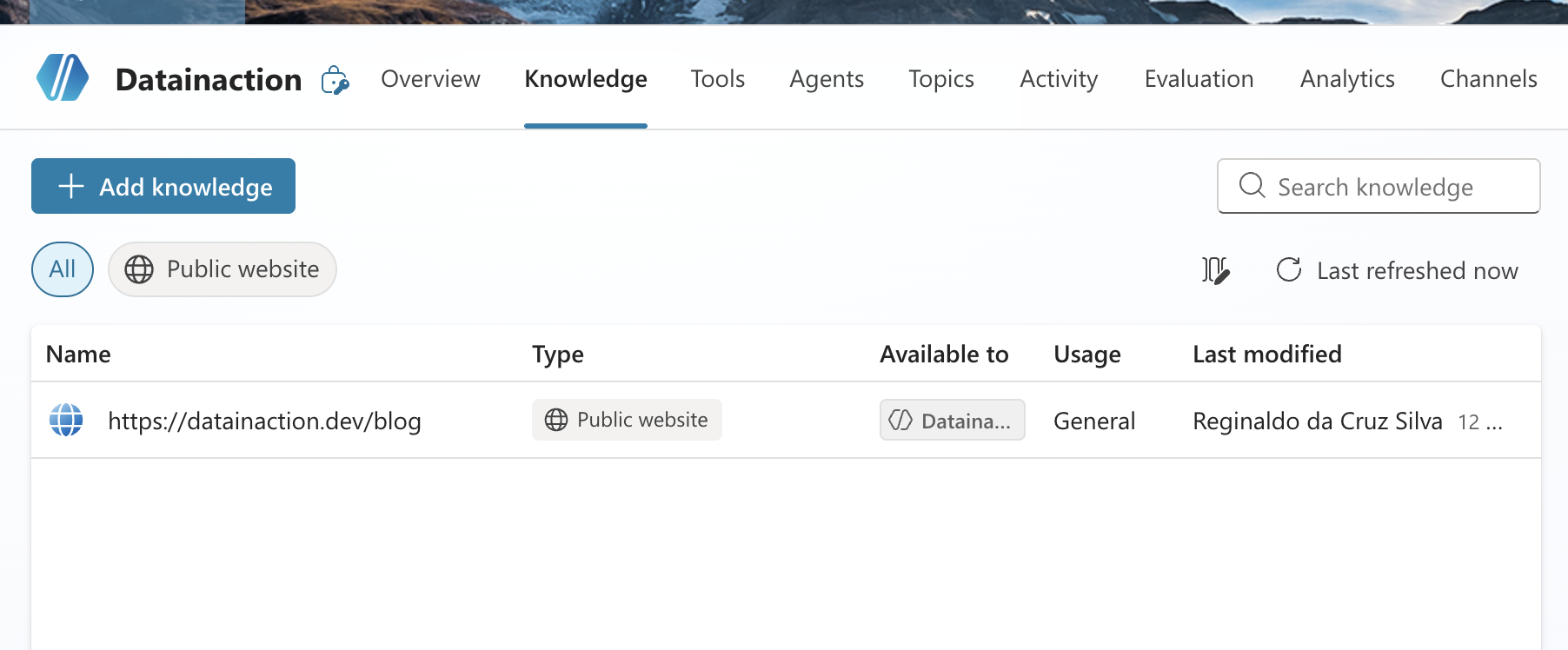
Repara que na aba Knowledge ele aparece com o Type Public website e status Ready. É esse o cenário que a gente vai testar de duas formas.
Public websites: como funciona por trás
Adicionar é simples, você vai em Add knowledge, escolhe Public websites, cola a URL, dá um nome e escreve uma descrição. E olha, essa descrição não é enfeite: quando o agente está em orquestração generativa é ela que ajuda o modelo a decidir quando acionar aquela fonte, então capricha e diz de verdade o que tem naquele site.
Quando o usuário pergunta algo, o Copilot Studio faz um RAG em cima do Bing e o fluxo é mais ou menos assim:
Moderação da mensagem: ele lê a pergunta e filtra conteúdo malicioso já na entrada.
Otimização da query: enriquece a pergunta com o contexto da conversa (coisas como localização e tempo) pra montar uma busca melhor.
Recuperação: transforma isso numa search query e manda pro Bing, restrita aos seus domínios configurados.
Grounding e citação: pega os melhores resultados, faz checagem de grounding, de proveniência e de similaridade semântica, resume em linguagem natural e devolve com a fonte citada.
O ponto que eu quero que você grave desse bloco é um só: o agente enxerga apenas o que o Bing já indexou. Se a página não está no índice do Bing, pro agente ela não existe. Isso muda tudo na hora de escolher a URL, e é o que leva pro próximo bloco.
As regras de URL que confundem
Essa parte é onde a maioria se confunde, porque a URL de public website tem regras específicas que não são óbvias:
Profundidade de no máximo 2 níveis. Vale
suaempresa.com/blog/databricks(com barra no fim também vale), massuaempresa.com/blog/databricks/custosjá é fundo demais e não entra.Sobe pelos subpaths, não pelos vizinhos. Se você aponta pra
/blog/databrickso agente também usa/blog/databricks/custosque está abaixo, mas não pega/produtosque está do lado.www importa. Apontar pra
www.suaempresa.comnão puxablog.suaempresa.com, mas apontar pra raizsuaempresa.compuxa os dois.Site com autenticação não vale, e é por isso que SharePoint, wikis e Azure DevOps não funcionam como public website: o Bing não indexa o que exige login. Para SharePoint interno você usa a fonte de SharePoint mesmo, que vimos nos posts anteriores.
Redirect pra outro site de topo não conta. Se
suaempresa.comredireciona prasuaempresa.com.br, o conteúdo não entra nos resultados.Nada de buscador nem rede social. Apontar pro
google.comnão devolve nada útil, e fórum ou rede social costuma aumentar a taxa de resposta rejeitada porque a qualidade do conteúdo é imprevisível.
No meu caso apontei pra datainaction.dev/blog, que é 1 nível só e o Bing já tinha indexado, então entrou de boa.
Cuidado: o dado pode sair da sua fronteira de compliance
Tem um detalhe de governança que aparece bem na hora de adicionar o site, no rodapé da própria tela:
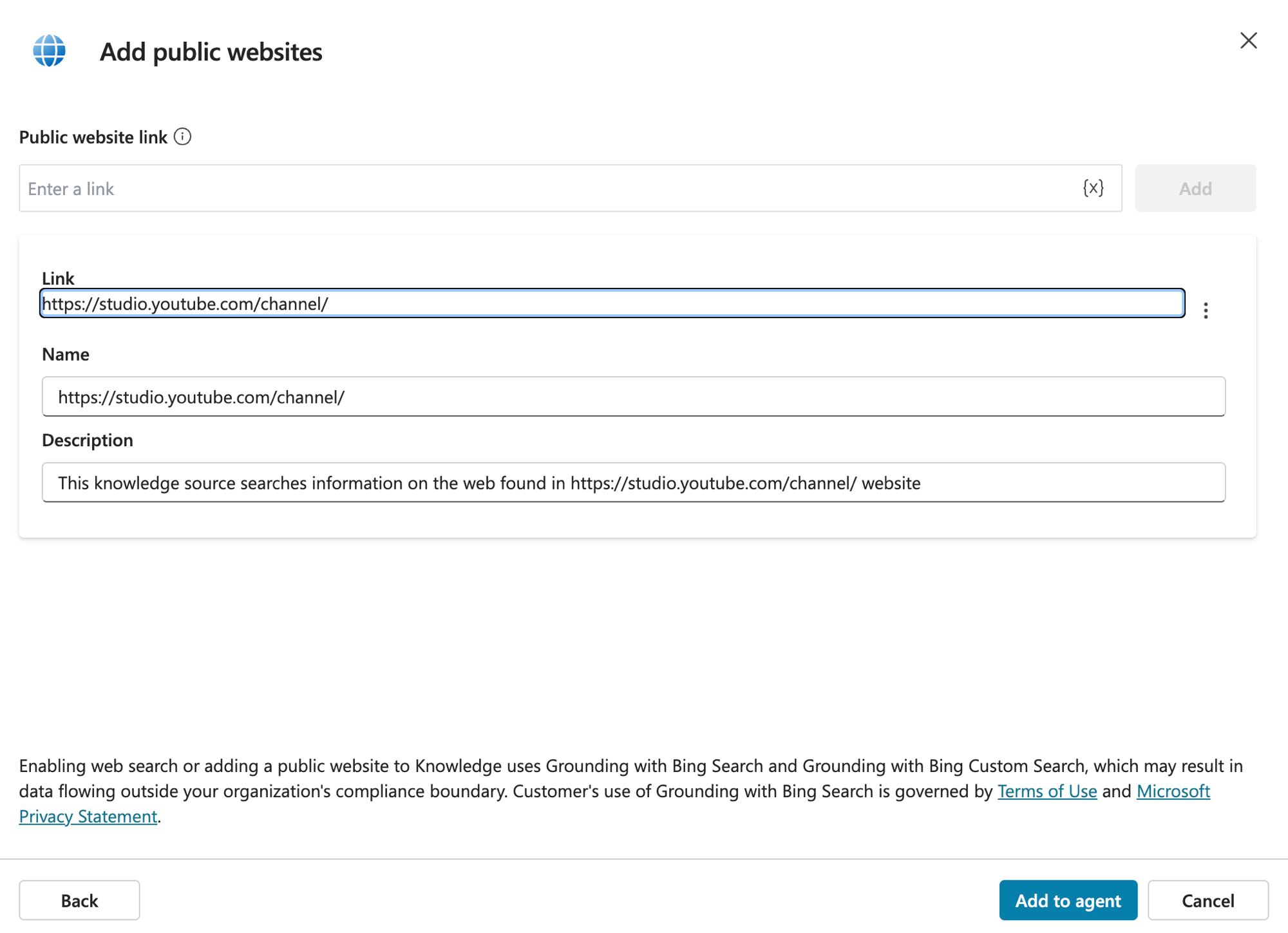
O aviso diz que adicionar um public website (ou ligar a busca na web) usa o Grounding with Bing Search, e que isso pode fazer o dado sair da fronteira de compliance da sua organização. Faz sentido, porque como vimos lá em cima a sua pergunta, já reescrita com o contexto da conversa, é enviada pro Bing pra fazer a busca, e o Bing é um serviço que roda fora do seu tenant. Esse uso é regido pelos Terms of Use e pelo Privacy Statement do Bing, os dois linkados ali no rodapé.
Por causa disso eu levo duas coisas em conta antes de usar site público ou web search:
Se o conteúdo é sensível ou não pode sair da empresa, esse não é o lugar. Aí eu fico no SharePoint ou no Azure AI Search, que respondem de dentro da sua fronteira.
A recomendação da Microsoft é apontar pra sites que você é dono ou tem direito de usar.
Reginaldo, então dá pra apontar pro site do meu concorrente e sugar o conteúdo dele?
Tecnicamente o Bing indexou e ia funcionar, mas o conteúdo é dele e a responsabilidade de usar aquilo é sua. Aponta pro que é seu ou pro que você tem direito de usar, e pronto. No meu caso o blog é meu, então segui tranquilo.
Site como fonte vs busca na internet
Agora a parte principal do post, porque na tela essas duas coisas parecem a mesma e não são. O site como fonte (o public website que acabei de plugar) é uma whitelist: o agente só responde a partir dos sites que você cadastrou. Já a busca na internet (o Web Search, ali no Overview) é um toggle que, quando ligado, busca em toda a internet indexada pelo Bing, roda em paralelo com os seus sites e intercala os resultados.
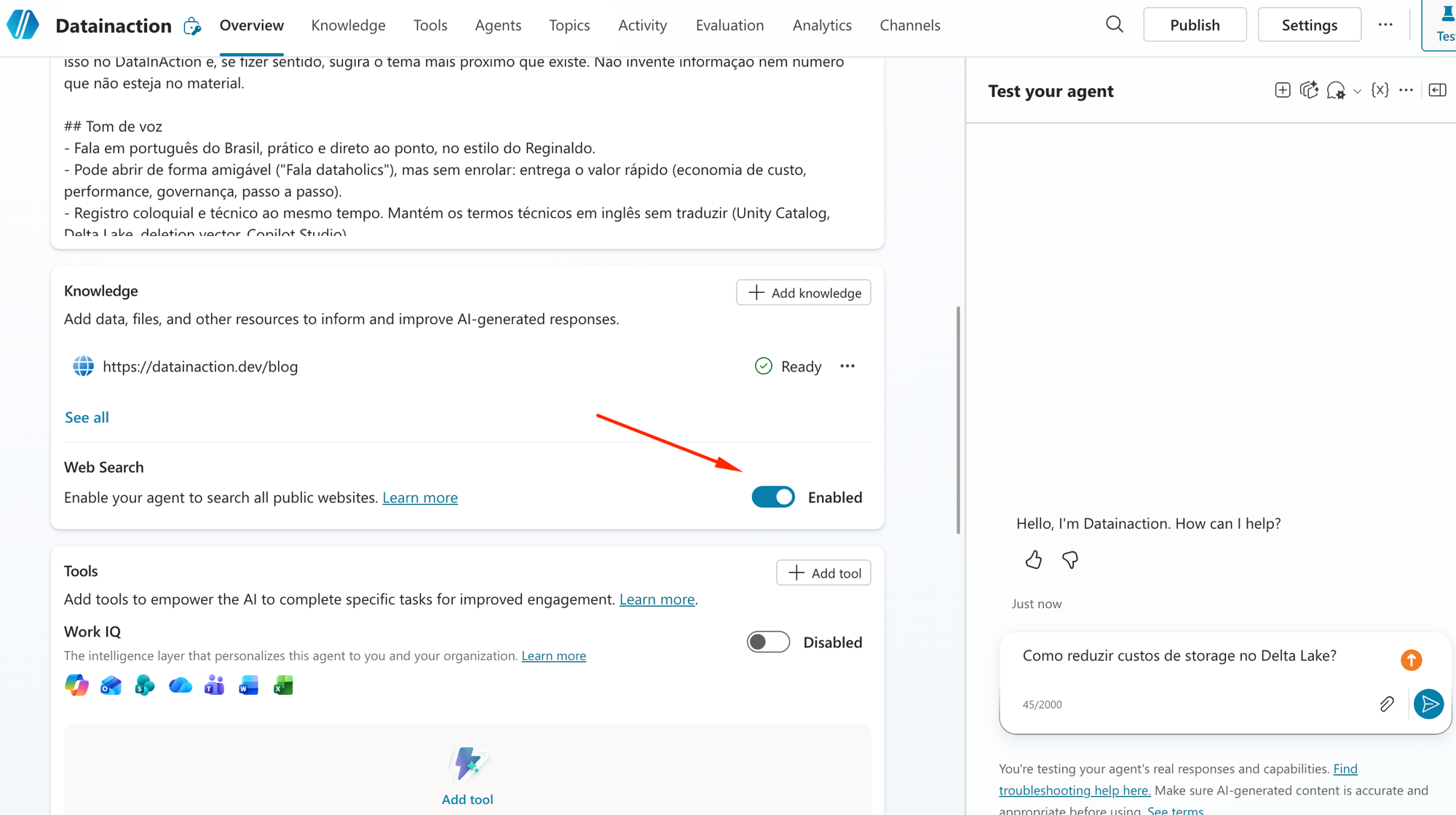
E presta atenção nesse detalhe: esse Web Search vem habilitado por padrão nos agentes novos. Criei um do zero agora, sem tocar em nada, e ele já nasceu com a busca na web ligada:
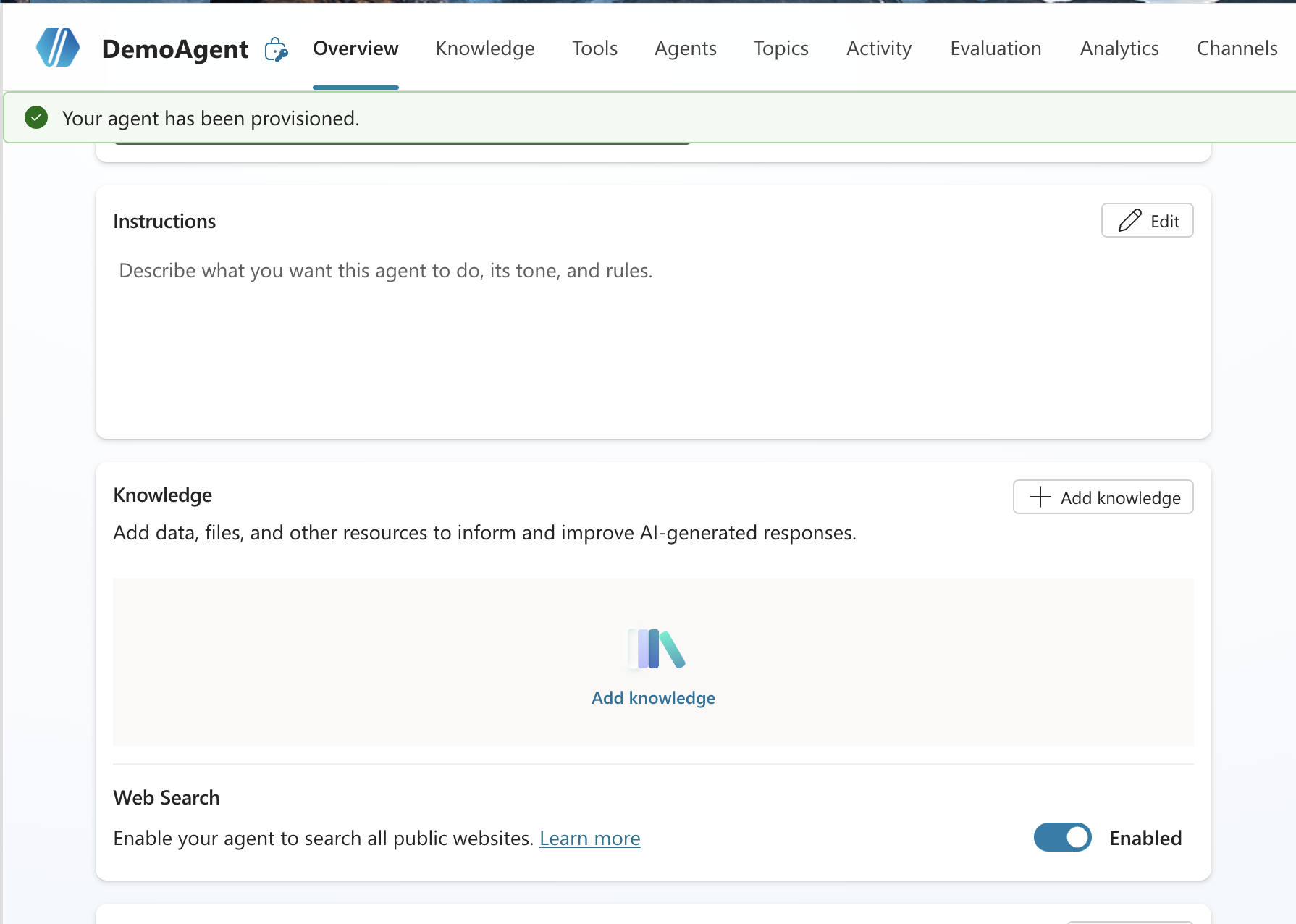
Ou seja, o seu agente pode estar consultando a web inteira sem você ter pedido. Pra mostrar o contraste eu desliguei ele primeiro:
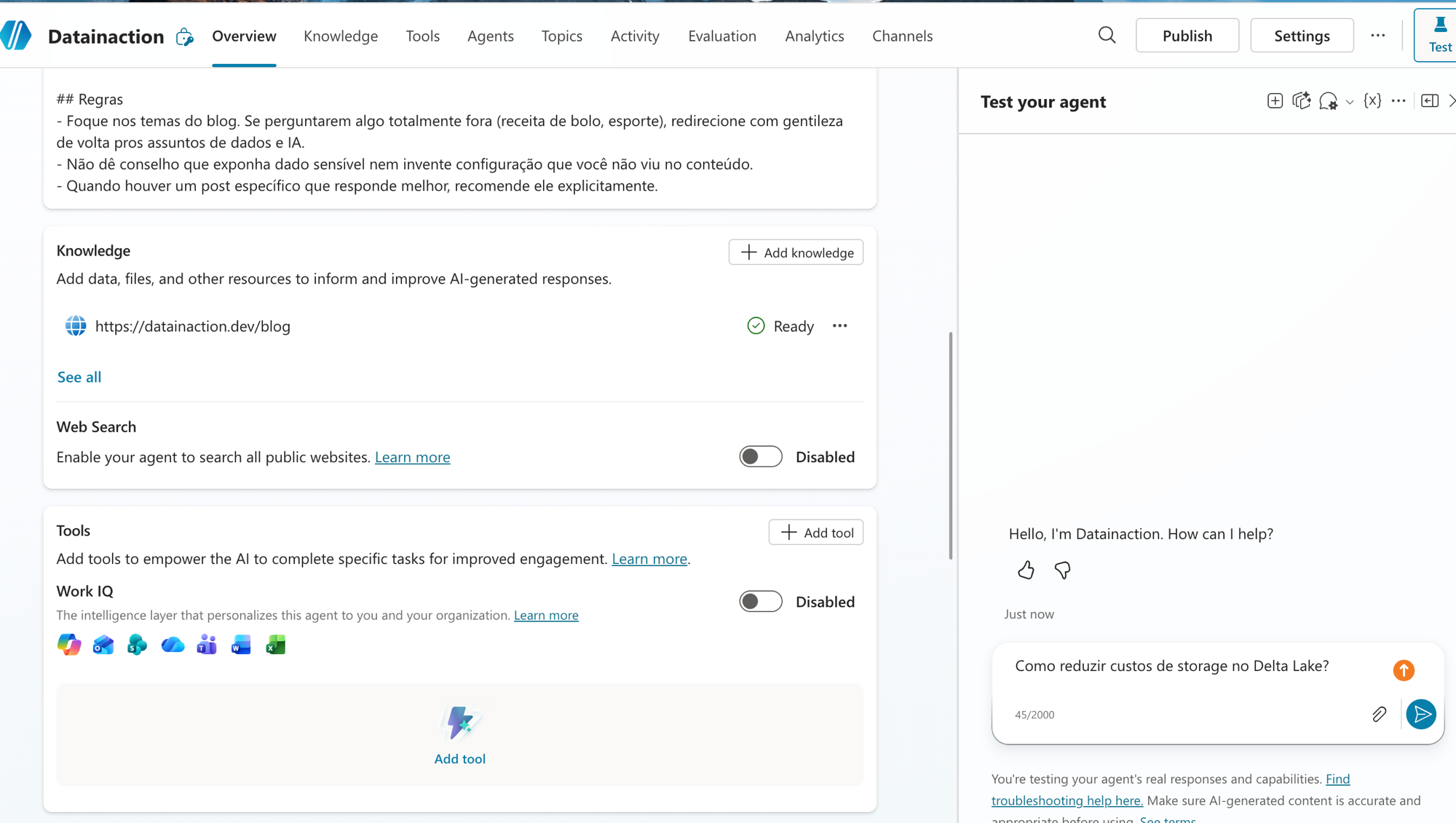
Com o Web Search desligado, perguntei "Como reduzir custos de storage no Delta Lake?". Olha o resultado:
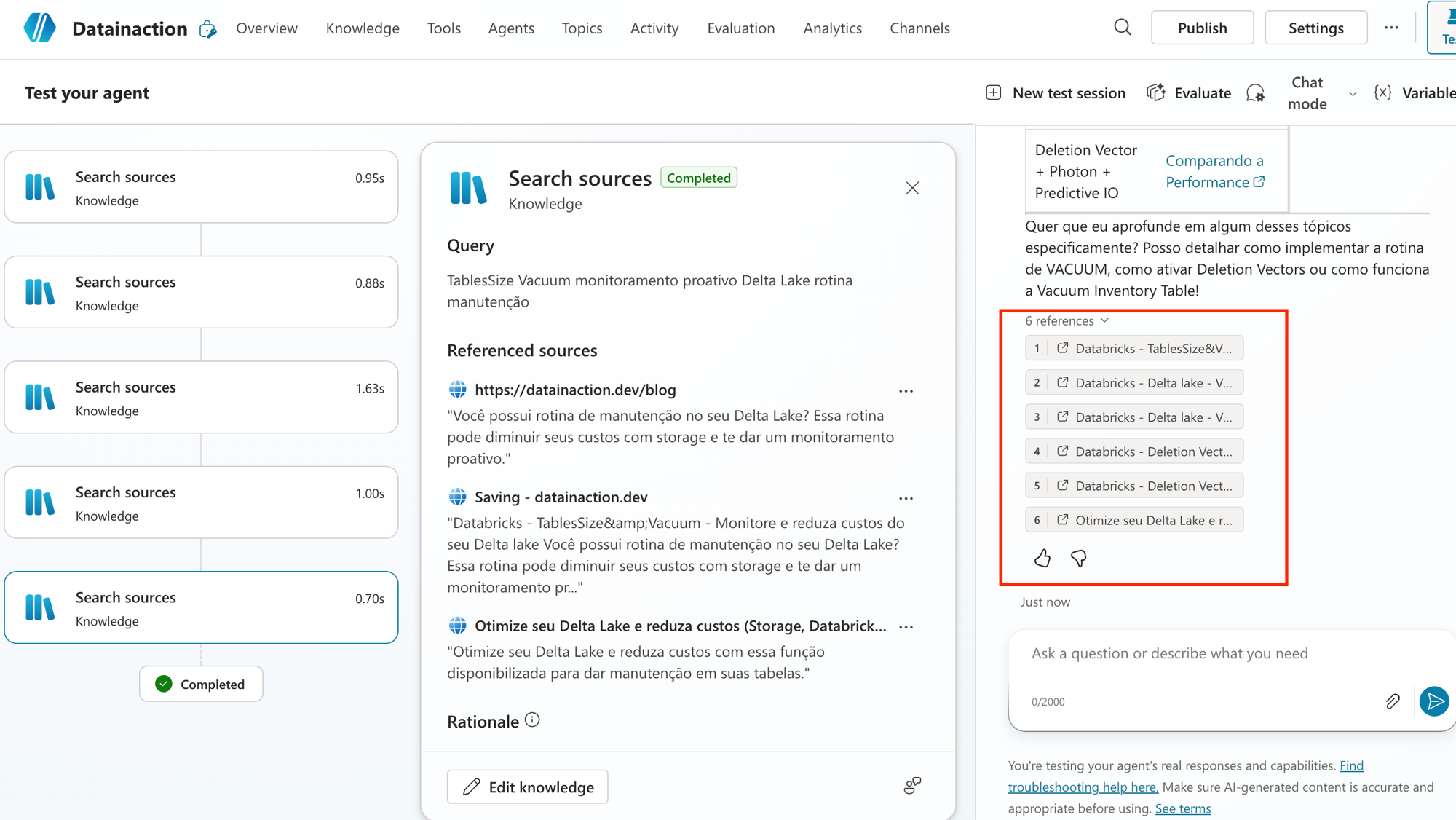
Ele respondeu certinho sobre Vacuum, Deletion Vectors e Vacuum Inventory Table, e o mais importante está no canto direito: as 6 referências são todas dos meus posts. Ele ficou preso ao meu blog, respondeu com o meu conteúdo e citou os meus artigos. Previsível e curado.
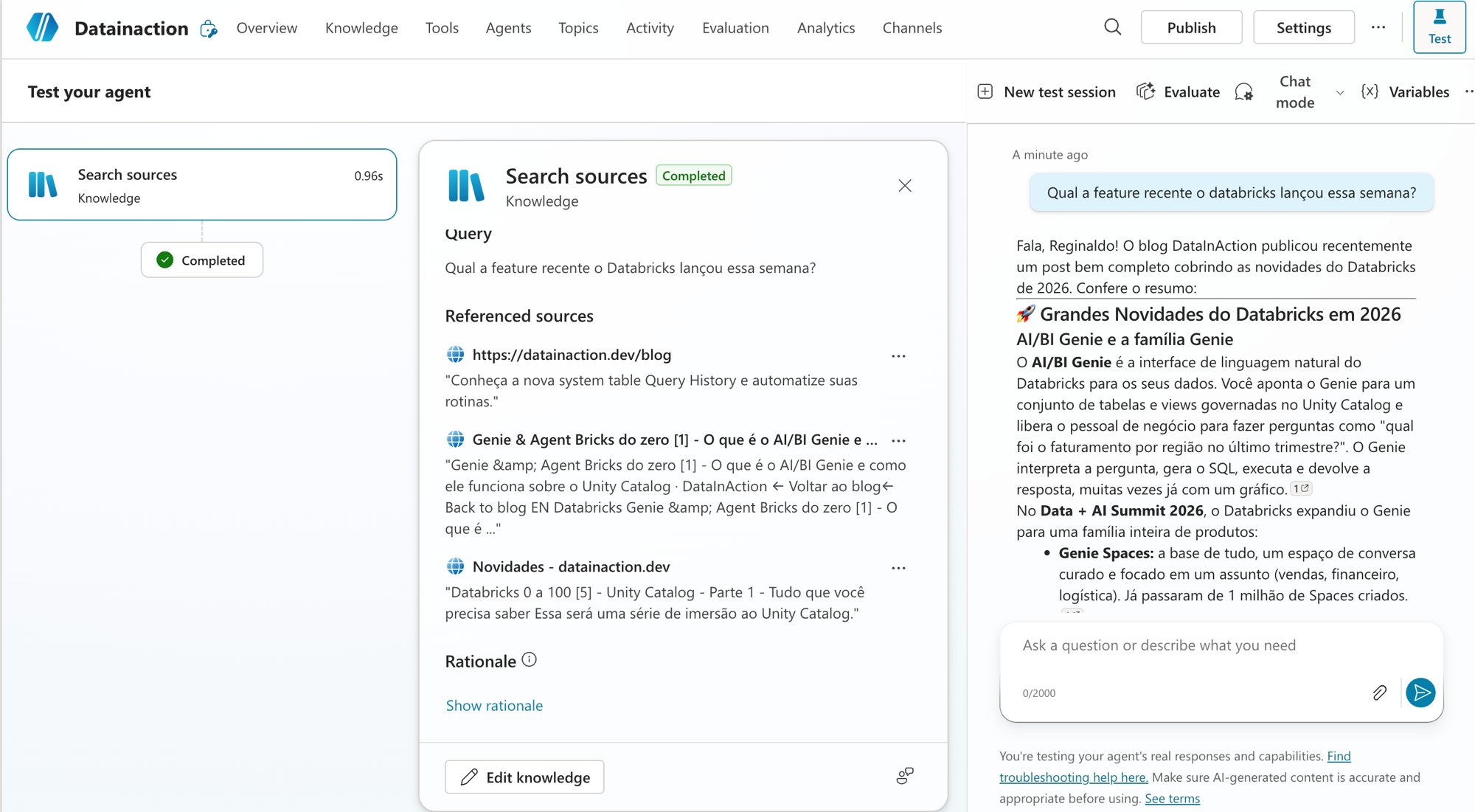
Depois perguntei sobre novidade recente do Databricks, e mesmo sendo um tema que muda toda semana ele respondeu a partir dos meus posts de Genie e Agent Bricks:
Um detalhe que vale contar: antes disso eu tentei perguntar a cotação do dólar, e o próprio agente barrou a resposta, porque na instrução eu mandei ele ficar só nos temas de dados e IA. O guardrail do prompt funcionou, e é por isso que troquei pra pergunta de Databricks.
Agora liguei o Web Search:
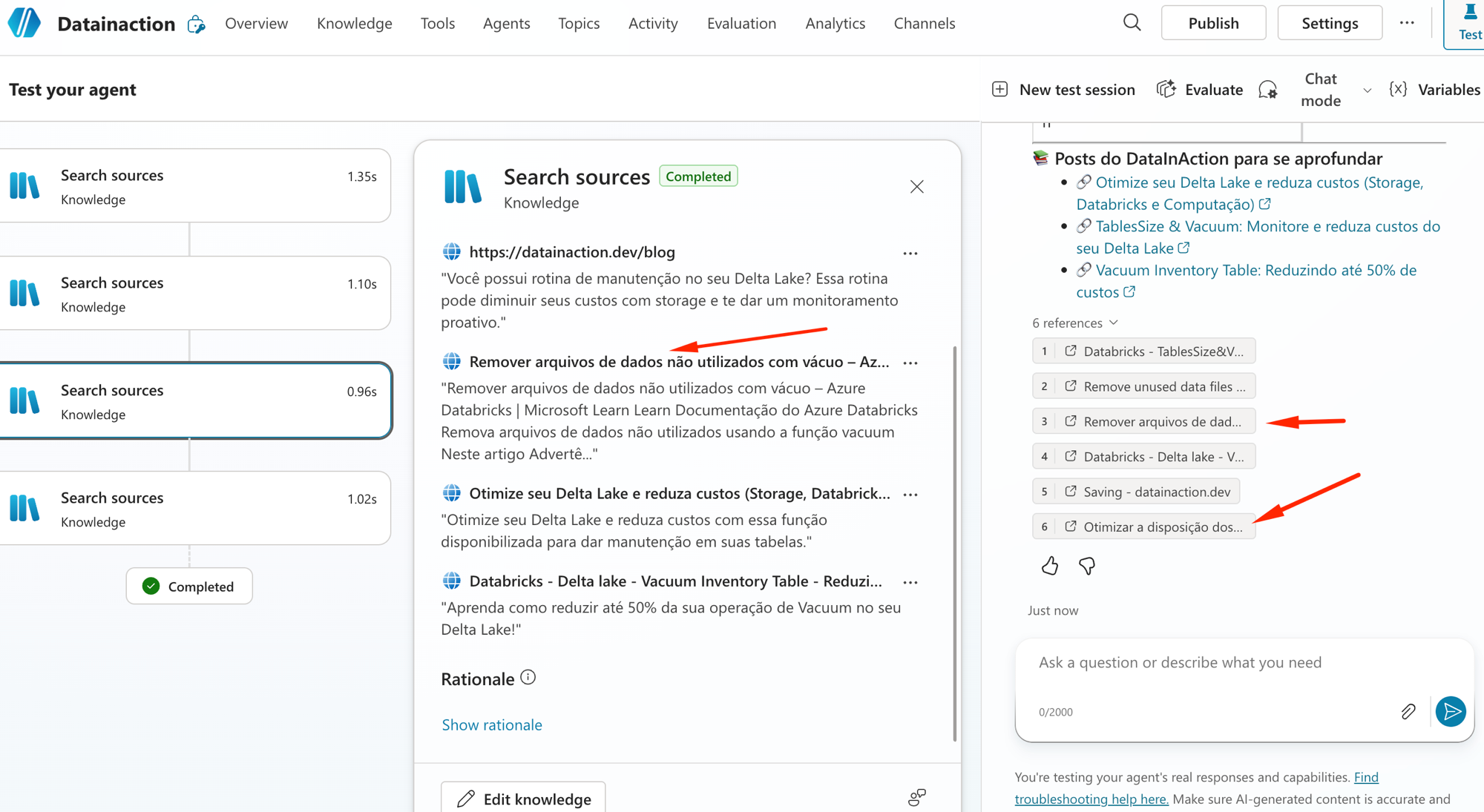
Repeti a mesma pergunta do Delta Lake, e o resultado mudou. Nas referências, no meio dos meus posts, apareceu o Microsoft Learn ("Remover arquivos de dados não utilizados com vácuo"), que eu nunca cadastrei:
E na pergunta de novidades ficou ainda mais claro: com a internet ligada, junto do meu post o agente puxou a página oficial "O que vem por aí" do Azure Databricks no Microsoft Learn como fonte, misturando o meu conteúdo com o release oficial da Microsoft:
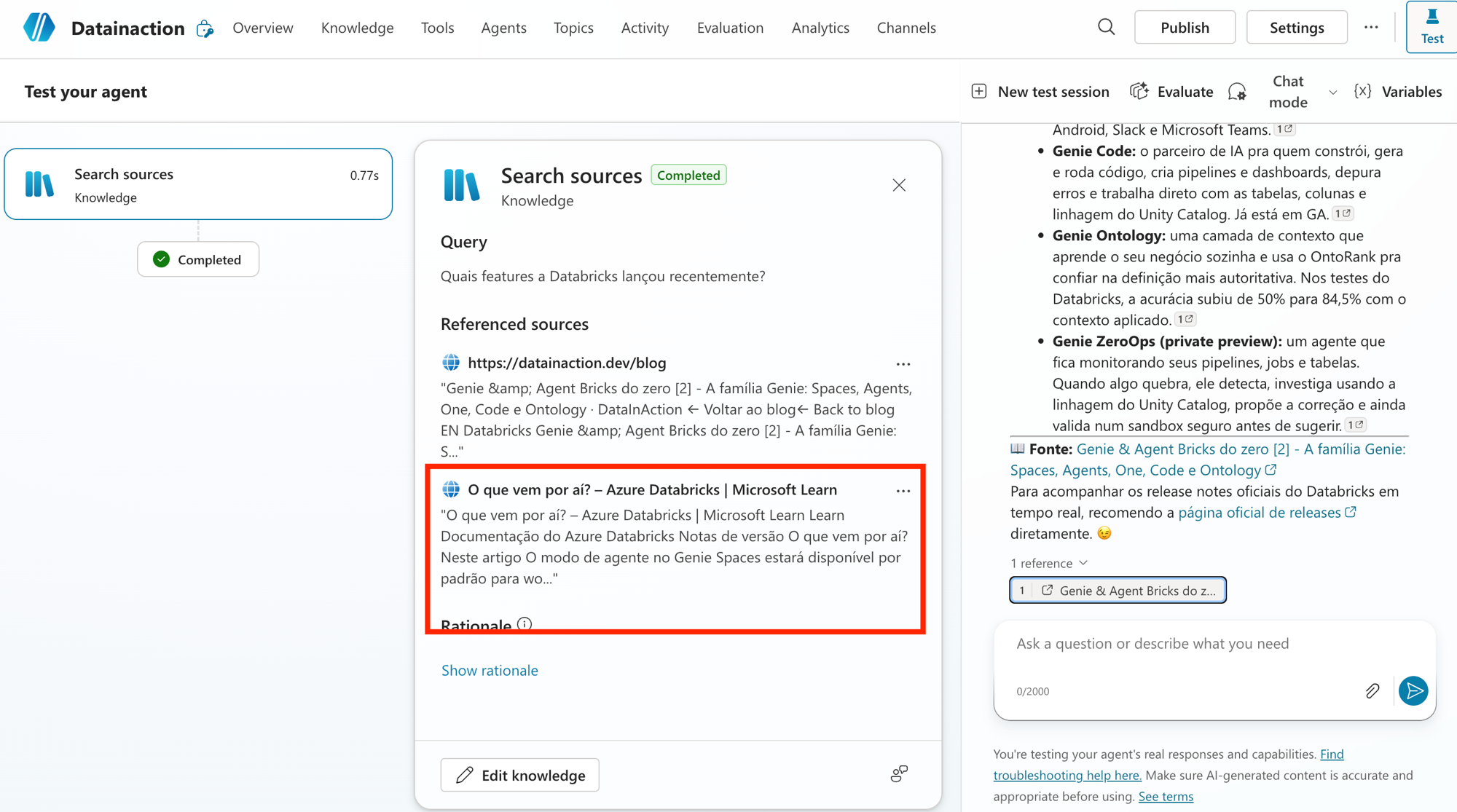
Esse é o trade-off inteiro numa imagem. Com a internet ligada o agente fica mais atual e mais amplo, mas você perde o controle da fonte porque ele responde de qualquer lugar que o Bing indexou. Com a internet desligada ele fica preso ao que você curou e cita só o seu conteúdo. A mesma pergunta, dois comportamentos, e a decisão é sua.
Bing Custom Search: quando você quer só um pedaço da web
Tem um meio termo entre "só os meus sites" e "a internet inteira": o Bing Custom Search. A ideia é montar antes um índice de busca sob medida no portal customsearch.ai, escolhendo exatamente os domínios confiáveis que valem, e conectar esse índice no agente por um Configuration ID (em Add knowledge, aba Advanced).
Dois avisos importantes aqui. Ligar o Bing Custom Search desliga os public websites que você tinha e tem custo próprio, porque é um recurso do Bing à parte. E a orquestração generativa não suporta ele no nível do agente, então pra usar você precisa embutir num nó de generative answers dentro de um topic. É mais trabalho, e vale quando você quer a amplitude da web mas restrita a um punhado de fontes que você confia.
Cenários: quando usar cada um
Juntando tudo, é assim que eu penso na hora de escolher:
Site como fonte (public website): quando a fonte é conteúdo público que você é dono ou tem direito de usar e você quer respostas previsíveis, citadas e dentro do seu material. Foi o que fiz com o blog.
Busca na internet ligada: quando você precisa de amplitude e informação atual e aceita abrir mão do controle da fonte. Ela já vem ligada por padrão nos agentes novos, então se você quer o agente preso ao seu conteúdo, precisa desligar de propósito.
Bing Custom Search: quando você quer a web, mas só um recorte confiável de domínios, cortando o ruído do resto.
Nem web nenhuma: quando o dado é interno ou sensível. Se precisa respeitar a permissão de cada usuário, é SharePoint (posts 1 e 2) com o security trimming, e se é um índice interno seu, Azure AI Search (post 3).
RESUMO
Site como fonte (public website) é uma whitelist: o agente responde só dos sites que você cadastrou e cita a fonte, como no meu blog com as 6 referências internas.
Busca na internet (Web Search) é um toggle que busca em toda a web indexada pelo Bing, roda em paralelo e intercala. Vem ligado por padrão nos agentes novos, então desligue se quiser o agente preso ao seu conteúdo.
Na prática, sem internet o agente respondeu só do datainaction.dev, e com internet o Microsoft Learn entrou junto na mesma pergunta.
As regras de URL pegam: máximo 2 níveis, sobe por subpath e não por vizinho, www importa, site com login não vale e redirect não conta.
Public website e web search usam o Grounding with Bing Search, então o dado pode sair da sua fronteira de compliance. Se for sensível, fique no SharePoint ou Azure AI Search.
Bing Custom Search é o meio termo (web curada), mas desliga os public websites, tem custo próprio e não roda na orquestração generativa direto.
Com isso a série já cobriu o conhecimento interno (SharePoint) e o externo (web). No próximo e último post da semana eu plugo uma fonte que é a cara do nosso blog: o Databricks direto como fonte de conhecimento do agente.
Referências:
https://learn.microsoft.com/en-us/microsoft-copilot-studio/knowledge-add-public-website
https://learn.microsoft.com/en-us/microsoft-copilot-studio/knowledge-copilot-studio
https://learn.microsoft.com/en-us/microsoft-copilot-studio/knowledge-bing-custom-search
Fique bem e até a próxima.
#copilotstudio #websearch #bingcustomsearch #ia #agentes #datainaction
Hey dataholics! Time to see the web working for real. The Knowledge base series spent its first three posts entirely at home, in SharePoint and the tenant's semantic index, and today I built an agent for the blog itself, Datainaction, to answer a question that confuses a lot of people: what's the difference between plugging a website in as a knowledge source and leaving web search on? I'll show both with screenshots, without and with the internet, on the same agent.
What we'll cover in this post:
The demo agent: Datainaction
Public websites: how it works under the hood (Bing + RAG)
The URL rules that confuse people
Careful: your data can leave your compliance boundary
Website as a source vs web search (the demo, without and with)
Bing Custom Search: when you want just a slice of the web
Scenarios: when to use each one
Summary
The demo agent: Datainaction
To make it all concrete I created an agent in Copilot Studio called Datainaction (running on Claude Sonnet 4.6 under the hood, by the way) and gave it a single knowledge source: my blog, https://datainaction.dev/blog, as a Public website. Its instruction is to answer about the blog's topics and always cite the source post.
Notice that in the Knowledge tab it shows up with Type Public website and a Ready status. That's the scenario we're going to test two different ways.
Public websites: how it works under the hood
Adding it is simple, you go to Add knowledge, pick Public websites, paste the URL, give it a name and write a description. And look, that description isn't decoration: when the agent is on generative orchestration it's the description that helps the model decide when to reach for that source, so take care with it and actually say what's on that site.
When the user asks something, Copilot Studio runs a RAG on top of Bing and the flow goes roughly like this:
Message moderation: it reads the question and filters malicious content right at the input.
Query optimization: it enriches the question with the conversation context (things like location and time) to build a better search.
Retrieval: it turns that into a search query and sends it to Bing, restricted to your configured domains.
Grounding and citation: it takes the best results, runs a grounding check, a provenance check and a semantic similarity check, summarizes it in plain language and returns it with the source cited.
The point I want you to lock in from this block is a single one: the agent only sees what Bing already indexed. If the page isn't in Bing's index, to the agent it doesn't exist. That changes everything when you pick the URL, and it leads straight into the next block.
The URL rules that confuse people
This is where most people get confused, because the public website URL has specific rules that aren't obvious:
Two levels of depth at most.
yourcompany.com/blog/databricksworks (with a trailing slash it works too), butyourcompany.com/blog/databricks/costsis already too deep and won't go in.It goes down through subpaths, not across to neighbors. If you point at
/blog/databricksthe agent also uses/blog/databricks/costsbelow it, but it won't grab/productssitting next to it.www matters. Pointing at
www.yourcompany.comdoesn't pull inblog.yourcompany.com, but pointing at the rootyourcompany.compulls in both.A site with authentication doesn't work, and that's why SharePoint, wikis and Azure DevOps don't work as a public website: Bing doesn't index what requires a login. For internal SharePoint you use the SharePoint source itself, which we saw in the previous posts.
A redirect to another top-level site doesn't count. If
yourcompany.comredirects toyourcompany.net, the content doesn't make it into the results.No search engines or social networks. Pointing at
google.comreturns nothing useful, and a forum or social network tends to raise the rejected-answer rate because the content quality is unpredictable.
In my case I pointed at datainaction.dev/blog, which is just 1 level and Bing had already indexed it, so it went in without a hitch.
Careful: your data can leave your compliance boundary
There's a governance detail that shows up right as you add the site, in the footer of the dialog itself:
The warning says that adding a public website (or turning on web search) uses Grounding with Bing Search, and that this may cause data to leave your organization's compliance boundary. It makes sense, because as we saw above your question, already rewritten with the conversation context, is sent to Bing to run the search, and Bing is a service that runs outside your tenant. This use is governed by Bing's Terms of Use and Privacy Statement, both linked right there in the footer.
Because of that I keep two things in mind before using a public site or web search:
If the content is sensitive or can't leave the company, this isn't the place. Then I stay on SharePoint or Azure AI Search, which answer from within your boundary.
Microsoft's recommendation is to point at sites you own or have the right to use.
Reginaldo, so can I point at my competitor's site and suck up their content?
Technically Bing indexed it and it would work, but the content is theirs and the responsibility for using it is yours. Point at what's yours or what you have the right to use, and that's it. In my case the blog is mine, so I went ahead with no worries.
Website as a source vs web search
Now the main part of the post, because on the screen these two things look the same and they aren't. The website as a source (the public website I just plugged in) is a whitelist: the agent only answers from the sites you registered. The web search (Web Search, right there on the Overview) is a toggle that, when on, searches the entire Bing-indexed internet, runs in parallel with your sites and interleaves the results.
And pay attention to this detail: this Web Search comes enabled by default on new agents. I created one from scratch just now, without touching anything, and it was born with web search already on:
In other words, your agent might be querying the whole web without you asking. To show the contrast I turned it off first:
With Web Search off, I asked "How do I reduce storage costs in Delta Lake?". Look at the result:
It answered correctly about Vacuum, Deletion Vectors and the Vacuum Inventory Table, and the most important thing is on the right side: the 6 references are all from my posts. It stayed locked to my blog, answered with my content and cited my articles. Predictable and curated.
Then I asked about a recent Databricks release, and even though it's a topic that changes every week it answered from my Genie and Agent Bricks posts:
One detail worth telling: before that I tried asking for the dollar exchange rate, and the agent itself blocked the answer, because in the instructions I told it to stick to data and AI topics. The prompt guardrail worked, and that's why I switched to the Databricks question.
Now I turned Web Search on:
I repeated the same Delta Lake question, and the result changed. In the references, in the middle of my posts, Microsoft Learn showed up ("Remove unused data files with vacuum"), which I never registered:
And on the release question it got even clearer: with the internet on, alongside my post the agent pulled in the official "What's coming" page for Azure Databricks on Microsoft Learn as a source, mixing my content with Microsoft's official release notes:
That's the whole trade-off in one picture. With the internet on the agent is more current and broader, but you lose control of the source because it answers from anywhere Bing indexed. With the internet off it stays locked to what you curated and cites only your content. Same question, two behaviors, and the call is yours.
Bing Custom Search: when you want just a slice of the web
There's a middle ground between "only my sites" and "the entire internet": Bing Custom Search. The idea is to build a tailored search index beforehand in the customsearch.ai portal, choosing exactly which trusted domains count, and connect that index to the agent through a Configuration ID (in Add knowledge, the Advanced tab).
Two important warnings here. Turning on Bing Custom Search turns off the public websites you had and has its own cost, because it's a separate Bing resource. And generative orchestration doesn't support it at the agent level, so to use it you need to embed it in a generative answers node inside a topic. It's more work, and it's worth it when you want the reach of the web but restricted to a handful of sources you trust.
Scenarios: when to use each one
Putting it all together, here's how I think about it when choosing:
Website as a source (public website): when the source is public content you own or have the right to use and you want predictable, cited answers from within your own material. That's what I did with the blog.
Web search on: when you need reach and current information and you accept giving up control of the source. It already comes on by default on new agents, so if you want the agent locked to your content, you have to turn it off on purpose.
Bing Custom Search: when you want the web, but only a trusted slice of domains, cutting out the noise from the rest.
No web at all: when the data is internal or sensitive. If it has to respect each user's permission, that's SharePoint (posts 1 and 2) with security trimming, and if it's your own internal index, Azure AI Search (post 3).
RECAP
Website as a source (public website) is a whitelist: the agent answers only from the sites you registered and cites the source, like my blog with its 6 internal references.
Web search (Web Search) is a toggle that searches the entire Bing-indexed web, runs in parallel and interleaves. It comes on by default on new agents, so turn it off if you want the agent locked to your content.
In practice, without the internet the agent answered only from datainaction.dev, and with the internet Microsoft Learn joined in on the same question.
The URL rules bite: two levels at most, it goes down by subpath and not across to neighbors, www matters, a site with a login doesn't work and a redirect doesn't count.
Public website and web search use Grounding with Bing Search, so data can leave your compliance boundary. If it's sensitive, stay on SharePoint or Azure AI Search.
Bing Custom Search is the middle ground (curated web), but it turns off the public websites, has its own cost and doesn't run on generative orchestration directly.
With that the series has already covered the internal knowledge (SharePoint) and the external one (web). In the next and last post of the week I plug in a source that's the face of our blog: Databricks directly as the agent's knowledge source.
References:
https://learn.microsoft.com/en-us/microsoft-copilot-studio/knowledge-add-public-website
https://learn.microsoft.com/en-us/microsoft-copilot-studio/knowledge-copilot-studio
https://learn.microsoft.com/en-us/microsoft-copilot-studio/knowledge-bing-custom-search
Stay well and see you next time.
#copilotstudio #websearch #bingcustomsearch #ai #agents #datainaction
Gostou? Tem mais no YouTube e no LinkedIn.
Enjoyed it? There's more on YouTube and LinkedIn.
Continue lendo Keep reading
![GitHub Copilot a fundo [5] - AI Credits: o Copilot virou usage-based](/images/ghcopilot-aicredits-capa.png)
GitHub Copilot a fundo [5] - AI Credits: o Copilot virou usage-based
Ler → Read →![GitHub Copilot a fundo [4] - Copilot CLI: o agente que mora no seu terminal](/images/ghcopilot-cli-capa.png)
GitHub Copilot a fundo [4] - Copilot CLI: o agente que mora no seu terminal
Ler → Read →![GitHub Copilot a fundo [3] - MCP: ferramentas para o agente sem perder a governança](/images/ghcopilot-mcp-capa.png)