IA & Agentes
Copilot Studio do zero [4] - Evaluation: será que seu agente responde bem? (o meu tirou 40%)
Copilot Studio from scratch [4] - Evaluation: does your agent actually answer well? (mine scored 40%)
![Copilot Studio do zero [4] - Evaluation: será que seu agente responde bem? (o meu tirou 40%)](/images/copilot-dataday-eval-capa.png)
Fala dataholics! Voltando pra série Copilot Studio do zero, essa é a parte 4. No post anterior a gente criou o DataDay, aquele agente que responde sobre o calendário da empresa. Eu testei na mão, ele respondeu certinho os eventos de janeiro e a sensação foi de "tá pronto, pode publicar".
Aí eu fiz a pergunta que todo mundo devia fazer antes de soltar um agente pro mundo: será que ele responde bem SEMPRE? Testar 2 ou 3 perguntas na mão não prova nada. Bora medir isso de verdade com o Evaluation do Copilot Studio. Spoiler do resultado: o DataDay tirou 40%. E foi a melhor coisa que podia ter acontecido.
O que veremos nesse post:
O que é Evaluation (e por que é teste de regressão pra agente)
Como criar uma evaluation: os tipos e as fontes de perguntas
Rodando e lendo o score
Um Pass por dentro: os 3 checks de qualidade
Um Fail por dentro: o "Not answered" que me ensinou muito
Boas práticas e o que dá pra corrigir
Resumo
O passo a passo está no vídeo abaixo. Como sempre, o vídeo é sem narração, só a gravação da tela. A explicação de verdade está aqui no post.

O que é Evaluation
Pensa no Evaluation como o teste de regressão do seu agente. Em vez de você ficar digitando pergunta por pergunta na mão, você monta um conjunto de perguntas (um Test Set), roda tudo de uma vez e um LLM juiz avalia cada resposta, dando Pass ou Fail e um score geral.
Por que isso importa? Porque agente é coisa viva: você mexe nas Instructions, troca a fonte de Knowledge, ativa uma tool, e sem querer quebra algo que funcionava. Com um Test Set salvo, é só rodar de novo depois de cada mudança e ver se melhorou ou piorou. Sem isso, "meu agente está bom" é achismo.
Criando uma evaluation: tipos e fontes de perguntas
Na aba Evaluation você clica em New evaluation e cai nessa tela. Tem duas decisões pra tomar: o Data type e a fonte das perguntas.
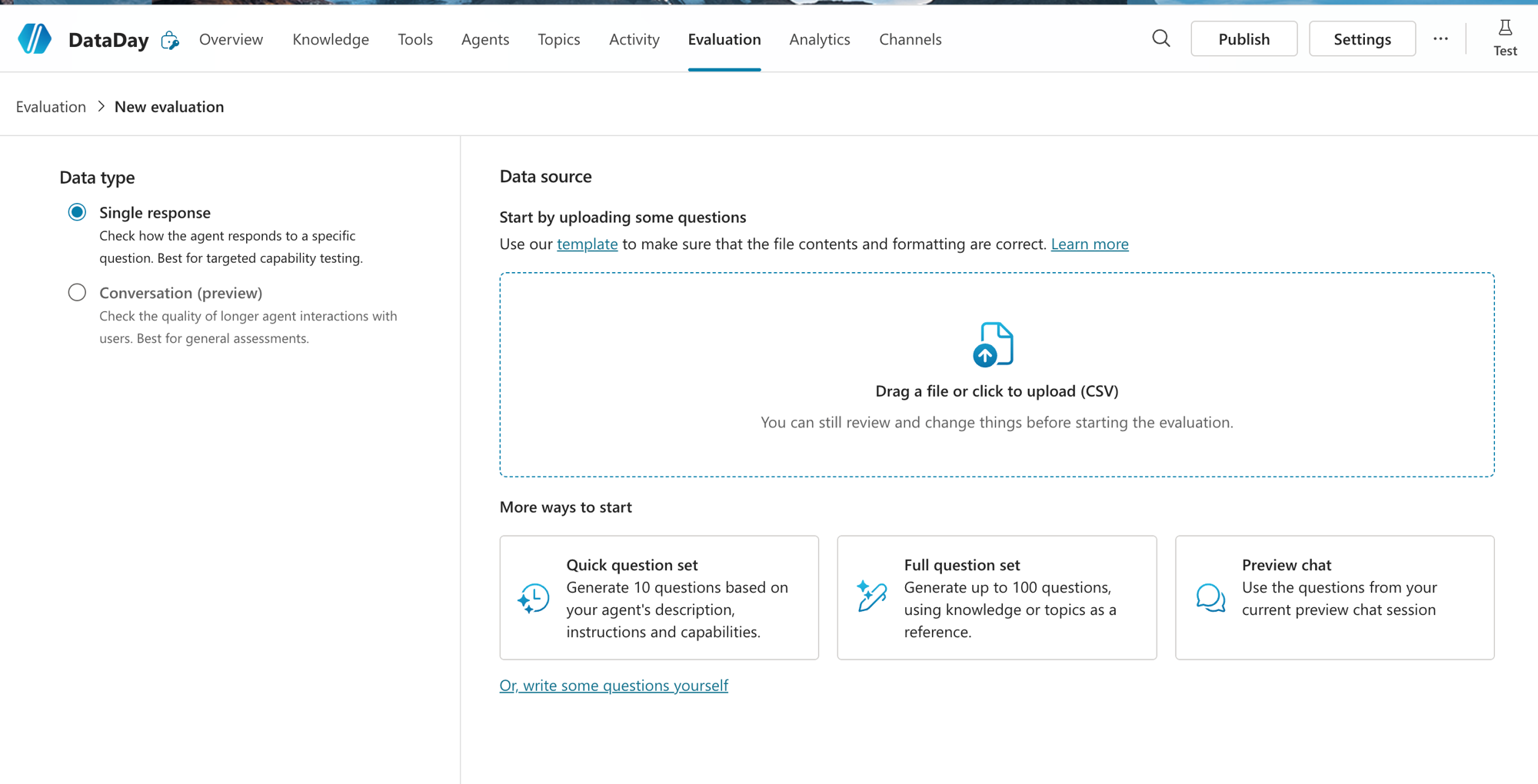
No Data type você escolhe entre:
Single response: avalia a resposta a uma pergunta isolada. É o "capability testing" pontual, ideal pra checar se ele acerta cada tipo de pergunta. Foi o que eu usei.
Conversation (preview): avalia a qualidade de uma conversa mais longa, com várias trocas. Melhor pra avaliação geral, quando o contexto de mensagens anteriores importa.
Já na fonte das perguntas, o Copilot te dá vários caminhos:
Upload de CSV: você sobe suas próprias perguntas (tem um template pronto pra baixar e não errar o formato).
Quick question set: gera 10 perguntas automaticamente a partir da descrição, das instructions e das capacidades do agente.
Full question set: gera até 100 perguntas usando o Knowledge e os Topics como referência.
Preview chat: aproveita as perguntas da sua sessão de teste atual.
Ou escrever as perguntas você mesmo, na unha.
Reginaldo, qual dessas eu escolho?
Vou ser honesto com você: nesse teste eu não montei nada na mão. Cliquei no Quick question set e deixei o Copilot gerar as 10 perguntas automaticamente, em segundos. E aí mora parte da explicação do meu 40%: algumas dessas perguntas geradas não estavam aderentes aos dados do calendário, pediam coisa que nem existe na planilha, então o agente ia falhar de qualquer jeito. Serve de lição: o Quick question set é ótimo pra dar o pontapé, mas o melhor dos mundos é você criar as perguntas reais, com base no que os usuários vão de fato perguntar (com gíria, sem data exata, ambíguas). Comece com o gerador, evolua pro seu próprio conjunto.
Rodando e lendo o score
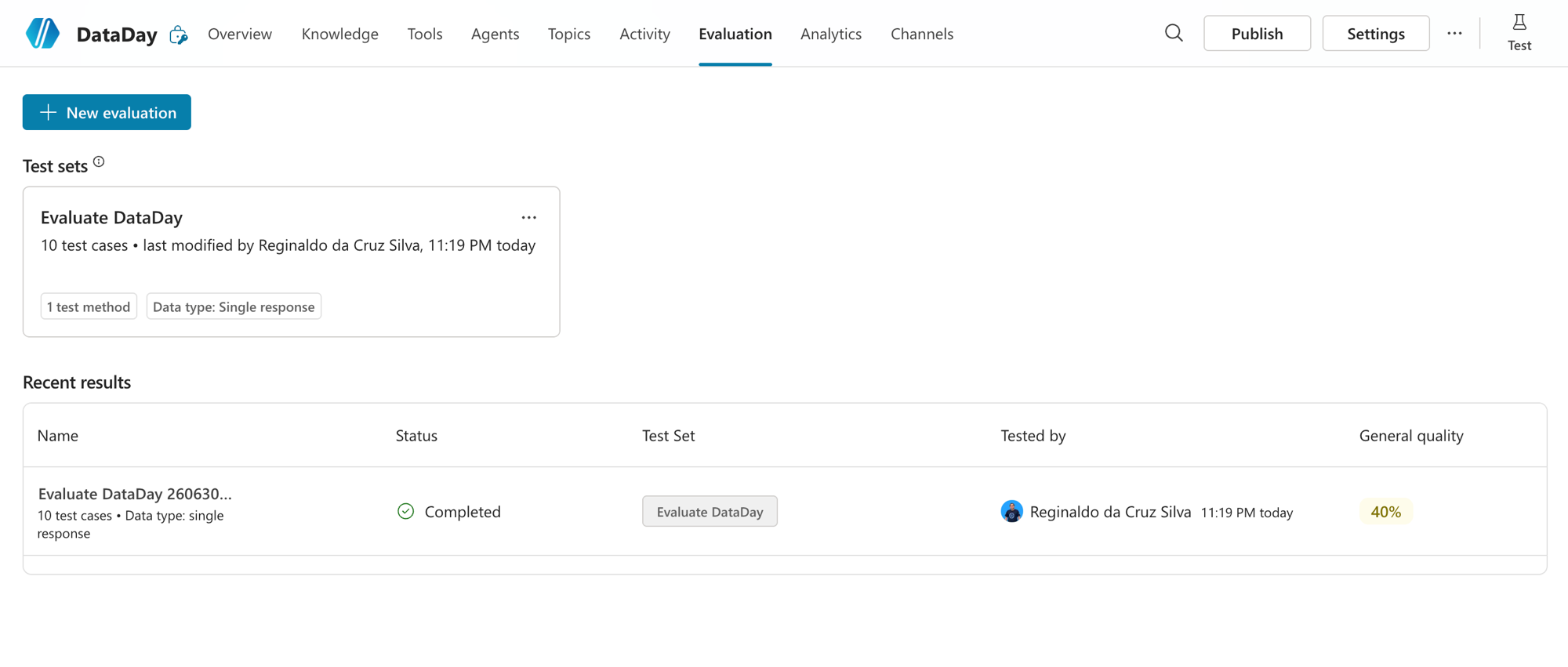
Depois de montar, seu Test Set fica salvo (dá pra reusar quantas vezes quiser) e cada execução aparece em Recent results com o score. Olha aqui: o Test Set Evaluate DataDay com 10 test cases, e a última rodada com General quality de 40%.
Abrindo o resultado, a coisa fica bem visível: 4 Pass e 6 Fail. Cada linha mostra a pergunta, a resposta do agente e o veredito. E dá pra filtrar só os Pass ou só os Fail, que é onde mora o aprendizado.
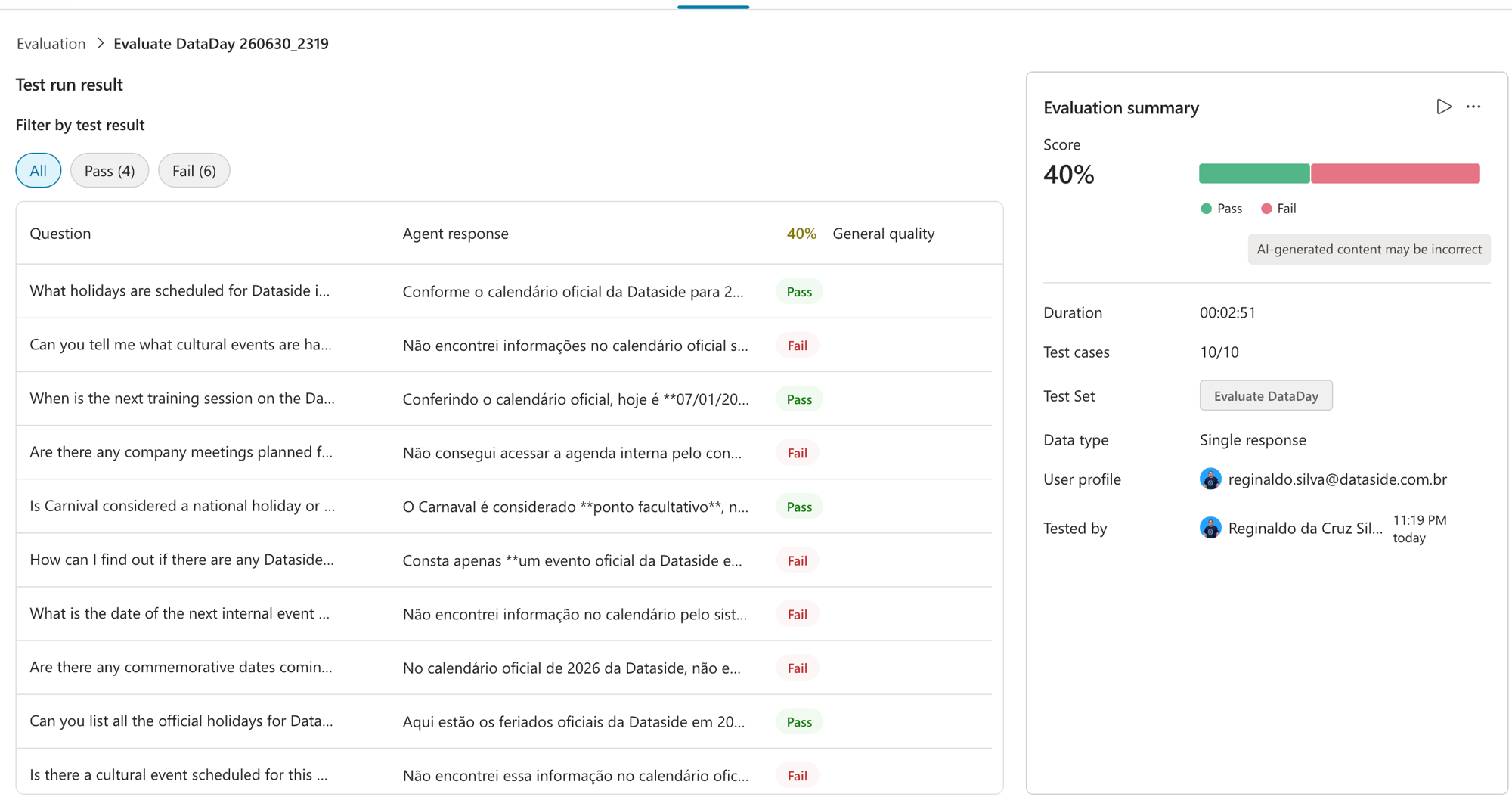
Repara num padrão logo de cara: as perguntas sobre feriados (fatos estáticos, que estão listados na planilha) passaram. As perguntas sobre "essa semana", "próximo evento", "eventos culturais deste mês" falharam. Guarda isso, porque é a chave do diagnóstico.
Um Pass por dentro: os 3 checks
Clicando num caso que passou (a pergunta "What holidays are scheduled for Dataside in 2026?"), o painel Test case details explica o porquê do Pass:
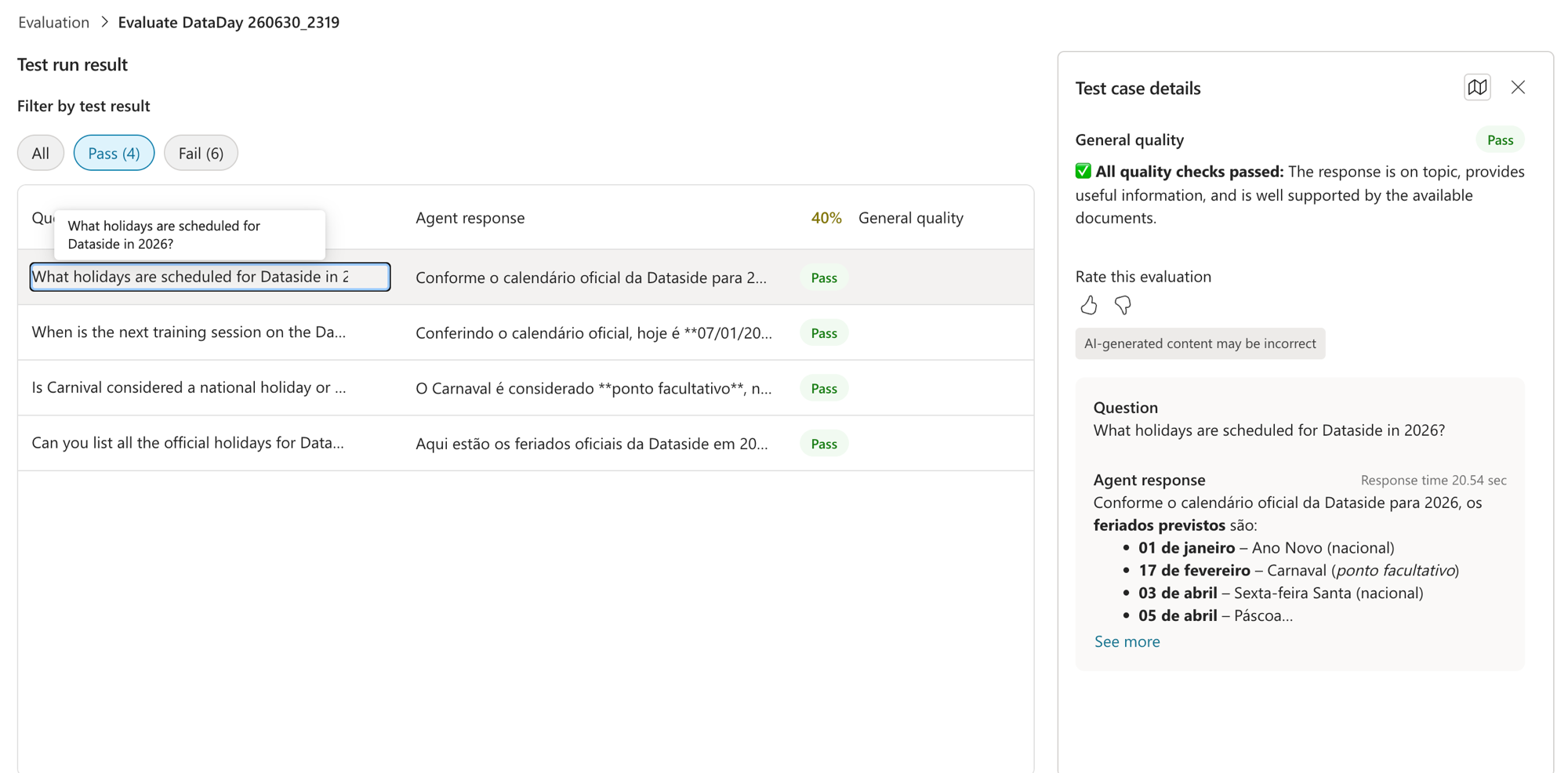
O juiz diz "All quality checks passed" e destrincha o critério: a resposta está no tema (relevance), traz informação útil e completa (completeness) e está bem embasada nos documentos disponíveis (use of knowledge sources). Esses são os 3 eixos que ele mede. O DataDay respondeu a lista de feriados com data e ainda separou nacional de facultativo, exatamente como pedimos nas Instructions. Pass merecido.
Um Fail por dentro: o "Not answered"
Agora a parte que mais me ensinou. Clica no Fail da pergunta "Can you tell me what cultural events are happening this week?". Olha o veredito:
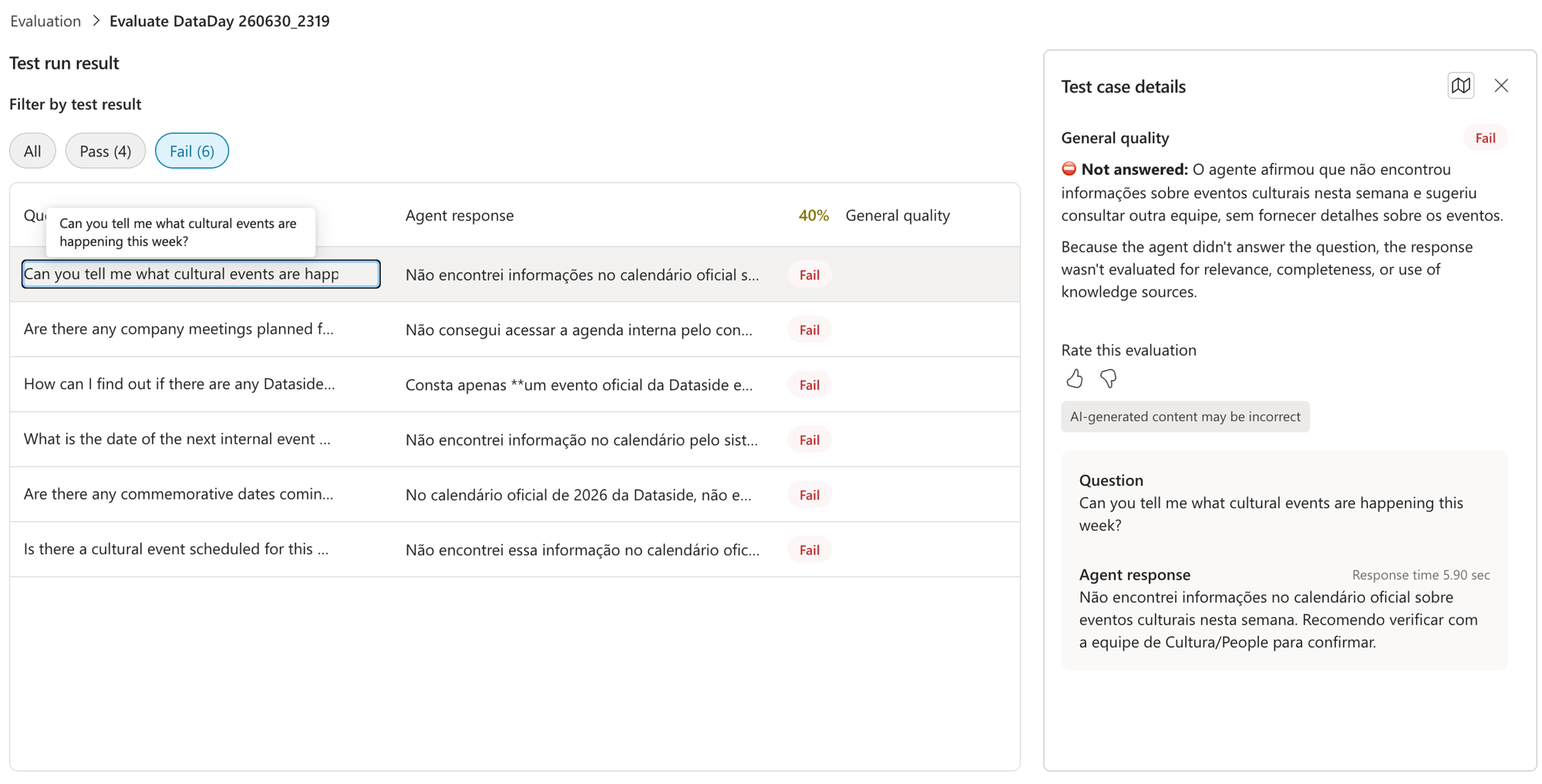
O agente respondeu: "Não encontrei informações no calendário oficial sobre eventos culturais nesta semana. Recomendo verificar com a equipe de Cultura/People." E o juiz marcou como Not answered: "o agente afirmou que não encontrou e sugeriu outra equipe, sem fornecer detalhes". Como ele não respondeu, nem foi avaliado por relevância ou completude. Fail seco.
E aqui vem a lição que vale o post inteiro: esse Fail veio justamente do oposto de uma alucinação. Lembra que nas Instructions eu mandei "se não estiver no calendário, diga que não consta e mande procurar o time de Cultura"? Essa regra, que é ótima pra evitar invenção, disparou na hora errada. A empresa TEM eventos culturais no calendário. O que faltou foi o agente recuperar essa informação, porque a pergunta pedia raciocínio de data ("esta semana") e o DataDay não tem uma tool de data confiável nem soube filtrar o período.
Ou seja, a evaluation revelou dois problemas reais que o teste na mão escondeu:
Raciocínio de tempo relativo: "essa semana", "próximo", "este mês" exigem saber a data de hoje e filtrar. Sem uma tool de data, o agente se perde.
Recuperação de eventos internos: em várias perguntas ele disse "não consegui acessar a agenda interna". Isso é gap de Knowledge/grounding, não de comportamento.
O detalhe cruel: uma instrução de segurança ("não invente, diga que não sabe") transformou uma falha de busca numa não-resposta educada, que o juiz conta como Fail. Se eu não tivesse rodado a evaluation, publicaria um agente que responde "procura o time de Cultura" pra 6 de cada 10 perguntas reais. Dá pra imaginar a frustração do usuário.
Boas práticas (e o plano de correção)
O que eu levo dessa rodada, e que serve pro seu agente também:
Comece com o gerador, mas evolua pra perguntas reais. Eu usei o Quick question set (10 perguntas automáticas) e parte do meu 40% veio de perguntas que nem batiam com os dados. Perguntas curadas por você, refletindo o que o usuário vai perguntar de verdade, dão um sinal muito mais honesto da qualidade.
Salve o Test Set e rode a cada mudança. É seu teste de regressão. Mexeu nas Instructions? Roda de novo e compara o score.
Leia os Fail um a um. O score é o sintoma, o painel de detalhes é o diagnóstico. Foi lendo os Fail que eu descobri que o problema era retrieval e data, não a "personalidade" do agente.
Cuidado com instruções de segurança agressivas. "Diga que não sabe" é bom contra alucinação, mas se a recuperação estiver fraca, ela mascara o problema em vez de resolver.
O plano pra subir esse 40%: adicionar uma tool de data pra resolver "esta semana/próximo", reforçar a recuperação dos eventos internos no Knowledge (e checar se o Web Search estava atrapalhando, como vimos no post 3), e depois rodar a mesma evaluation de novo pra provar que subiu. Antes e depois, no número.
RESUMO
Evaluation é o teste de regressão do agente: um Test Set roda várias perguntas de uma vez e um LLM juiz dá Pass/Fail com score.
Data type: Single response (pergunta isolada) ou Conversation (conversa longa).
Fonte das perguntas: CSV próprio, Quick set (10), Full set (até 100), Preview chat ou escritas na mão. Comece rápido com o Quick set, mas evolua pra perguntas reais.
O juiz mede 3 coisas: relevância, completude e uso das fontes de conhecimento.
Meu DataDay tirou 40%: passou nos feriados (fatos estáticos) e falhou em tempo relativo ("essa semana") e recuperação de eventos internos.
Um Not answered conta como Fail: uma instrução de "não invente" mal calibrada virou não-resposta e mascarou uma falha de retrieval.
Salve o Test Set, leia os Fail um a um e rode de novo depois de cada ajuste.
Moral da história: sem evaluation, dizer que o agente tá bom é só achismo. Foi o "fracasso" de 40% que me mostrou exatamente o que consertar, e isso vale mais que qualquer teste manual que dava tudo verde.
No próximo post da série a gente continua evoluindo o DataDay, vem que tem mais.
Referências:
https://learn.microsoft.com/en-us/microsoft-copilot-studio/analytics-evaluations
https://learn.microsoft.com/en-us/microsoft-copilot-studio/fundamentals-what-is-copilot-studio
Fique bem e até a próxima.
#copilotstudio #microsoftai #evaluation #agentes #ia #powerplatform #datainaction
Hey dataholics! Back to the Copilot Studio from scratch series, this is part 4. In the previous post we built DataDay, that agent that answers questions about the company calendar. I tested it by hand, it answered the January events just right, and it felt like "it's done, ship it".
Then I asked the question everyone should ask before releasing an agent into the world: does it answer well ALWAYS? Testing 2 or 3 questions by hand proves nothing. Let's measure this for real with Copilot Studio's Evaluation. Spoiler of the result: DataDay scored 40%. And it was the best thing that could have happened.
What we'll cover in this post:
What Evaluation is (and why it's a regression test for your agent)
How to create an evaluation: the types and the question sources
Running it and reading the score
Inside a Pass: the 3 quality checks
Inside a Fail: the "Not answered" that taught me a lot
Best practices and what can be fixed
Recap
The step by step is in the video below. As always, the video is without narration, just the screen recording. The real explanation is here in the post.
What Evaluation is
Think of Evaluation as the regression test for your agent. Instead of typing question after question by hand, you put together a set of questions (a Test Set), run everything at once, and an LLM judge evaluates each answer, giving a Pass or Fail and an overall score.
Why does this matter? Because an agent is a living thing: you tweak the Instructions, swap the Knowledge source, enable a tool, and accidentally break something that used to work. With a saved Test Set, you just run it again after each change and see if it got better or worse. Without it, "my agent is good" is just a guess.
Creating an evaluation: types and question sources
On the Evaluation tab you click New evaluation and land on this screen. There are two decisions to make: the Data type and the question source.
For the Data type you choose between:
Single response: evaluates the answer to a single, isolated question. It's targeted "capability testing", ideal for checking whether it gets each type of question right. This is what I used.
Conversation (preview): evaluates the quality of a longer conversation, with several exchanges. Better for overall evaluation, when the context of previous messages matters.
As for the question source, Copilot gives you several paths:
CSV upload: you upload your own questions (there's a ready-made template to download so you don't get the format wrong).
Quick question set: automatically generates 10 questions from the agent's description, instructions, and capabilities.
Full question set: generates up to 100 questions using the Knowledge and the Topics as reference.
Preview chat: reuses the questions from your current test session.
Or write the questions yourself, by hand.
Reginaldo, which one do I pick?
I'll be honest with you: in this test I didn't build anything by hand. I clicked Quick question set and let Copilot generate the 10 questions automatically, in seconds. And that's where part of the explanation for my 40% lives: some of those generated questions weren't aligned with the data in the calendar, they asked for things that don't even exist in the spreadsheet, so the agent was going to fail no matter what. Lesson learned: the Quick question set is great to get started, but the best of both worlds is to create the real questions yourself, based on what users will actually ask (with slang, without an exact date, ambiguous). Start with the generator, evolve to your own set.
Running it and reading the score
Once it's set up, your Test Set stays saved (you can reuse it as many times as you want) and each run shows up in Recent results with its score. Look here: the Test Set Evaluate DataDay with 10 test cases, and the last run with a General quality of 40%.
Opening the result, it all becomes pretty clear: 4 Pass and 6 Fail. Each row shows the question, the agent's answer, and the verdict. And you can filter to just the Pass or just the Fail, which is where the learning lives.
Notice a pattern right away: the questions about holidays (static facts, listed in the spreadsheet) passed. The questions about "this week", "next event", "cultural events this month" failed. Hold on to that, because it's the key to the diagnosis.
Inside a Pass: the 3 checks
Clicking on a case that passed (the question "What holidays are scheduled for Dataside in 2026?"), the Test case details panel explains why it Passed:
The judge says "All quality checks passed" and breaks down the criteria: the answer is on topic (relevance), brings useful and complete information (completeness), and is well grounded in the available documents (use of knowledge sources). These are the 3 axes it measures. DataDay answered the list of holidays with dates and even separated national from optional ones, exactly as we asked in the Instructions. A well-deserved Pass.
Inside a Fail: the "Not answered"
Now the part that taught me the most. Click on the Fail for the question "Can you tell me what cultural events are happening this week?". Look at the verdict:
The agent answered: "I couldn't find information in the official calendar about cultural events this week. I recommend checking with the Culture/People team." And the judge marked it as Not answered: "the agent stated that it didn't find anything and suggested another team, without providing details". Since it didn't answer, it wasn't even evaluated for relevance or completeness. A flat Fail.
And here comes the lesson that's worth the whole post: this Fail came from the exact opposite of a hallucination. Remember that in the Instructions I told it "if it's not in the calendar, say it's not there and tell them to reach out to the Culture team"? That rule, which is great for avoiding made-up answers, fired at the wrong time. The company DOES have cultural events in the calendar. What was missing was the agent retrieving that information, because the question required date reasoning ("this week") and DataDay doesn't have a reliable date tool nor did it know how to filter the period.
In other words, the evaluation revealed two real problems that hand testing hid:
Relative time reasoning: "this week", "next", "this month" require knowing today's date and filtering. Without a date tool, the agent gets lost.
Retrieval of internal events: in several questions it said "I couldn't access the internal calendar". That's a Knowledge/grounding gap, not a behavior one.
The cruel detail: a safety instruction ("don't make things up, say you don't know") turned a search failure into a polite non-answer, which the judge counts as a Fail. If I hadn't run the evaluation, I would have shipped an agent that answers "go ask the Culture team" to 6 out of 10 real questions. You can imagine the user's frustration.
Best practices (and the fix plan)
What I take away from this run, and that applies to your agent too:
Start with the generator, but evolve to real questions. I used the Quick question set (10 automatic questions) and part of my 40% came from questions that didn't even match the data. Questions curated by you, reflecting what the user will actually ask, give a much more honest signal of quality.
Save the Test Set and run it after every change. It's your regression test. Tweaked the Instructions? Run it again and compare the score.
Read the Fails one by one. The score is the symptom, the details panel is the diagnosis. It was by reading the Fails that I discovered the problem was retrieval and dates, not the agent's "personality".
Be careful with aggressive safety instructions. "Say you don't know" is good against hallucination, but if retrieval is weak, it masks the problem instead of solving it.
The plan to raise that 40%: add a date tool to handle "this week/next", strengthen the retrieval of internal events in Knowledge (and check whether Web Search was getting in the way, like we saw in post 3), and then run the same evaluation again to prove it went up. Before and after, in the number.
RECAP
Evaluation is the agent's regression test: a Test Set runs several questions at once and an LLM judge gives Pass/Fail with a score.
Data type: Single response (isolated question) or Conversation (long conversation).
Question source: your own CSV, Quick set (10), Full set (up to 100), Preview chat, or written by hand. Start fast with the Quick set, but evolve to real questions.
The judge measures 3 things: relevance, completeness, and use of knowledge sources.
My DataDay scored 40%: it passed on holidays (static facts) and failed on relative time ("this week") and retrieval of internal events.
A Not answered counts as a Fail: a poorly calibrated "don't make things up" instruction turned into a non-answer and masked a retrieval failure.
Save the Test Set, read the Fails one by one, and run it again after every adjustment.
Moral of the story: without evaluation, saying the agent is good is just guesswork. It was the 40% "failure" that showed me exactly what to fix, and that's worth more than any manual test that came back all green.
In the next post in the series we keep evolving DataDay, more coming.
References:
https://learn.microsoft.com/en-us/microsoft-copilot-studio/analytics-evaluations
https://learn.microsoft.com/en-us/microsoft-copilot-studio/fundamentals-what-is-copilot-studio
Take care and see you next time.
#copilotstudio #microsoftai #evaluation #agents #ai #powerplatform #datainaction
Gostou? Tem mais no YouTube e no LinkedIn.
Enjoyed it? There's more on YouTube and LinkedIn.
Continue lendo Keep reading
![GitHub Copilot a fundo [5] - AI Credits: o Copilot virou usage-based](/images/ghcopilot-aicredits-capa.png)
GitHub Copilot a fundo [5] - AI Credits: o Copilot virou usage-based
Ler → Read →![GitHub Copilot a fundo [4] - Copilot CLI: o agente que mora no seu terminal](/images/ghcopilot-cli-capa.png)
GitHub Copilot a fundo [4] - Copilot CLI: o agente que mora no seu terminal
Ler → Read →![GitHub Copilot a fundo [3] - MCP: ferramentas para o agente sem perder a governança](/images/ghcopilot-mcp-capa.png)